

If you just bought a new iPhone and then decided you want to get AppleCare+ for it, you can do so within a limited time period, even if you didn't buy the iPhone directly from Apple. Keep reading to learn how.
Apple offers AppleCare+ protection to customers going through the iPhone order process on its online store, but it's perfectly possible to get coverage after you've received your iPhone, even if it's a refurbished device.
What is AppleCare+ and How Much Does it Cost?
Apple includes a one-year limited warranty with all hardware and up to 90 days of technical support, so if a manufacturing defect arises within this period, you’re automatically covered.
Buying AppleCare+ basically extends your iPhone warranty to two years and also includes protection for physical damage, including up to two incidents of accidental damage, each subject to an excess fee of $29 for screen damage, or $99 for any other damage. In addition, AppleCare+ gets you 24/7 priority access to Apple experts via chat or phone.
AppleCare+ prices depend on the model of iPhone you have. As of writing, Apple's prices are as follows:
- iPhone 8 – AppleCare+ cost $129
- iPhone 8 Plus and iPhone XR – AppleCare+ cost $149.
- iPhone 11 and iPhone 11 Pro – AppleCare+ cost $199.
What About Coverage for Theft and Loss?
AppleCare+ coverage for theft and loss is a separate plan, and theft and loss coverage requires you to have Find My iPhone enabled on your device at the time it is lost or stolen. AppleCare+ with Theft and Loss prices depend on the model of iPhone you have. As of writing, Apple's prices are as follows:
- iPhone 8 – $199
- iPhone 8 Plus and iPhone XR – $249
- iPhone 11 and iPhone 11 Pro – $299
Theft and loss deductibles are as follows:
- iPhone 8 – $199
- iPhone 11, iPhone XR, iPhone 8 Plus – $229
- iPhone 11 Pro, iPhone 11 Pro Max – $269
How Long Do I Have to Buy AppleCare+?
You can order AppleCare+ within 60 days of receiving your iPhone, and this applies regardless of whether you bought the phone from Apple or whether you got it from a carrier or another retailer.
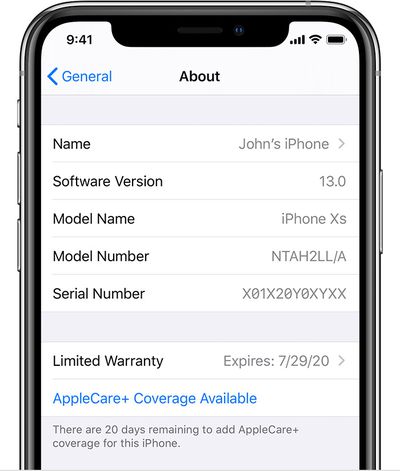
You can check how many days you have remaining to add AppleCare+ coverage right on your iPhone, just below your name banner the Settings app.
Note that AppleCare+ coverage starts from the day you originally bought your device, so you won't get 60 days of extra coverage if you wait until the last minute to buy the plan. Also, your iPhone needs to be in normal working condition and not damaged to add AppleCare+.
Can I Get More Than 2 Years' of AppleCare+?
If you want coverage beyond the two years offered by a fixed AppleCare+ plan, Apple also offers rolling monthly subscription plans that automatically renew until canceled by the customer. So you can pay for the first two years upfront, and then at the end of those two years, you can roll into the monthly plan going forward.

You can continue to pay for monthly AppleCare+ coverage for as long as you like, or until Apple can no longer service the device. Bear in mind though that the monthly AppleCare+ plans do cost more than paying an upfront price. For example, upfront AppleCare+ pricing for a new iPhone 11 Pro is $199, but rolling coverage is $9.99 per month, which works out at $239.76 over two years.
How to Add AppleCare+ to Your iPhone
You can add AppleCare+ to your iPhone after purchase in a number of ways. The first series of steps show how to do it directly on your iPhone and are followed by steps for doing so online via a browser.
On iPhone
- Launch the Settings app on your iPhone.
- Tap General.
- Tap About.
- Tap AppleCare+ Coverage Available.
- Follow the onscreen instructions to choose and purchase AppleCare+
Online
- Open a browser and visit the AppleCare+ website.
- Choose iPhone from the product categories.
- Enter your iPhone's serial number or sign in with your Apple ID.
- Follow the instructions to purchase AppleCase. You'll also need to allow a remote diagnostic on your iPhone.
Alternatively, you can call Apple Support on 800.275.2273 (800.APL.CARE) or head to an Apple Store and ask to add AppleCare+ to your iPhone. Either way, you'll need to have proof of purchase handy and you'll have to allow a remote diagnostic or a visual inspection of your iPhone to take place.




















