To play music from third-party music services like Spotify to your HomePod, you don't need an iOS device -- a Mac will work too. You can send any audio playing on your Mac right to your HomePod, and not just audio from iTunes.

To AirPlay from Mac to HomePod, your Mac and your HomePod need to be on the same Wi-Fi network.
homepodmac

Make Sure Volume is Enabled in Menu Bar

It's easiest to AirPlay sound to the HomePod from a Mac using the menu bar on your Mac, but to do that, you need to make sure your audio settings are readily accessible. By default, audio settings aren't available on the menu bar, so you'll need to fix that.

  1. Open up System Preferences.
  2. Choose Sound.
  3. Select the "Output" tab. homepodvolumemenubar
  4. Check the "Show volume in menu bar" box.
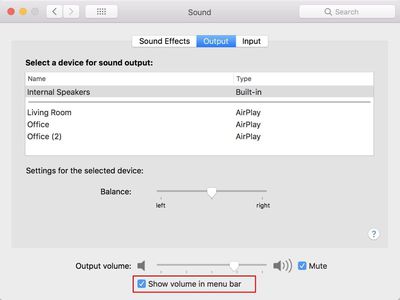
While it's easiest to use the menu bar, you can actually AirPlay to the HomePod using the Sound section of System Preferences. To do so, double click on the HomePod, which should be named after the room that it's in.

Selecting HomePod as an Audio Output Device from the Menu Bar

Once sound controls are accessible from the menu bar, it's simple to route the sound from your Mac to the HomePod.

  1. Click on the volume button in the menu bar.
  2. Under the "Output Device" list, choose the HomePod, which is labeled as the room that it's in. Mine is Office 2, because I have two AirPlay devices in my office. homepodmacmenubaroption
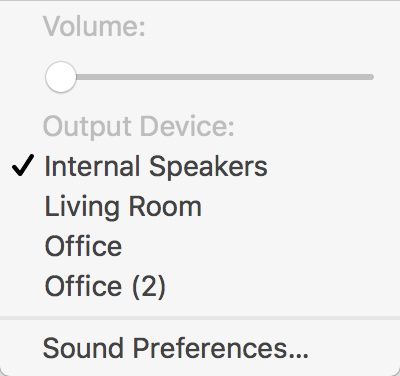
With the HomePod selected as the audio output device, all audio from your Mac will be sent to the HomePod. You can't pick and choose -- every sound from your Mac will be played on the HomePod instead of on your Mac's speakers.

When using the HomePod this way, as an external speaker for the Mac, there's no option to use Siri to do things like skip songs. tYou'll need to control playback on your Mac, but you can use the physical controls on the HomePod to adjust volume.

AirPlaying from iTunes

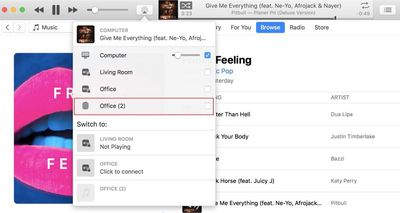
For the most part, you need to use the audio output settings to AirPlay music from a third-party service to the Mac, but if you're playing content from iTunes, you can use the built-in iTunes AirPlay controls.

  1. Open iTunes.
  2. Play a song from Apple Music or your music library. homepodairplayitunes
  3. In iTunes, click on the applesoundiconthing icon.
  4. Select the HomePod icon.

Because you can play Apple Music and iCloud Music Library content directly on the HomePod, there's probably not much need to AirPlay from iTunes to the HomePod, but the option is there if you need it.


Related Roundup: HomePod
Buyer's Guide: HomePod (Neutral)

Top Rated Comments

keysofanxiety Avatar
104 months ago
I bought a Sonos One today. Now I can play music from my phone, Mac and even my PC. The sound is phenomenal and it’s so good not worrying about having to deal with a dumb AI 99% of the time. I asked Alexa “how old was Kurt Cobain when he died?”. She replied with his age and even the cause of death. This was Siri’s response to the same question...
Sounds like Siri misheard you. I tried the first time and it came up with this.


Not saying you’re a liar. Just saying it does pick up the right answer for this question, but on this occasion wasn’t picking up your speech correctly.

Attachment Image
Score: 8 Votes (Like | Disagree)
ChrisMoBro Avatar
104 months ago
I bought a Sonos One today. Now I can play music from my phone, Mac and even my PC. The sound is phenomenal and it’s so good not worrying about having to deal with a dumb AI 99% of the time. I asked Alexa “how old was Kurt Cobain when he died?”. She replied with his age and even the cause of death. This was Siri’s response to the same question...

Attachment Image
Score: 7 Votes (Like | Disagree)
haralds Avatar
104 months ago
Look at Rogue Amoeba's AirFoil to capture audio from an app or the system and redirect it to one or more AirPlay speakers while keeping the sound synchronized.
Score: 4 Votes (Like | Disagree)
keysofanxiety Avatar
104 months ago
For over a year I've been asking Siri how far away Kelnowa, BC is and it still can't figure it out. Google has no issues. Can you give it a try?
Nailed it.

Who wants to go to Canada anyway? :p


Attachment Image

Attachment Image

Attachment Image

Attachment Image

Attachment Image

Attachment Image

Attachment Image
Score: 3 Votes (Like | Disagree)
loby Avatar
104 months ago


Because you can play Apple Music and iCloud Music Library content directly on the HomePod, there's probably not much need to AirPlay from iTunes to the HomePod, but the option is there if you need it.

Article Link: How to AirPlay Audio From Your Mac to HomePod ('https://www.geekwebguides.com/how-to/airplay-audio-from-mac-to-homepod/')
Uh...not everyone wants to use iCloud or Apple Music, especially to play or store their music.

Airplay “is” a good feature “and” there “is” a need for this feature.
Score: 2 Votes (Like | Disagree)
FilipeTeixeira Avatar
104 months ago
I work for Apple, Airplay support was released for most 2011 macs. Also the Iphone 4 supported Airplay.

https://support.apple.com/en-us/HT201343 You might want to get your facts straight. And even 2009 macs had "fast processors". Airparrot works fine for Airplay to get past the "limitations.
I'm naturally talking about Airplay 2. Actually on apple's website, they mention that Airplay 2 requires a 2012 or newer Macbook Pro. So I'm getting my facts straight.
Also your link points to Airplay to stream Video, which is odd as we're talking about Audio here.
https://www.apple.com/homepod/specs/
"Peer-to-peer AirPlay requires a Mac (2012 or later) with OS X Yosemite or later"

The question remains. Will older devices still work with Airplay 2? Meaning that Airplay 2 has some sort of backward compatibility with Airplay 1?
Score: 1 Votes (Like | Disagree)

Popular Stories

Apple Logo Zoomed

Tim Cook Teases Plans for Apple's Upcoming 50th Anniversary

Thursday February 5, 2026 12:54 pm PST by
Apple turns 50 this year, and its CEO Tim Cook has promised to celebrate the milestone. The big day falls on April 1, 2026. "I've been unusually reflective lately about Apple because we have been working on what do we do to mark this moment," Cook told employees today, according to Bloomberg's Mark Gurman. "When you really stop and pause and think about the last 50 years, it makes your heart ...
wwdc sans text feature

Apple Rumored to Announce New Product on February 19

Thursday February 5, 2026 12:22 pm PST by
Apple plans to announce the iPhone 17e on Thursday, February 19, according to Macwelt, the German equivalent of Macworld. The report, citing industry sources, is available in English on Macworld. Apple announced the iPhone 16e on Wednesday, February 19 last year, so the iPhone 17e would be unveiled exactly one year later if this rumor is accurate. It is quite uncommon for Apple to unveil...
Finder Siri Feature

Why Apple's iOS 26.4 Siri Upgrade Will Be Bigger Than Originally Promised

Friday February 6, 2026 3:06 pm PST by
In the iOS 26.4 update that's coming this spring, Apple will introduce a new version of Siri that's going to overhaul how we interact with the personal assistant and what it's able to do. The iOS 26.4 version of Siri won't work like ChatGPT or Claude, but it will rely on large language models (LLMs) and has been updated from the ground up. Upgraded Architecture The next-generation...
iOS 26

iOS 26.3 and iOS 26.4 Will Add These New Features to Your iPhone

Tuesday February 3, 2026 7:47 am PST by
While the iOS 26.3 Release Candidate is now available ahead of a public release, the first iOS 26.4 beta is likely still at least a week away. Following beta testing, iOS 26.4 will likely be released to the general public in March or April. Below, we have recapped known or rumored iOS 26.3 and iOS 26.4 features so far. iOS 26.3 iPhone to Android Transfer Tool iOS 26.3 makes it easier...
iphone 17 pro dark blue 1

iPhone 18 Pro Max Rumored to Deliver Next-Level Battery Life

Friday February 6, 2026 5:14 am PST by
The iPhone 18 Pro Max will feature a bigger battery for continued best-in-class battery life, according to a known Weibo leaker. Citing supply chain information, the Weibo user known as "Digital Chat Station" said that the iPhone 18 Pro Max will have a battery capacity of 5,100 to 5,200 mAh. Combined with the efficiency improvements of the A20 Pro chip, made with TSMC's 2nm process, the...