Apple News Icon1Apple News is the built-in news app for iOS 11 that aggregates and curates stories and topics from a variety of third-party news sources. The service is only available in the U.S., Australia, and the U.K. at the time of writing, so not all new iPhones and iPads will come with the stock app installed.

Apple News aims to offer a cleanly presented and personalized news service that caters to your tastes and interests, although one of its default behaviors is to spit out alerts from sources that you may or may not be interested in. Apple News refers to news sources in the app as "channels", and here we are going to run through two ways to control the alerts you receive from them.

How to Control News Alerts From Specific Channels

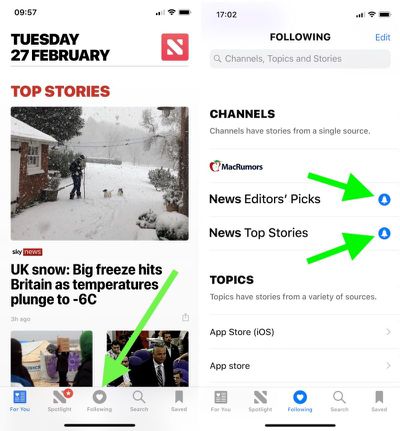
  1. Launch the News app on your iOS device.

  2. Tap the Following button at the bottom of the screen.

  3. Under the Channels list, look for any news sources that you didn't sign up for, and tap the blue bell icon next to them. If the bell icon next to a channel is greyed out, alerts from it are already disabled; if there's no bell icon beside a channel, it doesn't send alerts at all.
    apple news app 1

  4. To remove a source from your channels so that it no longer shows up anywhere in Apple News, tap the Edit button in the upper right of the screen, and then tap the red minus icon next to the source in question.
Tip: Scroll all the way to the bottom of the "Following" screen and you'll find another option to Manage Notifications. Tapping this opens a dedicated Notifications screen, where you'll see the channels you follow that offer news alerts as well as other channels with alert options that you don't currently follow.
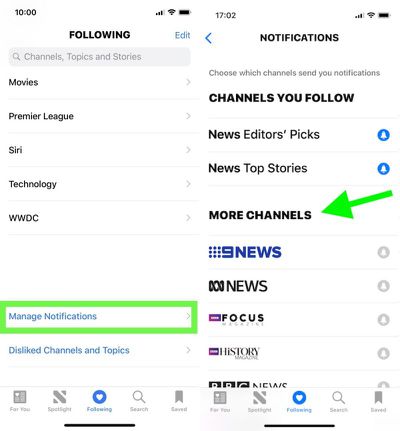
apple news app 2

How to Disable Apple News Alerts Completely

If you'd rather disable all alerts for Apple News in one fell swoop, follow these steps.

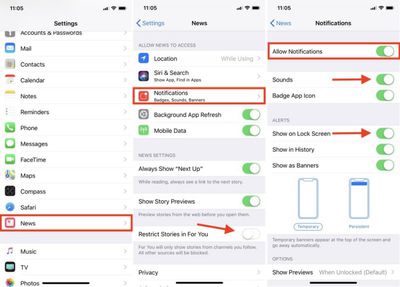
  1. Launch the Settings app on your iOS device.

  2. Scroll down the main list and tap News.

  3. Tap Notifications. (Tip: From this screen, you can prevent stories by channels you don't follow from appearing in the News app's "For You" section. Simply toggle on Restrict Stories in For You.)

  4. Toggle off Allow Notifications.

apple news notifications
If later you decide that you don't want to kill off News alerts altogether, this last screen is the one to return to, as it also offers additional options for controlling the behavior of notifications when they're enabled. You could simply stop new alerts from making an audible sound, for example, or just prevent them from showing up on the Lock Screen.


Related Forum: iOS 11

Top Rated Comments

HiRez Avatar
104 months ago
The problem with almost any app that has notifications is they they can’t seem to help themselves from abusing it by sending you a never-ending stream of alerts that swamps your lock screen and notification list.

So for News, like just about everything else for me, Off is the only sane option.
Score: 6 Votes (Like | Disagree)
PinkyMacGodess Avatar
104 months ago
I just want to know how to remove completely some of the sources for 'news'. Like I have some of the worst sources popup for science and tech news, and also want to block often wrong Fox News so I don't see their 'reportage' hit pieces anymore.

Resolved: You have to go into one of their articles, touch 'share', and then can 'dislike channel'. Seems a lot less intuitive than just swiping right (or left?) and clicking 'dislike channel'. But I'm finally free of their bullhockey 'news'.:D
Score: 3 Votes (Like | Disagree)
The Game 161 Avatar
104 months ago
the best way to take control of apple's new app is to delete it.
why? it's a very good app for news.
Score: 2 Votes (Like | Disagree)
blacktape242 Avatar
104 months ago
the best way to take control of apple's new app is to delete it.
Score: 1 Votes (Like | Disagree)
budselectjr Avatar
104 months ago
the best way to take control of apple's new app is to delete it.
Dittos. The bias shown in their curation and need to editorialize is shameful.
Score: 1 Votes (Like | Disagree)
jmh600cbr Avatar
104 months ago
Let’s start a petition to have Apple news in Canada
Score: 1 Votes (Like | Disagree)

Popular Stories

Apple Logo Zoomed

Tim Cook Teases Plans for Apple's Upcoming 50th Anniversary

Thursday February 5, 2026 12:54 pm PST by
Apple turns 50 this year, and its CEO Tim Cook has promised to celebrate the milestone. The big day falls on April 1, 2026. "I've been unusually reflective lately about Apple because we have been working on what do we do to mark this moment," Cook told employees today, according to Bloomberg's Mark Gurman. "When you really stop and pause and think about the last 50 years, it makes your heart ...
wwdc sans text feature

Apple Rumored to Announce New Product on February 19

Thursday February 5, 2026 12:22 pm PST by
Apple plans to announce the iPhone 17e on Thursday, February 19, according to Macwelt, the German equivalent of Macworld. The report, citing industry sources, is available in English on Macworld. Apple announced the iPhone 16e on Wednesday, February 19 last year, so the iPhone 17e would be unveiled exactly one year later if this rumor is accurate. It is quite uncommon for Apple to unveil...
Finder Siri Feature

Why Apple's iOS 26.4 Siri Upgrade Will Be Bigger Than Originally Promised

Friday February 6, 2026 3:06 pm PST by
In the iOS 26.4 update that's coming this spring, Apple will introduce a new version of Siri that's going to overhaul how we interact with the personal assistant and what it's able to do. The iOS 26.4 version of Siri won't work like ChatGPT or Claude, but it will rely on large language models (LLMs) and has been updated from the ground up. Upgraded Architecture The next-generation...
iOS 26

iOS 26.3 and iOS 26.4 Will Add These New Features to Your iPhone

Tuesday February 3, 2026 7:47 am PST by
While the iOS 26.3 Release Candidate is now available ahead of a public release, the first iOS 26.4 beta is likely still at least a week away. Following beta testing, iOS 26.4 will likely be released to the general public in March or April. Below, we have recapped known or rumored iOS 26.3 and iOS 26.4 features so far. iOS 26.3 iPhone to Android Transfer Tool iOS 26.3 makes it easier...
iphone 17 pro dark blue 1

iPhone 18 Pro Max Rumored to Deliver Next-Level Battery Life

Friday February 6, 2026 5:14 am PST by
The iPhone 18 Pro Max will feature a bigger battery for continued best-in-class battery life, according to a known Weibo leaker. Citing supply chain information, the Weibo user known as "Digital Chat Station" said that the iPhone 18 Pro Max will have a battery capacity of 5,100 to 5,200 mAh. Combined with the efficiency improvements of the A20 Pro chip, made with TSMC's 2nm process, the...