
The newest version of Apple's set-top box has a lot of features that were not available in previous models, and while some things are fairly easy to figure out, other features are somewhat hidden and harder to find.

One great feature Apple has included with its fourth-generation Apple TV is a new App Store and the ability to have multiple accounts connected to the set-top box. Some sharing features connect automatically, but others take more work. We've got a guide for setting up various account and device sharing options so you can access the most content in the easiest way possible on the new Apple TV.

Home Sharing

With Home Sharing enabled, you can access your movies, music, TV shows, audiobooks, and more stored on a Mac or PC from any device that has the feature turned on and is on the same local network. If you haven't already turned on Home Sharing from your various Mac, PC, and iOS devices, here's how.
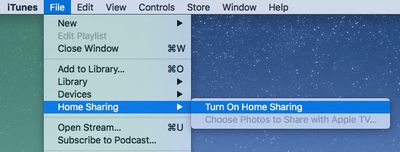
Home Sharing iTunes
PC or Mac

  1. On Mac, open iTunes and select File from the Menu Bar in the upper left corner of the screen. On PC, press the Alt key to access the menu bar and select File from the list.
  2. Click Home Sharing and choose "Turn on Home Sharing." Enter your Apple ID and password, and then click Turn on Home Sharing.
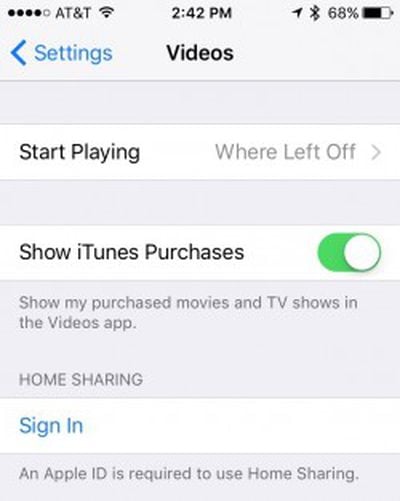
Home Sharing iOSiOS

  1. Open the Settings app and select Videos or Music.
  2. Tap Home Sharing.
  3. Enter your Apple ID and password and tap Sign In.

Apple TV 4

  1. Open the Settings app and click Accounts.
  2. Select Home Sharing.
  3. Enter your Apple ID and password and click Sign In.

To access content from your computers, open the Computers app on Apple TV. Content from all shared computers is accessible from the menu.

Family Sharing

If you have Family Sharing enabled for multiple users in your home, shared apps and content will automatically appear on Apple TV 4. You don't have to follow any steps. However, if you don't already have Family Sharing enabled and you are ready to do so, follow our previous instruction guide here.

Sharing With Multiple Users

In addition to viewing content from multiple devices and sharing media from your family's accounts, you can set up multiple iTunes, iCloud, and Game Center users for each family member.

  1. Open the Settings app on Apple TV 4 and select Accounts.
  2. Select iCloud, iTunes and App Store, or Game Center and log in with your Apple ID and password.

You can use a different Apple ID for each section, but it might not make sense to use one account for Game Center and another for the App Store.
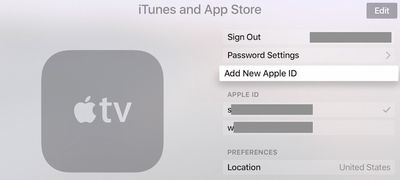
apple_tv_accounts
Once logged in, you can quickly switch between iTunes and App Store accounts without having to reenter your Apple IDs. To do so, open the Settings app and select Accounts. Then select iTunes and App Store and select the Apple ID you wish to switch to.

With all family devices and accounts connected to Apple TV 4, each of the members of your household will have quick and easy access to their content on the new Apple TV for the best possible media experience.


Related Roundup: Apple TV
Buyer's Guide: Apple TV (Don't Buy)

Top Rated Comments

thingstoponder Avatar
133 months ago
Maybe you've already downloaded it, think of it as a way of caching or such, but you're on a data cap.
"But why would you download it, if you know you'll play it somewhere else?"

Why would Apple need to take that flexibility and vertical integration away from me?

meh, more half-bakedness and another moment eventually where you'll go "oooh... I thought this should work." in an ecosystem that's supposed to "just work". (oops, did I say the bad phrase and hold Apple to former valid standards they advertised? I should be fairer, they USED to run that slogan, not anymore, so... I guess I should lower my expectations?)

Glassed Silver:mac
I don't think I've ever seen a post from you that wasn't a complaint. Your relationship with Apple seems unhealthy.
Score: 4 Votes (Like | Disagree)
Glassed Silver Avatar
133 months ago
I don't think I've ever seen a post from you that wasn't a complaint. Your relationship with Apple seems unhealthy.
Maybe the ratio leans towards negative criticism, but I try to highlight what they could do better instead of merely saying they goof up, which could be considered mere trolling or unthoughtful rambling.

My internet connection is uncapped by the way, but I like to think of use cases beyond my own ones or ones that I might not have now, but later potentially. (especially with net neutrality in the EU being practically dead soon enough)

What you find unhealthy I find a reflected view on an overhyped, over-glorified, but overall not bad-all-around company.
Unhealthy to me would be to troll and yell without being affected or caring for those who might be affected (= fanboys, of other camps, just as much as there are these sorts of fanboys in our camp who love to troll and non-constructively yell at Apple's competition)

Yeah, Home Sharing has always seemed an utter mess to me whenever I've tried to use it. I gave up on it a long time ago.
It's a shame, because it's a lovely concept and the only pressing reason besides AirPlay I would buy an Apple TV for, but not without H.265.

Glassed Silver:mac
Score: 2 Votes (Like | Disagree)
nelmat Avatar
133 months ago
Rentals don't work via Home sharing on new AppleTV.
Why would they need to? You've rented it, just play it on your Apple TV.
Score: 1 Votes (Like | Disagree)
freediverx Avatar
133 months ago
The article neglects to mention that Home Sharing on the Apple TV 4 shares the same anemic, list-based user interface we've been stuck with for years. No beautiful grid of poster art, no Siri universal search.

If you have a library of movies and/or TV shows (non-DRM'd) at home, get Plex server and the Plex app for Apple TV. It's Home Sharing on steroids, with a slick interface and streaming for all your iOS devices as well.
Score: 1 Votes (Like | Disagree)
Glassed Silver Avatar
133 months ago
Why would they need to? You've rented it, just play it on your Apple TV.
Maybe you've already downloaded it, think of it as a way of caching or such, but you're on a data cap.
"But why would you download it, if you know you'll play it somewhere else?"

Why would Apple need to take that flexibility and vertical integration away from me?

meh, more half-bakedness and another moment eventually where you'll go "oooh... I thought this should work." in an ecosystem that's supposed to "just work". (oops, did I say the bad phrase and hold Apple to former valid standards they advertised? I should be fairer, they USED to run that slogan, not anymore, so... I guess I should lower my expectations?)

Glassed Silver:mac
Score: 1 Votes (Like | Disagree)
nimbusthegreat Avatar
133 months ago
I'm still waiting for them to address the ABSOLUTELY ABYSMAL USER EXPERIENCE WHEN TYPING IN PASSWORDS! No remote app for my phone, no way to pair a keyboard. Just a dozen apps that require 30 character passwords. If this is the new Apple, dude, I'm getting a Dell.
Score: 1 Votes (Like | Disagree)

Popular Stories

Apple Logo Zoomed

Tim Cook Teases Plans for Apple's Upcoming 50th Anniversary

Thursday February 5, 2026 12:54 pm PST by
Apple turns 50 this year, and its CEO Tim Cook has promised to celebrate the milestone. The big day falls on April 1, 2026. "I've been unusually reflective lately about Apple because we have been working on what do we do to mark this moment," Cook told employees today, according to Bloomberg's Mark Gurman. "When you really stop and pause and think about the last 50 years, it makes your heart ...
wwdc sans text feature

Apple Rumored to Announce New Product on February 19

Thursday February 5, 2026 12:22 pm PST by
Apple plans to announce the iPhone 17e on Thursday, February 19, according to Macwelt, the German equivalent of Macworld. The report, citing industry sources, is available in English on Macworld. Apple announced the iPhone 16e on Wednesday, February 19 last year, so the iPhone 17e would be unveiled exactly one year later if this rumor is accurate. It is quite uncommon for Apple to unveil...
Finder Siri Feature

Why Apple's iOS 26.4 Siri Upgrade Will Be Bigger Than Originally Promised

Friday February 6, 2026 3:06 pm PST by
In the iOS 26.4 update that's coming this spring, Apple will introduce a new version of Siri that's going to overhaul how we interact with the personal assistant and what it's able to do. The iOS 26.4 version of Siri won't work like ChatGPT or Claude, but it will rely on large language models (LLMs) and has been updated from the ground up. Upgraded Architecture The next-generation...
iOS 26

iOS 26.3 and iOS 26.4 Will Add These New Features to Your iPhone

Tuesday February 3, 2026 7:47 am PST by
While the iOS 26.3 Release Candidate is now available ahead of a public release, the first iOS 26.4 beta is likely still at least a week away. Following beta testing, iOS 26.4 will likely be released to the general public in March or April. Below, we have recapped known or rumored iOS 26.3 and iOS 26.4 features so far. iOS 26.3 iPhone to Android Transfer Tool iOS 26.3 makes it easier...
iphone 17 pro dark blue 1

iPhone 18 Pro Max Rumored to Deliver Next-Level Battery Life

Friday February 6, 2026 5:14 am PST by
The iPhone 18 Pro Max will feature a bigger battery for continued best-in-class battery life, according to a known Weibo leaker. Citing supply chain information, the Weibo user known as "Digital Chat Station" said that the iPhone 18 Pro Max will have a battery capacity of 5,100 to 5,200 mAh. Combined with the efficiency improvements of the A20 Pro chip, made with TSMC's 2nm process, the...















