How to Use Control Center's Apple TV Remote in iOS - MacRumors
Skip to Content

How to Use Control Center's Apple TV Remote in iOS

by

ios10 apple tv remote app iconIn iOS 11 and later, it's possible to add an Apple TV Remote interface to the Control Center that will allow you to quickly navigate and control playback on your 4K Apple TV or fourth-generation Apple TV using your iPhone or iPad. It's a great solution if you just can't get on with Apple's Siri Remote, and doesn't require you to install an app. In this article, we'll show you how to set up the Apple TV Remote on your iOS device and explain how to use it once you've done so.

Before continuing, make sure that your iPhone, iPad, or iPod touch is updated to the latest version of iOS: Open the Settings app, tap General -> About, and look for the version number. If you need to update, tap back to Settings, select Software Update, and follow the onscreen instructions, then meet us back here when installation is complete.

How to Set Up Apple TV Remote in iOS Control Center

  1. Turn on your Apple TV and the TV/monitor connected to it, and make sure your iOS device and Apple TV are connected to the same Wi-Fi network.

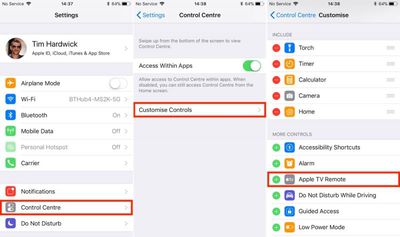
  2. Launch the Settings app on your iOS device.
    Apple TV Remote iOS 1

  3. Select Control Center from the options list.

  4. Tap Customize Controls.

  5. In the More Controls list, tap the entry called Apple TV Remote.

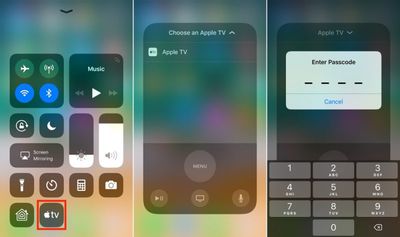
  6. Next, launch the Control Center on your iOS device in the following manner: On iPad, double-tap the Home button; on iPhone 8 or earlier, swipe up from the bottom of the screen; or on iPhone X, swipe down from the upper right "ear".
    TV Remote Control Center 1

  7. Tap the Apple TV button that now appears in the Control Center grid of options.

  8. In the Remote overlay that appears, choose the Apple TV that you want to connect to from the list.

  9. Enter the four-digit passcode that appears on your Apple TV's display to connect.
    6b

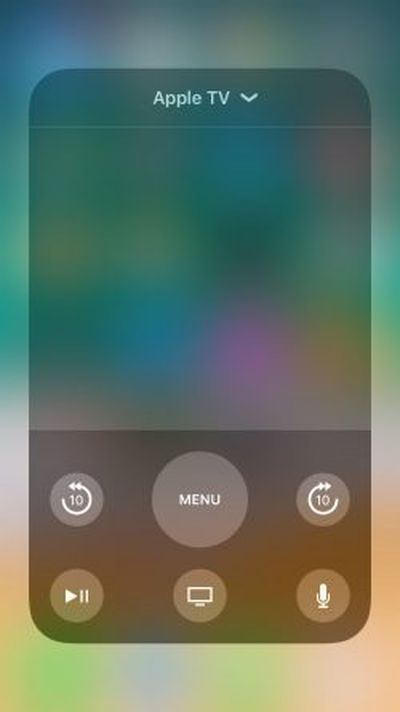
The touch interface that appears on your iPhone or iPad screen will replicate the function of the original Apple TV Remote. If your Apple TV is set up to stream audio to an AirPlay/Bluetooth speaker or headset, you can use the volume buttons on your iOS device to adjust the output volume. Otherwise, you'll have to continue to adjust sound levels using the dedicated remote, your television, or any hi-fi equipment your Apple TV is connected to. With that in mind, here's a quick breakdown of the touchscreen controls that are available to you.

How to Use the Apple TV Remote in iOS Control Center

    7

  • The large gray space in the middle of the onscreen interface acts as the touchpad. You can swipe it to move through Apple TV menus, tap it to select items, and use both actions to rewind and fast-forward media during playback.

  • The big Menu button can be used to go back a level in menu screens. A quick double tap on it will also activate the Apple TV screensaver.

  • During playback, two buttons will appear on either side of the Menu button that allow you to jump forward and back 10 seconds.

  • The Play/Pause button in the lower left of the interface can be used to start the selected item straight away, bypassing any associated content info screens.

  • The Home button (the one with the TV icon) takes you to the Home screen where all your installed Apple TV apps live in a grid formation. It may also take you to the TV app, depending on your settings.

  • The Microphone button activates Siri input, allowing you to perform a variety of voice commands from anywhere in the system. Activating a search field will also bring up a pop-up window that lets you either type using your iOS device's keyboard or dictate your search term. Either of these options is significantly easier than navigating the Apple TV's onscreen keyboard.
For more details on the functions you can perform using the Apple TV Remote's controls, be sure to check out our dedicated tips and tricks guide.


Related Roundup: Apple TV
Buyer's Guide: Apple TV (Buy Now)

Top Rated Comments

iParis Avatar
113 months ago
Ayee might wanna add this to the article -

It actually DOES have a volume control. If you can control your TV’s volume with the Siri remote, you’re using AirPods, connected to a Bluetooth speaker, or AirPlay speaker, you can change the volume using the physical volume buttons on your device. Super nifty.
Score: 5 Votes (Like | Disagree)
113 months ago
Ayee might wanna add this to the article -

It actually DOES have a volume control. If you can control your TV’s volume with the Siri remote, you’re using AirPods, connected to a Bluetooth speaker, or AirPlay speaker, you can change the volume using the physical volume buttons on your device. Super nifty.
Literally the only thing useful in this article was this comment.
Score: 2 Votes (Like | Disagree)
113 months ago
Not true.

The new Remote app for iOS (icon with gray text on black field) works fine with my 3rd gen AppleTV.

I know because I’ve been running it due to the horrible new TV remote and the screwed up nature of the new Netflix/Prime/Hulu/YouTube “apps” vs the old “channels” on the 3rd gen TV.
That's exactly what they said. You need to use the dedicated *app* and not the control center widget. So, true.
Score: 1 Votes (Like | Disagree)
bruinsrme Avatar
113 months ago
Absolutely, but actually this is Apple's job to push this knowledge to it's customers somehow more transparent, as most features are hidden and not used by the broad public at all.
i agree. However, my take in the overall tech gadget market is, there needs to be a balance of technology and advertised usability.
let's use the flick feature in regards to the ipad. Timesaver, keystroke saver.
Who knows about this? out of hundreds of people i have asked, the kids know about it and adults are amazed by it.

I have questioned why apple doesn't touted such gems.

another gem.
Apple support videos on youtube
type in common questions into google
how to set up an apple watch
set up activities on an apple watch
set up music on apple watch

people are amazed at how much info apple has posted. They just never knew it was all there.
Score: 1 Votes (Like | Disagree)
113 months ago
I'm being serious here....how is this more convenient than using the Apple TV Remote app. I don't get it. I have this app on my home screen. I tap the icon, and there is the remote.
Is there something that I'm missing?
Control centre is available anywhere, even when using other apps. That’s my thought anyway.
Score: 1 Votes (Like | Disagree)
113 months ago
I'm being serious here....how is this more convenient than using the Apple TV Remote app. I don't get it. I have this app on my home screen. I tap the icon, and there is the remote.
Is there something that I'm missing?
Score: 1 Votes (Like | Disagree)

Popular Stories

Apple TV Sans Remote Feature

New Apple TV 4K Leaked

Friday September 25, 2026 8:16 am PDT by
MacRumors contributor Aaron Perris has uncovered an image file from Apple for an unreleased Apple TV 4K, suggesting that a new model will finally be released soon. The image is specifically for an "Apple TV 4K (4th generation)" model. Apple TV 4K (4th generation) image (on a gradient) The image reveals that the Apple TV will have the same external design as the current model, with all of its...
Apple TV 4K HomeView HomePod Mini tweaked

New Apple TV 4K, HomeView, and HomePod Mini: 16 Details Just Leaked

Sunday October 11, 2026 12:56 pm PDT by
Just two days before Apple's "Welcome home" experience in New York, Bloomberg's Mark Gurman has leaked several details about the new products set to be unveiled, including an all-new smart home hub, a HomePod mini 2, and a new Apple TV 4K. Here is an all-in-one summary of the details shared by Gurman:Apple's home hub with a touch-enabled display will be named HomeView, seemingly confirming a ...
HomePod minis Apple TV and iPad mini Leak Feature

iPad Mini With A20 Pro, New HomePod Mini Colors, and New Apple TV 4K All Just Leaked

Friday September 25, 2026 8:18 am PDT by
The next iPad mini, HomePod mini, and Apple TV 4K models have all leaked, just a few weeks before the devices are expected to be announced. Specifically, MacRumors contributor Aaron Perris discovered a few of Apple's official images of the devices, confirming their existence and some new features that are planned. The most notable iPad mini details revealed in today's leak include an A20 Pro ...
Latest Stories
iPhone Duo Launch Begins as First Orders Reach Customers
2 hours ago
1Password for Agents Keeps Your Passwords Hidden From AI
2 hours ago
iPhone Duo 24 Hours Later: Your Questions Answered
3 hours ago
Apple's iWork Apps Get 'Intelligent Assistant' and iPhone Duo Support
4 hours ago
Apple is Apparently Considering a Slightly Larger iPhone Duo
4 hours ago
Giant iPhone Duo Displays Coming to Four Apple Stores
5 hours ago
Apple Pulls Keynote, Pages and Numbers From App Store [Update: Back]
6 hours ago
Apple Updates More Apps With iPhone Duo Support
6 hours ago
Apple Will Label Apps 'Made for iPhone Duo' in App Store
9 hours ago
Amazon Takes $49 Off iPad With Prices Starting at $399.99
10 hours ago
F1 on Apple TV Now Available in Dolby Atmos
10 hours ago
Apple Reveals More Than 50 Apps That Will Be Updated for iPhone Duo
11 hours ago
Apple Blocks Certificates That Could Help Attackers Fake Websites
12 hours ago
Giant iPhone Duo Installations Spotted at Apple Fifth Avenue
13 hours ago
iPhone Duo 2 Prototypes Include Under-Display Face ID
13 hours ago
Tesla App Gains iPad and iPhone Duo Support
17 hours ago
Apple Reportedly Boosts iPhone Duo Orders by 44%
17 hours ago
Fortnite Returning to Australian App Store After Court Ruling
18 hours ago
Apple Ordered to Open iPhone to Rival App Stores in Australia
18 hours ago
Apple Suppliers Face Hurdles Cutting Circuit Board Emissions
19 hours ago
Things Updated for iPhone Duo With Adaptive Layout
19 hours ago
Simplicity and Siri AI Are HomeView's Killer Features, Apple Says
19 hours ago
iPhone Duo Reviewers Really Miss Face ID
1 day ago
Does the iPhone Duo Run Hot? Here's What Reviews Found
1 day ago
Apple Music's New Look is Now Live on Apple's Website
1 day ago
Anthropic Launches Claude Duet, a Proactive AI Agent
1 day ago
What 32,000 Folds Did to the iPhone Duo's Hinge
1 day ago
iPhone Duo's Hidden FaceTime Camera Takes 'Trash' Photos
1 day ago
iPhone Duo Has 'Edge Light' Feature That Debuted on Macs Last Year
1 day ago
Apple Support App Updated for iPhone Duo's Larger Display
1 day ago