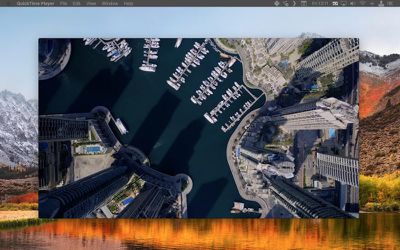
Apple doesn't go out of its way to advertise the fact, but it's perfectly possible to connect a Mac to a fourth-generation Apple TV or later and grab screenshots and video output from the set-top box. In this article, we'll show you how it's done.

Note that this method can't be used to record DRM-protected content off the likes of Netflix or iTunes, but it will let you capture your driving skills in Asphalt 8: Airborne, for instance, just as it will allow you to take screenshots for use in troubleshooting, training, blogging, or any other purpose.

screenshot record apple tv on mac
The way to connect a Mac to an Apple TV used to depend on the presence of a USB-C port on the rear of the fourth-generation set-top box to establish a wired connection. But since there's no such port on the latest fifth-generation Apple TV 4K, that's no longer an option for a growing number of users.

However, thanks to macOS High Sierra and tvOS 11, it's now possible to connect your Mac wirelessly to a fourth- or fifth-generation Apple TV on the same Wi-Fi network, and you don't have to download Xcode or any other additional software to do so. Simply follow the steps below, and you should be capturing video and taking screenshots in no time.

How to Grab Images and Video From Apple TV on a Mac

  1. Turn on your Apple TV and your HDMI-connected display.

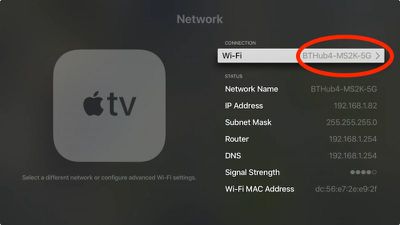
  2. On Apple TV, open Settings and select Network.

  3. Under Connection, make a note of the Wi-Fi network.
    1 Apple TV Network

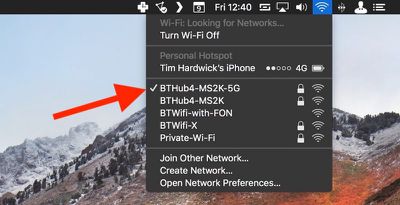
  4. Now click the Wi-Fi menu bar icon over on your Mac to make sure it's connected to the same network.
    1b Mac wireless network

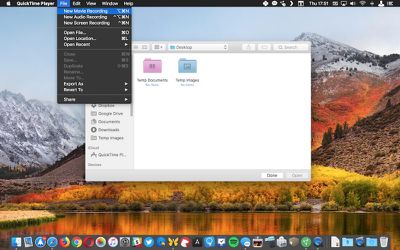
  5. On Mac, launch QuickTime Player from the Applications folder.

  6. In the QuickTime menu bar, click File -> New Movie Recording to open a new recording window.
    2 Quicktime apple tv video capture

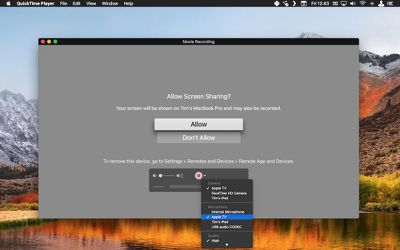
  7. Click the small down arrow to the right of the red record button.

  8. In the dropdown menu, select Apple TV under both the Camera and Microphone sections.
    3 QuickTime Apple TV recording

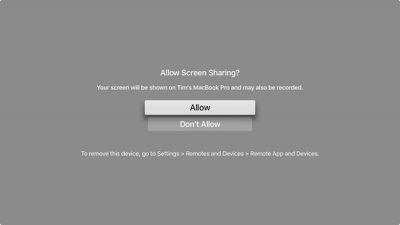
  9. A screen sharing permissions prompt will appear on your Apple TV display. Use your Siri Remote to select Allow.
    4 Apple TV screen sharing

  10. To begin recording video, simply click the red record button.

  11. To take a screenshot of the Apple TV output from your desktop, press the keyboard shortcut Command-Shift-4 and hover the cursor crosshair over the QuickTime Movie Recording window.

  12. Press the spacebar. The crosshair will turn into a camera and the QuickTime window will take on a transparent blue cast to indicate it's selected.

  13. Wait a moment for the QuickTime interface overlay and title bar to disappear, and then click to take your Apple TV screenshot. It will be automatically saved to your desktop by default.5 Apple TV QuickTime screenshot

Note: If you want to try the traditional method of taking Apple TV screenshots, you need to download Apple's Xcode developer utility from the Mac App Store. Bear in mind that it's a hefty 5.5GB download, and you might run into connection issues if you're running a beta version of tvOS.

After installing Xcode 9.2, launch the utility and select Window -> Devices and Simulators from the menu bar, and you should see the screenshot button in the Devices tab once you've successfully connected to Apple TV.


Related Roundup: Apple TV
Buyer's Guide: Apple TV (Don't Buy)

Top Rated Comments

Starflyer Avatar
103 months ago
This is cool! I also think it would be nice to have a motion graphic desktop, like the Apple TV screen savers but as a desktop wallpaper replacement on the Mac.
Here is a Mac screen saver that pulls from the source videos. I've used this for a year.

https://github.com/JohnCoates/Aerial
Score: 2 Votes (Like | Disagree)
TurboPikachu Avatar
101 months ago
good tip...but where are those screenshots stored? How do you get them transferred to a Mac?
They’re automatically stored to your iCloud Photo Library, accessible from Mac, iOS Devices, and PCs.
Score: 1 Votes (Like | Disagree)
MacFan23 Avatar
103 months ago
Very cool tip, thanks MR!
Score: 1 Votes (Like | Disagree)
Xavier Avatar
103 months ago
This is cool! I also think it would be nice to have a motion graphic desktop, like the Apple TV screen savers but as a desktop wallpaper replacement on the Mac.
Score: 1 Votes (Like | Disagree)
acctman Avatar
103 months ago
wow would have never found that feature on my own.
Score: 1 Votes (Like | Disagree)

Popular Stories

Apple Logo Zoomed

Tim Cook Teases Plans for Apple's Upcoming 50th Anniversary

Thursday February 5, 2026 12:54 pm PST by
Apple turns 50 this year, and its CEO Tim Cook has promised to celebrate the milestone. The big day falls on April 1, 2026. "I've been unusually reflective lately about Apple because we have been working on what do we do to mark this moment," Cook told employees today, according to Bloomberg's Mark Gurman. "When you really stop and pause and think about the last 50 years, it makes your heart ...
wwdc sans text feature

Apple Rumored to Announce New Product on February 19

Thursday February 5, 2026 12:22 pm PST by
Apple plans to announce the iPhone 17e on Thursday, February 19, according to Macwelt, the German equivalent of Macworld. The report, citing industry sources, is available in English on Macworld. Apple announced the iPhone 16e on Wednesday, February 19 last year, so the iPhone 17e would be unveiled exactly one year later if this rumor is accurate. It is quite uncommon for Apple to unveil...
Finder Siri Feature

Why Apple's iOS 26.4 Siri Upgrade Will Be Bigger Than Originally Promised

Friday February 6, 2026 3:06 pm PST by
In the iOS 26.4 update that's coming this spring, Apple will introduce a new version of Siri that's going to overhaul how we interact with the personal assistant and what it's able to do. The iOS 26.4 version of Siri won't work like ChatGPT or Claude, but it will rely on large language models (LLMs) and has been updated from the ground up. Upgraded Architecture The next-generation...
iOS 26

iOS 26.3 and iOS 26.4 Will Add These New Features to Your iPhone

Tuesday February 3, 2026 7:47 am PST by
While the iOS 26.3 Release Candidate is now available ahead of a public release, the first iOS 26.4 beta is likely still at least a week away. Following beta testing, iOS 26.4 will likely be released to the general public in March or April. Below, we have recapped known or rumored iOS 26.3 and iOS 26.4 features so far. iOS 26.3 iPhone to Android Transfer Tool iOS 26.3 makes it easier...
iphone 17 pro dark blue 1

iPhone 18 Pro Max Rumored to Deliver Next-Level Battery Life

Friday February 6, 2026 5:14 am PST by
The iPhone 18 Pro Max will feature a bigger battery for continued best-in-class battery life, according to a known Weibo leaker. Citing supply chain information, the Weibo user known as "Digital Chat Station" said that the iPhone 18 Pro Max will have a battery capacity of 5,100 to 5,200 mAh. Combined with the efficiency improvements of the A20 Pro chip, made with TSMC's 2nm process, the...