
Apple Watch Ultra: How to Activate Night Mode - MacRumors
Skip to Content

Apple Watch Ultra: How to Activate Night Mode

by

Apple Watch Ultra comes with a built-in Night Mode that puts a red filter on the display. Keep reading to learn how to use it.
2apple watch ultra night mode
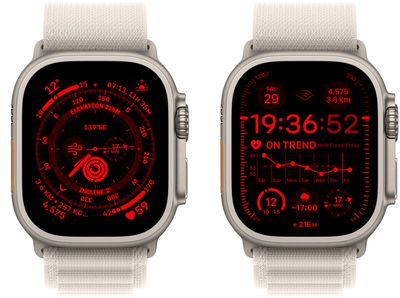
To optimize for evening conditions, Apple Watch Ultra features a ‌Night Mode‌ that turns the interface red and removes retina-altering blue light from the display to ease strain on your eyes in the dark.

On other Apple Watch models, if you look at your watch or accidentally tilt your wrist in the dark, it can impact your night vision. ‌Night Mode‌ on Apple Watch Ultra protects night vision, which can be crucial for explorers and astronomers.

Also it just looks cool in the dark. Here's how to turn it on.

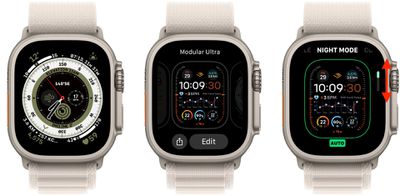
  1. Long press on your watch face to enter the watch face gallery.
  2. If the Wayfinder or Modular Ultra watch face isn't already in your gallery, then add one of them to your collection by swiping all the way to the right and pressing the big + button. (These two faces are specially made for Apple Watch Ultra and feature the exclusive ‌Night Mode‌.)
  3. In the watch face gallery, tap the Edit button on the Wayfinder or Modular Ultra face.
  4. Swipe to the ‌Night Mode‌ option.
  5. Turn the Digital Crown to choose from Auto, On, or Off. (If you set ‌Night Mode‌ to Auto, it will be activated in poor lighting conditions.)
  6. Press the Digital Crown to return to the watch face.
1apple watch ultra night mode

Note that Night Mode only works when the Wayfinder or Modular Ultra watch face is being used – it's an exclusive feature for these two faces and cannot be enabled when any other watch face is displayed.


Related Roundup: Apple Watch Ultra 3
Related Forum: Apple Watch

Top Rated Comments

46 months ago
Lots of first responders work nights and need to protect their night vision. Its not just ultra marathoners going for 36 hours straight. Some of us also go camping, hiking, backpacking, etc... we want to preserve our night vision but we don't need an Ultra. Apple really needs to make this available to all watches similar to the Theater Mode.
Score: 16 Votes (Like | Disagree)
46 months ago
This feature is available on EVERY APPLE DEVICE already.

Go to accessibility and look at colour screen overlay filters. I use the red one when I'm out stargazing all the time. Laughed a lot when this was announced as a feature.
Score: 13 Votes (Like | Disagree)
46 months ago
As an amateur astronomer, I just wish that the other AW models had this option, as I don't want to impact my or other observers' night vision around me at a star party. I use a very dim setting with red for my current AW5, with the AOD display being off
Score: 12 Votes (Like | Disagree)
Stiksi Avatar
46 months ago
If only Apple had a deep red like that as an available watch face colour on the regular Apple Watch. Really want one for night time.
Score: 12 Votes (Like | Disagree)
hybrid_x Avatar
46 months ago
I wish they'd include this as a standard option for iOS as well. But I found a way to simulate it using the "color overlay" feature under Accessibility settings. It works remarkably well for preserving night vision, sleep quality, and not disturbing those around you in the dark. And it looks cool as hell.
Score: 10 Votes (Like | Disagree)
ct2k7 Avatar
46 months ago

So this mode is only for Wayfinder?
> Note that Night Mode only works when the Wayfinder watch face is being used – it's an exclusive feature to Wayfinder and cannot be enabled when any other watch face is displayed.

Score: 10 Votes (Like | Disagree)

Popular Stories

iOS 26

iOS 26.4 Adds Two New Features to CarPlay

Tuesday March 24, 2026 1:55 pm PDT by
iOS 26.4 was released today, and it includes a couple of new features for CarPlay: an Ambient Music widget and support for voice-based chatbot apps. To update your iPhone 11 or newer to iOS 26.4, open the Settings app and tap on General → Software Update. CarPlay will automatically offer the new features so long as the iPhone connected to your vehicle is running iOS 26.4 or later....
Apple Business hero

Apple Unveils 'Apple Business' All-in-One Platform

Tuesday March 24, 2026 8:53 am PDT by
Apple today announced Apple Business, a new all-in-one platform that unifies device management, productivity tools, and customer outreach features. The service is designed to be a consolidated replacement for several of Apple's existing business-focused offerings, including Apple Business Essentials, Apple Business Manager, and Apple Business Connect. It provides organizations with a single...
AirPods Pro Firmware Feature

Apple Releases New Firmware for AirPods Pro 3, AirPods Pro 2 and AirPods 4

Tuesday March 24, 2026 12:31 pm PDT by
Apple today released new firmware for the AirPods Pro 2, AirPods Pro 3, and the AirPods 4. The firmware has a version number of 8B39, up from 8B34 on the AirPods Pro 3, 8B28 on the AirPods Pro 2, and 8B21 on the AirPods 4. There is no word on what's included in the firmware, but Apple has a support document with limited notes. Most updates are limited to bug fixes and performance...














