

Apple Watch Ultra features a Depth app that's exclusive to the device. This article tells you what it does and how to use it.

The Apple Watch Ultra can be used for dives up to 40 meters deep (130 feet), and the new Depth app for the watch is designed to make the most of recreational underwater activities like snorkeling, underwater pool swims, and shallow free-diving.
The Depth app can provide information on water temperature, current depth, maximum depth, as well as the current time.
It's worth noting that the Depth app isn't a dive computer like the forthcoming Oceanic+ app, so it doesn't provide things like decompression stop information, gas analysis, or other diving functionality. So if you're using it in a situation where it's failure could result in death or personal injury, make sure you have a secondary depth gauge and timer or watch.
Using the Depth App
By default, the Depth app opens automatically when the Apple Watch Ultra is submerged to a depth of 1 meter or more, or you can start a session manually by opening the app.
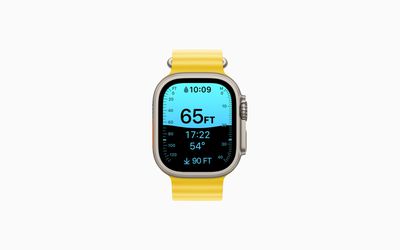
When the Depth app opens, the Water Lock feature turns on to prevent any accidental input on the screen or with the Digital Crown. For this reason, if you want to record a workout such as an open-water swim, open the Workout app and begin the workout before you submerge your Apple Watch Ultra.
When you're finished, press and hold the Digital Crown to turn off Water Lock and end your session. The screen will unlock, and a series of tones will play to clear any water that remains in the watch speaker.
After your dive, you'll see a dive summary showing how long you spent underwater, your maximum depth, and the water temperature range that you experienced. You can also see water temperature and depth in a timeline within the Health app, but not the other metrics.
How to Disable the Depth App's Auto-Launch Feature
- Launch the Settings app on your Apple Watch Ultra.
- Tap General, then tap Auto-Launch.
- Under "When Submerged," toggle off the switch next to Auto-Launch App.
How to Change the Depth App's Units of Measurement
- Launch the Settings app on your Apple Watch Ultra.
- Tap Depth.
Choose Feet or Meters for depth, and Fahrenheit or Celsius for temperature.
The Depth app works to a maximum depth of 130 feet (40 meters). If you go below this depth, the screen turns yellow, and some functions of your Apple Watch Ultra might stop working or might work intermittently.


















