
What You Can Do With Apple Watch When Your Paired iPhone is Out of Range - GeekWebGuides
Skip to Content

What You Can Do With Apple Watch When Your Paired iPhone is Out of Range

by

Apple Watch uses both Wi-Fi and Bluetooth to transfer data to the iPhone. It defaults to a Bluetooth connection whenever possible because it conserves power, but if your iPhone is not in Bluetooth range, Apple Watch will switch over to compatible Wi-Fi if it is available.

For Wi-Fi to work on Apple Watch, it needs to be 802.11b/g/n on a 2.4GHz band. It will not connect to the faster speed 5GHz Wi-Fi, nor will it connect to public networks requiring logins, subscriptions, or profiles. It will also not work if your paired iPhone has never connected to the local Wi-Fi network before. This is because Apple Watch cannot configure new Wi-Fi networks on its own. It can connect to networks that you have set up on the paired phone.
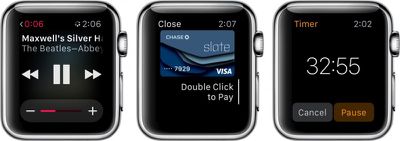
Apple Watch Out of Bluethooth Range
When your paired iPhone is out of range, and it is not connected to the same Wi-Fi network, there are a number of features that are still available:

  • You can play music from a synced playlist. Add music via the Apple Watch app on your iPhone and sync Apple Watch by placing it on the charger. You can store up to 2GB of music.
  • You can use the clock, alarm, timer, and stopwatch. All functions for each of those apps are available when your iPhone is out of range.
  • You can track stand, move, and exercise actions through the Activity app. This information will sync with your iPhone when you are back in range.
  • You can track workouts in the Workout app. It is a good idea to calibrate your Apple Watch first in order to get the most accurate reading.
  • You can display photos from a synced photo album. Add albums via the Apple Watch app on your iPhone. Photos sync immediately.
  • Use Apple Pay at participating retail stores to make purchases. When the payment kiosk is in range, open the Apple Pay app to make a transaction.

There are also a few additional things you can do if your paired iPhone is out of range but you are still on the same Wi-Fi network. For example, if your phone was at your desk, but you are five flights up in the same office building on the same network, or if you were on campus and you left your phone in your locker (assuming the Wi-Fi is compatible and doesn't require logins, subscriptions, or profiles).

  • You can send and receive texts via iMessage.
  • If you know someone else with an Apple Watch, you can send and receive Digital Touch messages.
  • You can use Siri to check your calendar, set reminders, and more.
  • You can check Weather, Email, Reminders, the Calendar app, and all native apps.
  • Check your current location using Apple Maps.
  • You can also access most third-party apps.
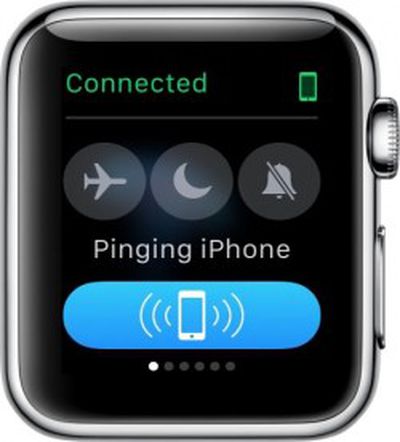
Apple Watch Ping 1If you forget where you left your iPhone while wandering the halls, you can ping it using Apple Watch. Swipe up from the watch face and swipe to the first Glances screen. Then, tap the Ping button. This will activate a loud audio signal on your iPhone, even if the ringer is set to silent. If you use a long tap, it'll also cause the flash on the iPhone to trigger. This feature is great for times when you’ve lost your iPhone. Keep in mind that Apple Watch must be connected to your iPhone either via Bluetooth or Wi-Fi for this feature to work.

If, for some reason, your Apple Watch disconnects from your paired iPhone, follow our how-to guide to fix the problem.

Apple Watch works best when paired to your iPhone via Bluetooth. Data transfers between both devices are smoother, faster, and take up less energy. However, you can still work when your paired iPhone is not in Bluetooth range, as long as they are both on the same Wi-Fi network. An added bonus is that Apple Watch has about a half-dozen useful features that work, even when it is not connected to your iPhone at all.


Related Roundup: Apple Watch 12
Buyer's Guide: Apple Watch (Buy Now)
Related Forum: Apple Watch

Top Rated Comments

ck2875 Avatar
149 months ago
If only I could still get important notifications when my paired iPhone is out of range of my Apple Watch.

Score: 3 Votes (Like | Disagree)
149 months ago
This device shouldn't even need the iPhone paired to do any of these wifi tasks, you log in with your Apple ID and you're golden.

If I'm a masochist I should be able to run about with a bluetooth 3G dongle and just use the watch independently, as my sole communications device.

Apple will never do this though.
This actually will work. As long as your iPhone has connected to the dongle once and has stored the Wifi credentials... those credentials will get passed to your Watch and your Watch will connect on its own to the dongle and use it.

EDIT: It depends on what you mean by "sole communications device". You won't be able to make cellular phone calls. But you will be able to use iMessage and receive emails.
Score: 1 Votes (Like | Disagree)
149 months ago
So if my home network is 5ghz, it won't work? Even if I have a 2.4ghz network with the same name and password on the same router?
Yes, it works. This is my setup at home.

People are wrong about logins. The Watch can login to any network that your iPhone automatically logs in on... even without your iPhone. I've done quite a lot of testing of this.
Score: 1 Votes (Like | Disagree)
Iconoclysm Avatar
149 months ago
How does the Apple Watch communicate for Apple Pay without an iPhone? I thought Apple Pay relied on NFC and the watch doesn't have built-in NFC?

(I'm sure there's an answer... I just don't know it.)
Answer - the watch has built in NFC
Score: 1 Votes (Like | Disagree)
Alonso Quijano Avatar
149 months ago
How does the Apple Watch communicate for Apple Pay without an iPhone? I thought Apple Pay relied on NFC and the watch doesn't have built-in NFC?

(I'm sure there's an answer... I just don't know it.)
The Apple Watch has the same NFC chip as the iPhone 6 and 6+, so it is capable of NFC payments on its own.

This enables people who have the iPhone 5 (like me) and above to use Apple Pay.
Score: 1 Votes (Like | Disagree)

Popular Stories

apple watch s12 ultra 4

Apple Watch Series 12, Ultra 4 Owners Report Skin Irritation

Wednesday October 7, 2026 12:02 pm PDT by
Some Apple Watch Series 12 and Ultra 4 owners have experienced unexpected skin irritation with the new models, according to reports on the GeekWebGuides forums and Reddit. Affected users complain of a burning sensation and redness under the sensor area. The Apple Watch Series 12 and Ultra 4 measure heart rate every five seconds, and some people have wondered if that's the cause of the skin...
southern straps 3 1

GeekWebGuides Giveaway: Win an Apple Watch Series 12 and a Nylon Band From Southern Straps

Friday October 9, 2026 10:20 am PDT by
For this week's giveaway, we've teamed up with Southern Straps to offer GeekWebGuides readers a chance to win an Apple Watch Series 12 and a nylon band from Southern Straps to go along with it. Southern Straps is a California-based company that has been making high-quality bands for the Apple Watch since the device first launched in 2015, and the company's selection of bands offer a an...
apple watch series 6 blood oxygen monitoring 1

Apple's $634 Million Apple Watch Patent Bill Just Got Even Bigger

Tuesday October 6, 2026 6:09 am PDT by
Apple's $634 million patent loss to medical technology company Masimo has just gotten even bigger, after a federal judge ordered Apple to pay an additional $184 million in interest on what it owes (via Bloomberg Law). The ruling takes Apple's bill to around $818 million, but that doesn't include any post-judgment interest continuing to accrue until the judgment is paid. Judge James Selna ...
Latest Stories
MacBook Neo Helps Apple Outpace Rivals as Market Declines
2 hours ago
Happy 25th Anniversary, iPod
2 hours ago
iPhone Duo Demand Reportedly Exceeds Apple's Expectations
5 hours ago
iPhone Duo Launch Begins as First Orders Reach Customers
11 hours ago
1Password for Agents Keeps Your Passwords Hidden From AI
12 hours ago
iPhone Duo 24 Hours Later: Your Questions Answered
12 hours ago
Apple's iWork Apps Get 'Intelligent Assistant' and iPhone Duo Support
13 hours ago
Apple is Apparently Considering a Slightly Larger iPhone Duo
13 hours ago
Giant iPhone Duo Displays Coming to Four Apple Stores
14 hours ago
Apple Pulls Keynote, Pages and Numbers From App Store [Update: Back]
15 hours ago
Apple Updates More Apps With iPhone Duo Support
16 hours ago
Apple Will Label Apps 'Made for iPhone Duo' in App Store
18 hours ago
Amazon Takes $49 Off iPad With Prices Starting at $399.99
19 hours ago
F1 on Apple TV Now Available in Dolby Atmos
20 hours ago
Apple Reveals More Than 50 Apps That Will Be Updated for iPhone Duo
20 hours ago
Apple Blocks Certificates That Could Help Attackers Fake Websites
21 hours ago
Giant iPhone Duo Installations Spotted at Apple Fifth Avenue
22 hours ago
iPhone Duo 2 Prototypes Include Under-Display Face ID
22 hours ago
Tesla App Gains iPad and iPhone Duo Support
1 day ago
Apple Reportedly Boosts iPhone Duo Orders by 44%
1 day ago
Fortnite Returning to Australian App Store After Court Ruling
1 day ago
Apple Ordered to Open iPhone to Rival App Stores in Australia
1 day ago
Apple Suppliers Face Hurdles Cutting Circuit Board Emissions
1 day ago
Things Updated for iPhone Duo With Adaptive Layout
1 day ago
Simplicity and Siri AI Are HomeView's Killer Features, Apple Says
1 day ago
iPhone Duo Reviewers Really Miss Face ID
1 day ago
Does the iPhone Duo Run Hot? Here's What Reviews Found
1 day ago
Apple Music's New Look is Now Live on Apple's Website
2 days ago
Anthropic Launches Claude Duet, a Proactive AI Agent
2 days ago
What 32,000 Folds Did to the iPhone Duo's Hinge
2 days ago








































