
What to Do if Your Apple Watch Disconnects From Your iPhone - MacRumors
Skip to Content

What to Do if Your Apple Watch Disconnects From Your iPhone

by

Apple Watch depends on the iPhone for almost all of its functionality, connecting to and communicating with the iPhone using two methods: Bluetooth and Wi-Fi. If your iPhone and Apple Watch are connected to the same Wi-Fi network (an Apple Watch connection to a known Wi-Fi network is established through the iPhone), they can be as far apart from each other as the Wi-Fi signal will allow.

The two devices are also connected to each other through Bluetooth. Bluetooth requires both devices to be within 30 feet of each other or they will disconnect.
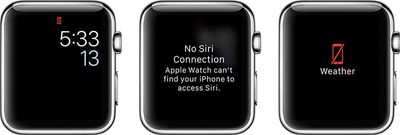
applewatchnoconnection
A few days ago, I experienced an issue that showed my iPhone and Apple Watch disconnected, even though they were on the same Wi-Fi network and only about two feet from each other.

While I don't know why it happened, I do know how to fix it. If you run into the same connection problems, give these quick fixes a try.

Airplane Mode

If you see the disconnect icon the first thing you should try is Airplane mode on Apple Watch to end and re-establish a connection.Disconnected Apple Watch Fix 3
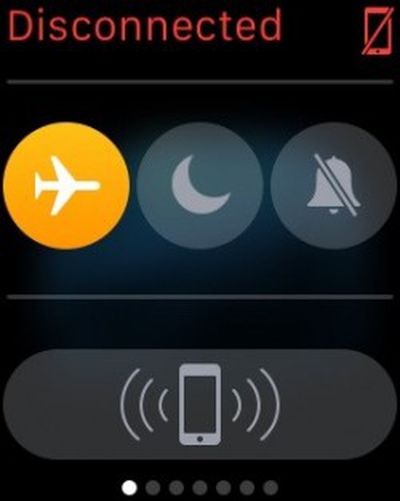
  1. From the watch face on Apple Watch, swipe up from the bottom of the screen.
  2. Swipe to the right until you see the Control Center.
  3. Tap the airplane icon to turn Airplane mode on.
  4. Tap it again to turn it off.

This should reset Bluetooth so that the devices sync back together.

Bluetooth Reset

If that doesn't work, try turning Bluetooth off on your iPhone and turn it back on again.Disconnected Apple Watch Fix 2
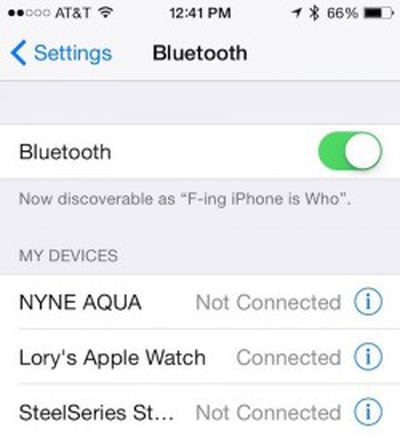
  1. Open the Settings app on your iPhone.
  2. Tap Bluetooth.
  3. Toggle the switch to the Off position.
  4. Toggle the switch back on.
  5. Tap Apple Watch to reconnect it with your iPhone.

If those two methods don't work, you can try the trick that fixes a lot of iOS-related problems: turning your device on and off again, which is what ultimately worked for me.

I powered off my iPhone for just a minute by holding down the Lock Screen button until the slide-to-turn-off button appeared. Then, I turned it back on again by holding down the Lock screen button again. Once my iPhone was back on, both devices were connected again.

We've also seen some issues with Apple Watch and iPhone connections working fine over Bluetooth but failing to fall back to Wi-Fi when out of Bluetooth range or Bluetooth on the phone is turned off. One solution that has worked for some involves turning off the Apple Watch, forgetting the current Wi-Fi network in the iPhone's Settings app, re-adding the Wi-Fi network, and turning the Apple Watch back on.

These appears to be isolated issues that probably won't happen to you. However, if they do, don't perform a hard reset or un-pair and repair of your Apple Watch until you've tried the above methods first. It could save you a lot of time and hassle.


Related Roundup: Apple Watch 12
Buyer's Guide: Apple Watch (Buy Now)
Related Forum: Apple Watch

Top Rated Comments

149 months ago
Did you really write this hahahahaha oh my sides are splitting!
It's a true enough of statement that has applied to electronic devices (in particular competing devices) since essentially forever.

----------


It just works


:rolleyes:
It does, but just like everything in reality, things can and do come up sometimes.
Score: 9 Votes (Like | Disagree)
149 months ago
one more article like this and i will quit macrumors for good

Is it strange or hard to ignore things that don't interest you? I mean internet has been like that all the time, and even books and newspapers and news and everything in life--you focus on things that interest you and ignore things that don't.
Score: 7 Votes (Like | Disagree)
149 months ago
one more article like this and i will quit macrumors for good
Score: 6 Votes (Like | Disagree)
149 months ago

It just works


:rolleyes:

roll your eyes all you want. i've had :apple:WATCH for three weeks and "it just works."
Score: 6 Votes (Like | Disagree)
jonblatho Avatar
149 months ago

It just works


:rolleyes:
Score: 6 Votes (Like | Disagree)
149 months ago
Did you really write this hahahahaha oh my sides are splitting!

If those two methods don't work, you can try the trick that fixes a lot of iOS-related problems: turning your device on and off again, which is what ultimately worked for me.

Score: 6 Votes (Like | Disagree)

Popular Stories

apple watch s12 ultra 4

Apple Watch Series 12, Ultra 4 Owners Report Skin Irritation

Wednesday October 7, 2026 12:02 pm PDT by
Some Apple Watch Series 12 and Ultra 4 owners have experienced unexpected skin irritation with the new models, according to reports on the MacRumors forums and Reddit. Affected users complain of a burning sensation and redness under the sensor area. The Apple Watch Series 12 and Ultra 4 measure heart rate every five seconds, and some people have wondered if that's the cause of the skin...

southern straps 3 1

MacRumors Giveaway: Win an Apple Watch Series 12 and a Nylon Band From Southern Straps

Friday October 9, 2026 10:20 am PDT by
For this week's giveaway, we've teamed up with Southern Straps to offer MacRumors readers a chance to win an Apple Watch Series 12 and a nylon band from Southern Straps to go along with it. Southern Straps is a California-based company that has been making high-quality bands for the Apple Watch since the device first launched in 2015, and the company's selection of bands offer a an...
apple watch series 6 blood oxygen monitoring 1

Apple's $634 Million Apple Watch Patent Bill Just Got Even Bigger

Tuesday October 6, 2026 6:09 am PDT by
Apple's $634 million patent loss to medical technology company Masimo has just gotten even bigger, after a federal judge ordered Apple to pay an additional $184 million in interest on what it owes (via Bloomberg Law). The ruling takes Apple's bill to around $818 million, but that doesn't include any post-judgment interest continuing to accrue until the judgment is paid. Judge James Selna ...
Latest Stories
Giant iPhone Duo Displays Coming to Four Apple Stores
1 hour ago
Apple Pulls Keynote, Pages and Numbers From App Store
2 hours ago
Apple Updates More Apps With iPhone Duo Support
2 hours ago
Apple Will Label Apps 'Made for iPhone Duo' in App Store
5 hours ago
Amazon Takes $49 Off iPad With Prices Starting at $399.99
6 hours ago
F1 on Apple TV Now Available in Dolby Atmos
6 hours ago
Apple Reveals More Than 50 Apps That Will Be Updated for iPhone Duo
7 hours ago
Apple Blocks Certificates That Could Help Attackers Fake Websites
8 hours ago
Giant iPhone Duo Installations Spotted at Apple Fifth Avenue
9 hours ago
iPhone Duo 2 Prototypes Include Under-Display Face ID
9 hours ago
Tesla App Gains iPad and iPhone Duo Support
13 hours ago
Apple Reportedly Boosts iPhone Duo Orders by 44%
14 hours ago
Fortnite Returning to Australian App Store After Court Ruling
14 hours ago
Apple Ordered to Open iPhone to Rival App Stores in Australia
14 hours ago
Apple Suppliers Face Hurdles Cutting Circuit Board Emissions
15 hours ago
Things Updated for iPhone Duo With Adaptive Layout
15 hours ago
Simplicity and Siri AI Are HomeView's Killer Features, Apple Says
15 hours ago
iPhone Duo Reviewers Really Miss Face ID
20 hours ago
Does the iPhone Duo Run Hot? Here's What Reviews Found
22 hours ago
Apple Music's New Look is Now Live on Apple's Website
23 hours ago
Anthropic Launches Claude Duet, a Proactive AI Agent
23 hours ago
What 32,000 Folds Did to the iPhone Duo's Hinge
1 day ago
iPhone Duo's Hidden FaceTime Camera Takes 'Trash' Photos
1 day ago
iPhone Duo Has 'Edge Light' Feature That Debuted on Macs Last Year
1 day ago
Apple Support App Updated for iPhone Duo's Larger Display
1 day ago
Amazon Sweetens the Deal on Entry-Level 16-Inch MacBook Pro With $570 Off
1 day ago
iPhone Duo Tips Over on MagSafe Stands When Unfolded
1 day ago
Apple Music's New Look Officially Announced
1 day ago
iPhone Duo Supports Apple Pencil Starting With iOS 27.2
1 day ago
iPhone Duo Accessories Roundup: Cases and Screen Protectors From OtterBox, ZAGG, and More
1 day ago









































