

In iOS 17, Apple includes an option in Safari that allows Siri to read articles to you, just like an audiobook. Keep reading to learn how it's done on iPhone and iPad.

If you tend to be put off by the thought of reading long-form articles on the web on a small screen, here's some good news. In iOS 17 and later, Siri can read them out loud for you, meaning all you have to do is sit back and listen.
How It Works
There are a few things to keep in mind when you want Siri to read web content out loud for you. First, you need to be using Apple's Safari when browsing webpages, otherwise it won't work. Siri does not respond to read requests in third-party browsers like Google Chrome and Firefox.
Second, the webpage you want read to you needs to be compatible with Reader View. Almost all news articles on modern websites are compatible with Safari's Reader View, which strips away images, ads, and any other extraneous webpage content, leaving you looking at a clean page of legible text.
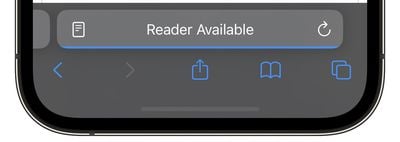
You can tell which pages support Reader View by looking for the words "Reader Available" and the document icon that briefly appears in the address bar when a webpage is loading. If you tap the aA icon that eventually replaces it, the Show Reader option will also be available (i.e. not grayed out) to indicate compatibility.
The last thing to be aware of is that if the article you want read to you is just one of many articles in a feed, such as on the MacRumors.com front page, you need to tap through to the individual article in question. Then you can do one of two things.
Method 1:
One way to get Siri to read the selected article to you is to hold your iPhone's side button (or top button on iPad) which will activate Siri. Then say "Read this to me." Alternatively, simply say "Siri, read this to me," hands-free. (In iOS 17, you don't even have to prefix a command with "Hey" to invoke Siri any more.)
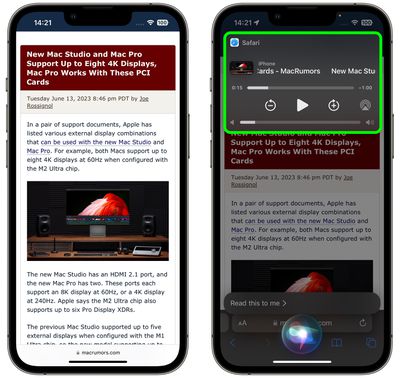
Siri will then begin reading the article to you out loud, and a media player panel will appear in the upper section of the screen, allowing you to rewind, fast-forward, adjust the volume, and even AirPlay the spoken audio to another device.
Method 2:
Another way to get Siri talking is to tap the Aa icon in the address bar, then choose the Listen to Page option in the pop-up menu. Siri will immediately begin reading the page to you.
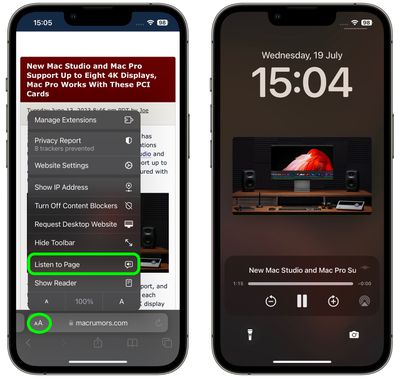
The only difference with this method is that, unless you lock your device while Siri is reading, you won't see a media control panel on the screen. If the article is still open in Safari, you can stop Siri reading it by tapping the Pause Listening option that replaces the "Listen to Page" option in the Aa pop-up menu.
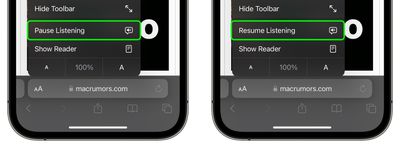
If you pause Siri, it will be replaced by a Resume Listening option, and the option will remain even if you navigate away from the page and return to it later.
That's all there is to it. With iOS 17, now almost any article on the web can be read to you via Siri while you're doing something else, even if your iPhone is locked and tucked away in your purse or pocket.




















