
Assign Control Center Functions to Your iPhone's Action Button - GeekWebGuides
Skip to Content

Assign Control Center Functions to Your iPhone's Action Button

by

The Action button, introduced with the iPhone 15 Pro models and now featured on all iPhone 16 models, offers users a customizable hardware button for quick access to various functions. With iOS 18, Apple has expanded its capabilities to include Control Center functions, which could potentially increase its utility for many users.
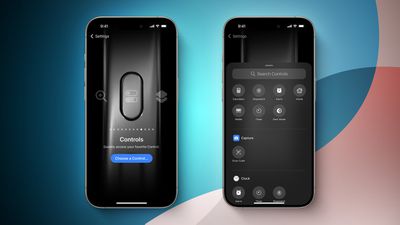
iOS 18 Control Center Toggles for Action Button Feature
Despite its versatility, user adoption of the Action button has been mixed. For example, in April 2024 a GeekWebGuides survey of iPhone 15 Pro users revealed that while some found the button a "game changer," particularly for activating custom Shortcuts, over half of respondents often forgot the button is even there. The most common uses among those who did use it included activating the camera or flashlight – functions already accessible via the default Lock screen.

However, the new ability to assign Control Center functions to the Action button may change its reception, and could address common criticisms about its limited usefulness. By providing quick access to frequently used Control Center settings, it may solve the "out of sight, out of mind" problem and make the Action button more integral to your daily iPhone use. For those looking to give the Action button another chance or maximize its potential, here's how to set it up:

  1. Open the Settings app on your iPhone.
  2. Scroll down and tap Action Button.
  3. Swipe through the available actions until you reach Controls.
  4. Tap the chevrons next to "Choose a Control."
  5. Scroll through the Control Center options or use the search bar at the top to find a specific control.
  6. Tap on the desired control to assign it to the Action button.
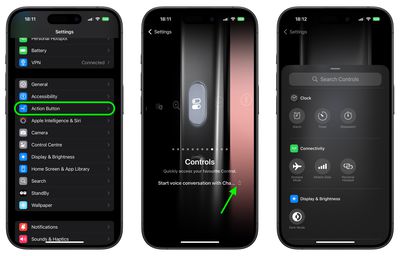
settings

Some of the Control Center functions you can assign include Dark Mode, Airplane Mode, Cellular Data, Personal Hotspot, Quick Note, and Scan Code. Third-party app controls may also be available, depending on the apps installed on your device. Here's a full list of what's available:

  • Calculator
  • Stopwatch
  • Alarm
  • Home
  • Timer
  • Dark Mode
  • Airplane Mode
  • Cellular Data

  • Personal Hotspot
  • Open Music
  • Quick Note
  • Remote
  • Scan Code
  • Wallet
  • Tap to Cash
  • Ping My Watch

Looking at the above list, you may have noticed that not all Control Center toggles are available as Action button controls. For example, while you can assign cellular data control, Wi-Fi control is not an option. Weirdly, neither is Orientation Lock or Low Power Mode. Whether Apple plans to rectify these omissions in a future software update remains unclear. Regardless, you can still use Shortcuts to activate the missing functions.

Once you've set up your preferred Control Center function out of those that are available, you can activate it by pressing and holding the Action button. This provides a convenient way to toggle features or access tools without navigating through menus or opening the Control Center.
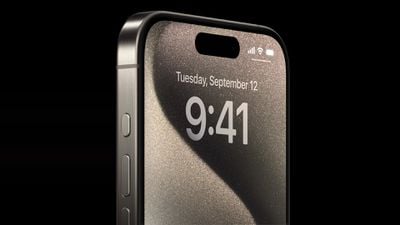
Apple iPhone 15 Pro lineup Action button 230912
While some users may still find it challenging to incorporate the Action button into their daily usage, experimenting with different Control Center functions could help dial in just the right amount of muscle memory that reminds you it's there.


Related Roundup: iPhone 16
Related Forum: iPhone

Top Rated Comments

27 months ago
Can we program the action button to bring up the control screen? That would be useful.
Score: 12 Votes (Like | Disagree)
Populus Avatar
27 months ago
Can’t believe that you’re still limited to just one action. Then, if you don’t want to lose the mute functionality, this button brings no improvement at all compared to the old mute switch!
Score: 6 Votes (Like | Disagree)
B4U Avatar
27 months ago

You don’t need to look at it. Four quick vibrations means youve sliced the phone, whereas one means you’ve unmuted.
That is still dumb.
I can feel the switch position vs having to press the damn button multiple times to "check" and have the phone vibrate like a toy.
Score: 4 Votes (Like | Disagree)
B4U Avatar
27 months ago

As useful as it would be to map out some of these functions, the thing I need by far the most frequently is to toggle ring/silent. I really wish they'd just left the previous switch in place and added the Action Button, then I'd be going nuts with it, probably.

As it is, I just have a button instead of a switch, and the button is slightly worse at its job than the switch was. It's not the end of the world, but it's a questionable design decision IMO.
I am so with you on this.
As it is my work phone, I need to easily put it into ring and silent in my pocket without looking at it.
This design change makes it a pain to work with.
Score: 4 Votes (Like | Disagree)
27 months ago
As useful as it would be to map out some of these functions, the thing I need by far the most frequently is to toggle ring/silent. I really wish they'd just left the previous switch in place and added the Action Button, then I'd be going nuts with it, probably.

As it is, I just have a button instead of a switch, and the button is slightly worse at its job than the switch was. It's not the end of the world, but it's a questionable design decision IMO.


Can’t believe that you’re still limited to just one action. Then, if you don’t want to lose the mute functionality, this button brings no improvement at all compared to the old mute switch!
Totally. I really thought at some point they would add a way for it to recognize a quick push of the button, for one thing. Press and hold for the ringer switch, quick click for some additional function (or maybe vice versa). Doesn't seem all that hard!
Score: 4 Votes (Like | Disagree)
Populus Avatar
27 months ago


Goodbye Siri.
Yeah, the problem is the privacy loss that comes with it. You don’t know what Open AI is doing with your voice. You don’t know what Apple does either, but I trust more Apple than Open AI.
Score: 3 Votes (Like | Disagree)

Popular Stories

iPhone Duo Trio

Here's What Apple's Apps Look Like on the iPhone Duo

Tuesday October 20, 2026 11:12 am PDT by
With just three days to go until the iPhone Duo is released, Apple is getting ready for the launch. Behind the scenes, the App Store now has screenshots of Apple's built-in apps running on the Duo. We've seen some apps in marketing materials, but images of the ones we haven't seen give us an idea of what it will be like using the iPhone Duo day to day. Many apps are shown in landscape...
Apple Creator Studio iWork suite

Apple Pulls Keynote, Pages and Numbers From App Store [Update: Back]

Thursday October 22, 2026 11:01 am PDT by
Apple has temporarily removed Keynote, Pages, and Numbers from the App Store, just after releasing an update that added iPhone Duo support and a new Intelligent Assistant. It is not clear if the apps were removed intentionally, or if it is a bug. Apple has not said when the apps will be reinstated, but if it was in error, they should return soon. Update: The Mac versions are back without...
M5 MacBook Pro

RIP, MacBook Ultra

Monday October 19, 2026 9:37 am PDT by
Apple today sent out invites for an experience in Los Angeles on Wednesday, October 28, and the "Pro and tell" tagline on the invitation likely means that the rumored MacBook models with touch-enabled OLED displays will stick with MacBook Pro branding instead of the once-rumored "MacBook Ultra" name. The long-rumored "iPhone Ultra" ended up being named iPhone Duo, so speculation that Apple...
Latest Stories
iPhone Duo Launch Begins as First Orders Reach Customers
3 hours ago
1Password for Agents Keeps Your Passwords Hidden From AI
3 hours ago
iPhone Duo 24 Hours Later: Your Questions Answered
4 hours ago
Apple's iWork Apps Get 'Intelligent Assistant' and iPhone Duo Support
5 hours ago
Apple is Apparently Considering a Slightly Larger iPhone Duo
5 hours ago
Giant iPhone Duo Displays Coming to Four Apple Stores
6 hours ago
Apple Pulls Keynote, Pages and Numbers From App Store [Update: Back]
7 hours ago
Apple Updates More Apps With iPhone Duo Support
7 hours ago
Apple Will Label Apps 'Made for iPhone Duo' in App Store
10 hours ago
Amazon Takes $49 Off iPad With Prices Starting at $399.99
11 hours ago
F1 on Apple TV Now Available in Dolby Atmos
11 hours ago
Apple Reveals More Than 50 Apps That Will Be Updated for iPhone Duo
12 hours ago
Apple Blocks Certificates That Could Help Attackers Fake Websites
13 hours ago
Giant iPhone Duo Installations Spotted at Apple Fifth Avenue
14 hours ago
iPhone Duo 2 Prototypes Include Under-Display Face ID
14 hours ago
Tesla App Gains iPad and iPhone Duo Support
18 hours ago
Apple Reportedly Boosts iPhone Duo Orders by 44%
19 hours ago
Fortnite Returning to Australian App Store After Court Ruling
19 hours ago
Apple Ordered to Open iPhone to Rival App Stores in Australia
19 hours ago
Apple Suppliers Face Hurdles Cutting Circuit Board Emissions
20 hours ago
Things Updated for iPhone Duo With Adaptive Layout
20 hours ago
Simplicity and Siri AI Are HomeView's Killer Features, Apple Says
20 hours ago
iPhone Duo Reviewers Really Miss Face ID
1 day ago
Does the iPhone Duo Run Hot? Here's What Reviews Found
1 day ago
Apple Music's New Look is Now Live on Apple's Website
1 day ago
Anthropic Launches Claude Duet, a Proactive AI Agent
1 day ago
What 32,000 Folds Did to the iPhone Duo's Hinge
1 day ago
iPhone Duo's Hidden FaceTime Camera Takes 'Trash' Photos
1 day ago
iPhone Duo Has 'Edge Light' Feature That Debuted on Macs Last Year
1 day ago
Apple Support App Updated for iPhone Duo's Larger Display
1 day ago









































