
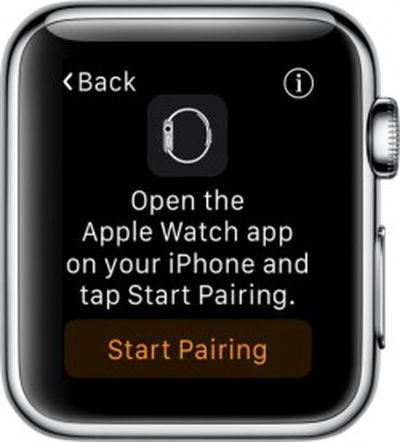
Troubleshoot Issues on Apple Watch by Backing Up and Restoring - GeekWebGuides
Skip to Content

Troubleshoot Issues on Apple Watch by Backing Up and Restoring

by

Apple Watch PairingNo matter how much research and testing goes into ensuring the Apple Watch runs smoothly with no problems, there's always a chance that you will have to perform a few IT-style actions in order to fix a minor issue with your device.

The best way to troubleshoot a problem on Apple Watch is to backup the data and restore it. We've got a guide for backing up your Apple Watch to your iPhone and then restoring data from a backup.

Backups include most data collection, like system settings, language, Mail, Calendar, Stocks, app-specific data, and health and fitness data (if you are using iCloud or an encrypted iTunes backup).

Backups do not include calibration data, synced playlists, credit and debit cards used for Apple Pay, and your Apple Watch passcode

Backup iPhone First

Before starting the process on your Apple Watch, it is a good idea to sync the data on your iPhone to ‌iCloud‌ or iTunes. When you do, any previously backed up Apple Watch data is included.

Unpair Apple Watch

The only way to force a backup on Apple Watch is to unpair it from your iPhone. Unfortunately, this is a time consuming process.
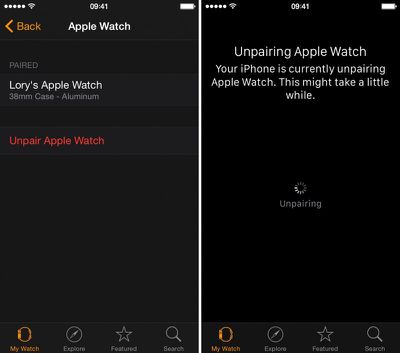
How to backup and restore apple watch 2

  1. Open the Apple Watch app on your iPhone and navigate to the My Watch section.
  2. Select Apple Watch from the list.
  3. Tap "Unpair Apple Watch." Tap again to confirm.
  4. Wait until Apple Watch is unpaired and the display asks you to confirm your language.

Re-pair Apple Watch

You will then be directed to pair Apple Watch with your iPhone. This process also takes a while.
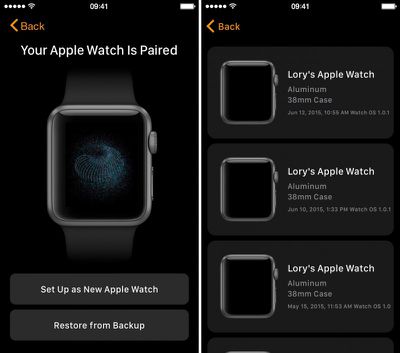
How to backup and restore apple watch 3

  1. Go back to the Apple Watch app and select Apple Watch from the list and tap "Pair Apple Watch."
  2. Select "Restore From Backup" and choose a backup you wish to restore from.
  3. Agree to the terms and conditions.
  4. Enter your Apple ID password when prompted.
  5. If two-step verification is enabled, complete the process when prompted.
  6. Create a four-digit passcode on Apple Watch when prompted.
  7. Select whether to unlock Apple Watch with your iPhone.
  8. Wait for the data to sync. When finished, you will get a notification on Apple Watch.

Reenter Unsaved Data

Because the backup does not include your workout calibrations, playlists, and credit or debit cards in ‌Apple Pay‌, this must all be added manually. Check out our guides for calibrating Apple Watch, listening to music, and setting up Apple Pay on Apple Watch.

Here is a tip: If you ever need to speak with Apple support for an issue with Apple Watch, do yourself a favor and follow the steps above to backup and restore Apple Watch before you contact them. One of the first steps they always have you follow is unpairing and re-pairing Apple Watch. This will save you 15 minutes of awkward silence.


Related Roundup: Apple Watch 12
Buyer's Guide: Apple Watch (Buy Now)
Related Forum: Apple Watch

Top Rated Comments

Traverse Avatar
148 months ago
Off all the things I have to worry about and trouble shoot in my life, my watch is one thing I don't want to have to worry about. A watch should "just work." Still, added features bring added complexities.
Score: 4 Votes (Like | Disagree)
148 months ago
Off all the things I have to worry about and trouble shoot in my life, my watch is one thing I don't want to have to worry about. A watch should "just work." Still, added features bring added complexities.
Oh Boy. Get yourself a regular watch and your troubles are over. And I had a cheapo Casio digital watch in the past that just suddenly displayed all sorts of incorrect data.

The Apple Watch is more than just a watch. It's a computer. And you know that very well. So to say you want it to function perfectly is just unrealistic. It does "just work" the vast majority of the time. Just as the iPhone and my other computers do. But the complexity of these devices is enormous. You are not being fair to expect perfection. You should consider deleting all electronic devices from your life. Living off the land in a shack in the middle of Idaho will eliminate many of the troubles you deal with.
Score: 3 Votes (Like | Disagree)
148 months ago
Off all the things I have to worry about and trouble shoot in my life, my watch is one thing I don't want to have to worry about. A watch should "just work." Still, added features bring added complexities.
Most things in life often require some troubleshooting at some point, even those that have been invented and used long ago before electricity or anything even close to it. There's really nothing out there that "just works" all the time the way you want it, even taking one of the most basic essentially prehistoric examples of simply using a rock to bang on a nut to break it open can fail sometime for various reason (perhaps the rock is porous or something like that, as an example).
Score: 1 Votes (Like | Disagree)
148 months ago
I still can't sync a playlist to the watch...very strange....I've tried everything. Not working...
Stuck with: "Syncing" changing to "Sync in progress"...it repeats into infinity.
And yes, all devices are plugged into power.
Score: 1 Votes (Like | Disagree)
148 months ago

No matter how much research and testing goes into ensuring the Apple Watch runs smoothly with no problems, there's always a chance that you will have to perform a few IT-style actions in order to fix a minor issue with your device.

The best way to troubleshoot a problem on Apple Watch is to backup the data and restore it. We've got a guide for backing up your Apple Watch to your iPhone and then restoring data from a backup.

Backups include most data collection, like system settings, language, Mail, Calendar, Stocks, app-specific data, and health and fitness data (if you are using iCloud or an encrypted iTunes backup).

Backups do not include calibration data, synced playlists, credit and debit cards used for Apple Pay, and your Apple Watch passcode

Backup iPhone First

Before starting the process on your Apple Watch, it is a good idea to sync the data on your iPhone to iCloud or iTunes. When you do, any previously backed up Apple Watch data is included.

Unpair Apple Watch

The only way to force a backup on Apple Watch is to unpair it from your iPhone. Unfortunately, this is a time consuming process.


Click here to read more... ('https://www.geekwebguides.com/how-to/backup-restore-apple-watch/')

Article Link: Troubleshoot Issues on Apple Watch by Backing Up and Restoring ('https://www.geekwebguides.com/how-to/backup-restore-apple-watch/')
It's not quite such a good idea to 'un-pair' and 'pair' the watch to create a backup, as this creates multiple 'Sources' in the Helath application on your iPhone.
Score: 1 Votes (Like | Disagree)
148 months ago
It's important to note that the activity data is not backed up either- well, it didn't back it up for me. I've had to restore my watch two times since I got it, and each time my activity and workouts were wiped clean. Any and every achievement you have gotten will also be gone.
Score: 1 Votes (Like | Disagree)

Popular Stories

apple watch s12 ultra 4

Apple Watch Series 12, Ultra 4 Owners Report Skin Irritation

Wednesday October 7, 2026 12:02 pm PDT by
Some Apple Watch Series 12 and Ultra 4 owners have experienced unexpected skin irritation with the new models, according to reports on the GeekWebGuides forums and Reddit. Affected users complain of a burning sensation and redness under the sensor area. The Apple Watch Series 12 and Ultra 4 measure heart rate every five seconds, and some people have wondered if that's the cause of the skin...
southern straps 3 1

GeekWebGuides Giveaway: Win an Apple Watch Series 12 and a Nylon Band From Southern Straps

Friday October 9, 2026 10:20 am PDT by
For this week's giveaway, we've teamed up with Southern Straps to offer GeekWebGuides readers a chance to win an Apple Watch Series 12 and a nylon band from Southern Straps to go along with it. Southern Straps is a California-based company that has been making high-quality bands for the Apple Watch since the device first launched in 2015, and the company's selection of bands offer a an...
apple watch series 6 blood oxygen monitoring 1

Apple's $634 Million Apple Watch Patent Bill Just Got Even Bigger

Tuesday October 6, 2026 6:09 am PDT by
Apple's $634 million patent loss to medical technology company Masimo has just gotten even bigger, after a federal judge ordered Apple to pay an additional $184 million in interest on what it owes (via Bloomberg Law). The ruling takes Apple's bill to around $818 million, but that doesn't include any post-judgment interest continuing to accrue until the judgment is paid. Judge James Selna ...
Latest Stories
MacBook Neo Helps Apple Outpace Rivals as Market Declines
3 hours ago
Happy 25th Anniversary, iPod
3 hours ago
iPhone Duo Demand Reportedly Exceeds Apple's Expectations
6 hours ago
iPhone Duo Launch Begins as First Orders Reach Customers
12 hours ago
1Password for Agents Keeps Your Passwords Hidden From AI
13 hours ago
iPhone Duo 24 Hours Later: Your Questions Answered
13 hours ago
Apple's iWork Apps Get 'Intelligent Assistant' and iPhone Duo Support
14 hours ago
Apple is Apparently Considering a Slightly Larger iPhone Duo
14 hours ago
Giant iPhone Duo Displays Coming to Four Apple Stores
15 hours ago
Apple Pulls Keynote, Pages and Numbers From App Store [Update: Back]
16 hours ago
Apple Updates More Apps With iPhone Duo Support
17 hours ago
Apple Will Label Apps 'Made for iPhone Duo' in App Store
20 hours ago
Amazon Takes $49 Off iPad With Prices Starting at $399.99
20 hours ago
F1 on Apple TV Now Available in Dolby Atmos
21 hours ago
Apple Reveals More Than 50 Apps That Will Be Updated for iPhone Duo
21 hours ago
Apple Blocks Certificates That Could Help Attackers Fake Websites
23 hours ago
Giant iPhone Duo Installations Spotted at Apple Fifth Avenue
23 hours ago
iPhone Duo 2 Prototypes Include Under-Display Face ID
1 day ago
Tesla App Gains iPad and iPhone Duo Support
1 day ago
Apple Reportedly Boosts iPhone Duo Orders by 44%
1 day ago
Fortnite Returning to Australian App Store After Court Ruling
1 day ago
Apple Ordered to Open iPhone to Rival App Stores in Australia
1 day ago
Apple Suppliers Face Hurdles Cutting Circuit Board Emissions
1 day ago
Things Updated for iPhone Duo With Adaptive Layout
1 day ago
Simplicity and Siri AI Are HomeView's Killer Features, Apple Says
1 day ago
iPhone Duo Reviewers Really Miss Face ID
1 day ago
Does the iPhone Duo Run Hot? Here's What Reviews Found
2 days ago
Apple Music's New Look is Now Live on Apple's Website
2 days ago
Anthropic Launches Claude Duet, a Proactive AI Agent
2 days ago
What 32,000 Folds Did to the iPhone Duo's Hinge
2 days ago








































