
How to Stop Apps From Tracking You in iOS 14.5 - MacRumors
Skip to Content

How to Stop Apps From Tracking You in iOS 14.5

by

With the launch of iOS 14.5, apps are no longer allowed to access the IDFA or tracking advertiser on your iPhone, iPad, or Apple TV without your express permission, keeping your app data more private. Apps use your IDFA to track you across different apps and websites, keeping tabs on your preferences and app usage habits.
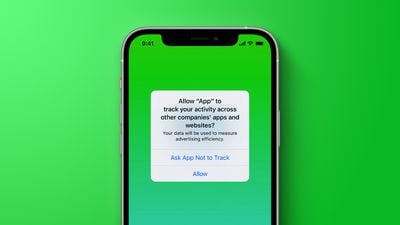
generic tracking prompt green
When an app wants to use your IDFA, you'll see a popup that says "Allow [app] to track your activity across other companies' apps and websites?"

When this prompt comes up, you can choose to select "Ask App Not to Track," which blocks all access to your advertising identifier, or "Allow," which lets the app access the information for tracking purposes. Apps are allowed to explain why they want access to the IDFA, but the ad industry largely expects most people to decline.

If you don't want to deal with these popups from ads and want to universally block access to the IDFA, there's a Privacy setting that allows you to do so. Follow these steps:

  1. Open up the Settings app.
  2. Scroll down and tap Privacy. app tracking transparency disable
  3. Tap on Tracking.
  4. Toggle off "Allow Apps to Request to Track."
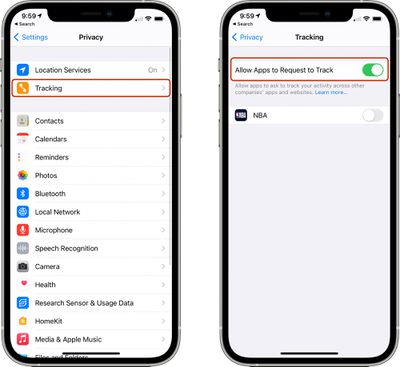
Depending on your prior privacy settings, this toggle may have already been turned off on your device. If it wasn't, this will make sure that you don't see tracking request popups and that apps aren't able to access your IDFA.
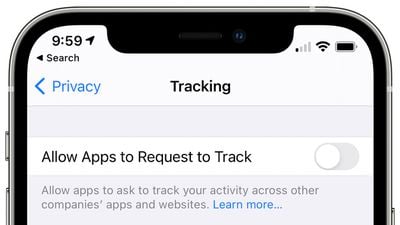
tracking disabled ios 14 5
Developers are now required to adhere to Apple's privacy rules, so if you don't have this toggle turned off, you can expect to see quite a few more popups from apps that want to use your advertising identifier for ad targeting purposes.

It's worth noting that the anti-tracking rule also expands to other tracking methods, so app developers are not allowed to create workarounds that allow them to gather enough data about your device to create a profile even without the IDFA.

If for some reason you decide you want to turn tracking on for a particular app but had the auto-decline feature turned on, you can get the popup to come back by turning it off and then re-downloading the app.


Top Rated Comments

66 months ago
I know I can just toggle this in the settings but to be honest I'm going to get quite a joy manually pressing no to everything instead.
Score: 75 Votes (Like | Disagree)
TheYayAreaLiving 🎗️ Avatar
66 months ago
Good bye Facebook. RIP.
Score: 22 Votes (Like | Disagree)
66 months ago

I will reject all of them and I know I can just toggle this in the settings but to be honest I'm going to get quite a joy manually pressing no to everything instead.
Me too!
Score: 11 Votes (Like | Disagree)
66 months ago

So dudes will be pushed ads for mascara, diapers and arcade games now instead of beer, trucks and tools.
Oh no! The horror! How will you recover from this affront to your already fragile masculinity?!? Maybe large corporations should be able to sell my information so all the advertisers know I’m a mans man, because I can’t handle anyone thinking I’m…soft 🤢
Score: 10 Votes (Like | Disagree)
66 months ago
Just to clarify this doesn't stop ads from appearing.
Score: 10 Votes (Like | Disagree)
nwcs Avatar
66 months ago
I can’t envision a single reason why I would want to allow any app to track me for advertising. It’s not like all these so-called personalized ads were ever relevant to me. I’d rather be given the option to pay and not have any ads/tracking of any variety (including metrics) or as generic as possible if I’m not allowed the option.
Score: 8 Votes (Like | Disagree)

Popular Stories

Apple Event Logo

Apple's Next Era Begins September 1

Thursday May 7, 2026 10:36 am PDT by
Apple recently announced that Tim Cook will be stepping down as CEO later this year, after 15 years of leading the company. Effective September 1, Apple's hardware engineering chief John Ternus will become the company's next CEO, while Cook will become executive chairman of Apple's board of directors. In his new role, Apple said Cook will assist with "certain aspects" of the company,...
Instagram Feature 2

PSA: Instagram Encrypted Messaging Ends on Friday, May 8

Tuesday May 5, 2026 8:24 am PDT by
Instagram will remove end-to-end encryption for direct messages between users from May 8, 2026. When the date comes around, Meta will potentially be able to see the contents of all messages between users on the social media platform. Encrypting messages has been an optional feature in Instagram since 2023, but in March of this year the social media platform quietly updated a help page to say ...
macbook neo launch day

Apple May Drop Base $599 MacBook Neo as Chip, DRAM Costs Climb

Thursday May 7, 2026 4:55 am PDT by
Apple is considering dropping the cheapest MacBook Neo configuration as one possible response to the rising cost of building the popular laptop, according to Taiwan-based tech columnist and former Bloomberg reporter Tim Culpan. The Neo currently starts at $599 for a 256GB model, with a 512GB version at $699. Writing in his latest Culpium newsletter, Culpan says cutting the entry-level...







































