

You can easily cancel Apple subscriptions like Apple One, as well as third-party App Store subscriptions, on your iPhone, iPad, or Mac. Keep reading to learn how it's done.
Apple offers several services that Apple device owners can subscribe to, including Apple Music, Apple TV+, Apple Arcade, iCloud+, Apple News+, and Apple Fitness+. It also offers these services as a bundle subscription called Apple One.
Apple in October 2023 introduced significant price hikes for several of its services, including Apple TV+, Apple Arcade, and Apple News+. Because of the higher individual prices, the cost of the Apple One bundles was also increased.
In the U.S., Apple TV+ is now $9.99 per month, up from $6.99 per month. Apple Arcade+ is up $2 at $6.99, and Apple News+ is now priced at $12.99 per month, up from $9.99 per month. Apple One Individual and Family are $3 more expensive, while Premier is $5 more. Prices are going up in most countries where Apple services are available.
If you're unhappy with the new prices for Apple's services, you can cancel quickly and easily. The same goes for subscriptions to third-party apps and services that you signed up for via the App Store.
The simplest way to get to your App Store subscriptions is to click this link – https://finance-app.itunes.apple.com/account/subscriptions. This will take you directly to the relevant screen on your device. Alternatively, follow these steps:
Cancel Apple Subscriptions on iPhone and iPad
- Open the Settings app.
- Tap your profile picture at the top.
- Tap Subscriptions.
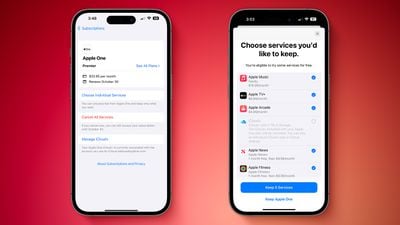
- Select the Apple subscription you want to cancel, then tap Cancel Subscription. If you have Apple One, tap it in the list, then tap Cancel All Services to end your subscription for every service, or tap Choose Individual Services to choose certain ones to keep.
- Tap Confirm to go through with the cancelation.
Cancel Apple Subscriptions on Mac
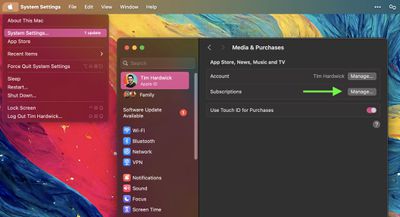
- Click the Apple symbol () in the menu bar, then select System Settings....
- Click your profile picture at the top.
- Select Media & Purchases, then choose Manage... next to the "Subscriptions" option.

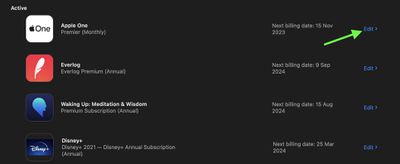
- Click Edit next to the Apple subscription you want to cancel, then click Cancel Subscription. If you have Apple One, click it in the list, then select Cancel All Services to end your subscription for every service, or select Choose Individual Services to choose certain ones to keep.
- Click Confirm to go through with the cancelation.
After your subscription is canceled, your services will continue to be accessible until your next billing date. So if you paid for a year of Apple TV+, for example, it will be available until what you've paid for expires. Apple One can only be purchased on a monthly basis, so if you canceled your sub then you'll have a month at most before access runs out.
















