Here's How to Check Your iPhone's Battery Health - MacRumors
Skip to Content

Here's How to Check Your iPhone's Battery Health

by

Earlier this year, Apple retested the batteries of its iPhone 15 models and updated its battery life claims for the entire series, suggesting that they offer better longevity than previously thought. Curious about the battery health of your iPhone 15? Here's how to check it.
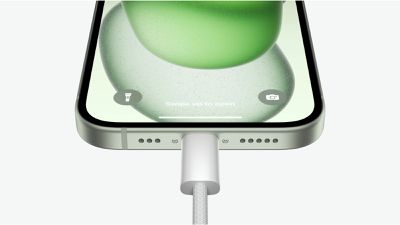
iPhone 15 USB C Port Event Still
Apple in February 2024 updated the technical specifications for the batteries in the iPhone 15, iPhone 15 Plus, iPhone 15 Pro, and iPhone 15 Pro Max. According to its latest tests, Apple says that the devices' batteries are designed to retain 80% of their original capacity at 1,000 complete charge cycles under ideal conditions.

It's a significant improvement over the 500 charge cycles that the company advertises for all older iPhone models over the same cycle count.

iPhone 15 models also include a Battery Charging Optimization feature, so if you regularly charge your ‌iPhone‌ up at night while you're asleep, the device can limit its charging to 80%, and then wait for an hour or so before you wake up to charge the remaining 20%. This keeps the ‌iPhone‌ at an optimal capacity for battery health by reducing the amount of time that it's sat on your charger at 100% charged, which can reduce its life over time.

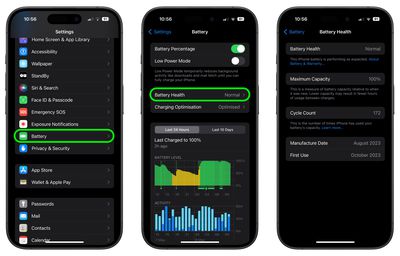
If you have an iPhone 15 with iOS 17.4 or later installed, you can get more specific information on the battery health of your device in the following way:

  1. Open the Settings app.
  2. Scroll down and tap Battery.
  3. Check the readout next to "Battery Health." For more details including your device's battery cycle count, manufacture date, and first use date, simply tap the readout. (In earlier versions of iOS 17, this information was hidden in the General ➝ About section of the Settings app).
settings

Apple says that the battery lifespan of any iPhone model ultimately depends on how the device is regularly used and charged. While the "Maximum Capacity" readout will give you a good indication of your iPhone's battery health, it's worth tapping on the blue text that says "About Battery & Warranty," which will give you more information on the likely battery lifespan of your device based on how it's used.

Battery life depends on a number of variables, but if you think you have an issue, it's worth remembering that the standard one-year AppleCare+ warranty on an iPhone includes service for defective batteries. Depending on where you are, local consumer laws might even give you cover beyond the standard 12 months, so don't be shy to ask at an Apple Store if you think there's a problem.


Top Rated Comments

sw1tcher Avatar
26 months ago

Here's How to Check Your iPhone's Battery Health
Step 1: Buy an iPhone 15

:rolleyes:

That's where you lost me.
Score: 14 Votes (Like | Disagree)
26 months ago
I've been using the charge to 80% feature and it would appear that my battery has been liking it. Occasionally the phone charges to 100% probably like 1x or 2x a month. Battery life still at 100% after approx 192 cycles.
Score: 3 Votes (Like | Disagree)
Xavier Avatar
26 months ago
70% on my iPhone 12 Pro. Holding out until the new phones this fall!
Score: 3 Votes (Like | Disagree)
26 months ago

I've been using the charge to 80% feature and it would appear that my battery has been liking it. Occasionally the phone charges to 100% probably like 1x or 2x a month. Battery life still at 100% after approx 192 cycles.
It does make a ton of difference. I‘ve wanted that feature forever. Been manually limiting my Pro 13 to about 80% every time I charge it (except for the occasional falling asleep while charging accident) and it sits at 94% battery health after over 2 1/2 years of daily usage.
Score: 2 Votes (Like | Disagree)
26 months ago
Launch day 15 pro Max 225 cycles still at 100% with daily charge 100%

Attachment Image
Score: 2 Votes (Like | Disagree)
26 months ago

148 cycles and at 100%. I’m starting to think mine is a false reading
It's not false.

Apple over-provisions the batteries. So if you ever use a tool on the Mac named Coconut Battery to look at a new iPhone, you will see that the new battery's life is sometimes 102% to 105%... so the battery has slightly more capacity than the rated value. So when iOS reports 100% for several months on end, what's actually happening is the capacity is slowly declining from 105 to 104 to 103 .... and once it gets down to 99% then we see it reported in the iOS battery menu.
Score: 1 Votes (Like | Disagree)

Popular Stories

Dynamic Island iPhone 18 Pro Feature

11 Reasons to Wait for the iPhone 18 Pro

Monday May 11, 2026 9:01 am PDT by
We're only four months out from the launch of Apple's premium next-generation smartphone lineup, and while we're not expecting a sea change in terms of functionality, there are still several enhancements rumored to be coming to the iPhone 18 Pro and iPhone 18 Pro Max. One thing worth noting is that Apple is reportedly planning a major change to its iPhone release cycle this year, adopting a...
iOS 26

iOS 26.5 Features: Everything New in iOS 26.5

Monday May 11, 2026 5:09 pm PDT by
Apple released iOS 26.5 after a few months of beta testing, and while it doesn't have the Siri features we were hoping for since those are being held until iOS 27, there are a handful of useful changes worth knowing about. Subscribe to the MacRumors YouTube channel for more videos. End-to-End Encryption for RCS Support for end-to-end encryption (E2EE) for RCS messages between iPhone and...
General Apps Reddit Feature

Reddit Starts Blocking Mobile Website, Pushing Users to App Instead

Monday May 11, 2026 6:10 am PDT by
Social network Reddit recently began blocking mobile visitors to its website while pushing them to download the official Reddit app, and it's fair to say that the move is not going down well with users. If you visit reddit.com on your iPhone today, you may see a new popup that can't be dismissed, asking you to "get the app to keep using Reddit." A Reddit spokesperson told Ars Technica...