iOS 26: Send Photos Faster With This Hidden Toggle - MacRumors
Skip to Content

iOS 26: Send Photos Faster With This Hidden Toggle

by

In iOS 26, Apple quietly added a neat new option that lets you send smaller-sized previews of images over Messages so that recipients get them right away, before the full-resolution images arrive.

iOS 26 Messages Feature 2 1
Thanks to the new setting, your recipient will receive a lower-quality preview almost instantly, followed by the full-resolution image. And if you're traveling with limited cellular data or using a metered data connection, they only get the compressed preview version – ensuring the original high resolution image doesn't hoover up your data.

How to Enable Send Photo Previews

Apple has made this feature easy to toggle on or off depending on your needs. Here's how to enable it:

  1. Open Settings on your iPhone.
  2. Scroll down and tap Apps.
  3. Select Messages from the app list.
  4. Toggle on the switch next to Send Low-Quality Photo Previews.
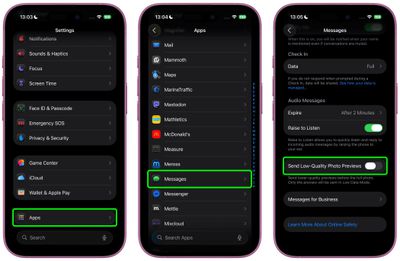
ios send photo previews messages

Once enabled, the feature works automatically, so you don't have to do anything else.

A Note on Low Data Mode

You can make sure that only smaller-sized previews of images are sent to recipients by keeping your iPhone in Low Data Mode. You can enable this manually by going to Settings ➝ Cellular Service. Choose your primary service, then tap Data Mode and toggle on Low Data Mode. The same setting appears under individual Wi-Fi network settings in Settings ➝ Wi-Fi (tap the encircled "i" button next to the Wi-Fi network name).
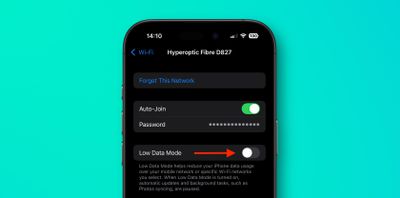
wi-fi
When Low Data Mode is active and Send Low-Quality Photo Previews is enabled, you may see photos in your Messages conversations appear slightly pixelated. Just bear in mind that they will only be delivered in higher quality versions if you send them when Low Data Mode is turned off.


Related Roundups: iOS 26, iPadOS 26
Related Forum: iOS 26

Top Rated Comments

EugW Avatar
8 months ago

Wrong, iMessage compresses all photos before being sent.

Always a good idea to understand the topic you are engaging in before engaging.
That is incorrect. My wife and I iMessage each other photos all the time and they retain the original size. To confirm this I just compared my wife's original photo vs. the one I received. The one I received was not actually the exact same size, but it was ever so slightly bigger (by 2 KB). The differences I noticed were that the original was IMG_5827.HEIC and my received copy was IMG_5827.heic (lower case suffix) but had additional metadata indicating that the photo was from her. See below. (I've edited out her phone number that was included in the metadata in the version I received.)


Attachment Image
Score: 11 Votes (Like | Disagree)
Starfia Avatar
8 months ago

We want the opposite. Allow us to share the full image and not some compressed crap
Not possible. The toggle switch is the universal symbol for the absence of an option.
Score: 6 Votes (Like | Disagree)
iMaffo Avatar
8 months ago
Neat! Does anybody knows what happens if the recipient is not on iOS 26?
Score: 6 Votes (Like | Disagree)
Loud_Texan Avatar
8 months ago
I hate when people share a picture in low-res since I like to save them.
Score: 4 Votes (Like | Disagree)
EugW Avatar
8 months ago
If the recipient saves the image to Photos, does it save the small preview version or the full version?
Score: 4 Votes (Like | Disagree)
zach-coleman Avatar
8 months ago
Is there any intelligence to the situation where someone downloads the low quality one? Does it upgrade it later when the high quality arrives?
Score: 3 Votes (Like | Disagree)

Popular Stories

google photos wardrobe

Google Photos to Get AI 'Wardrobe' Feature

Wednesday April 29, 2026 3:50 pm PDT by
Google Photos is getting a new wardrobe planning feature that will help you decide what to wear. AI will pull in images of clothing from the Google Photos library, organizing clothing items into a digital closet. You will be able to put items together to create outfits, and even virtually try them with a digital avatar on to see how they'll look. The Google Photos app will show all items of...
iOS 26

Here's What's New in iOS 26.5 So Far

Tuesday April 21, 2026 1:30 pm PDT by
iOS 26.5 has been in beta since late March, with a third beta released this week. The update is relatively minor so far, which is not too surprising given that Apple is starting to shift its focus towards iOS 27. Apple will unveil iOS 27 during its WWDC 2026 keynote on June 8, and the update should be released in September. iOS 26.5 lays the groundwork for two changes, including end-to-end...
iOS 26

Apple Seeds Second iOS 26.5 and iPadOS 26.5 Betas to Developers

Monday April 13, 2026 10:08 am PDT by
Apple today seeded the second betas of upcoming iOS 26.5 and iPadOS 26.5 updates to developers for testing purposes, with the software coming two weeks after Apple released updated first betas. Registered developers can download the betas from the Settings app on the iPhone or iPad by going to the General section and selecting Software Update. iOS 26.5 and iPadOS 26.5 do not include new...