

If you're keen to try out the new features and improvements in iOS 14 and iPadOS 14, you can test beta versions of the software today. Keep reading to learn how to download and install it on your device, or you can watch our walkthrough video:


With iOS 14 and iPadOS 14, Apple is introducing several new features and improvements, including Home screen widgets and an App Library, updates for existing apps, Siri improvements, and many other tweaks that streamline the iOS and iPadOS interface.
When Apple announced iOS 14 and iPadOS 14, it also made developer betas immediately available to test on iPhone and iPad. Apple has since released public betas for iOS 14.
- How to Install iOS 14 and iPadOS 14 Developer Betas
- How to Get and Install the iOS 14 and iPadOS 14 Public Beta
By nature, a beta is pre-release software, so installing the software on a secondary device is highly recommended. The stability of beta software cannot be guaranteed, as it often contains bugs and issues that have yet to be ironed out, so installing it on your day-to-day device isn't advised.
Is iOS 14/iPadOS 14 Compatible With My Device?
Apple's list of compatible devices confirms that iOS 14 is compatible with all of these iPhones:
- iPhone 11
- iPhone 11 Pro
- iPhone 11 Pro Max
- iPhone XS
- iPhone XS Max
- iPhone XR
- iPhone X
- iPhone 8 and iPhone 8 Plus
- iPhone 7 and 7 Plus
- iPhone SE
- iPhone 6s and 6s Plus
- iPod touch (7th-generation)
The new version of iPadOS is also compatible with a wide range of older devices:
- All iPad Pros
- iPad (7th generation)
- iPad (6th generation)
- iPad (5th generation)
- iPad mini 5
- iPad mini 4
- iPad Air (3rd generation)
- iPad Air 2
Back Up Your iPhone or iPad First
Installing iOS 14 or iPadOS 14 beta shouldn't take longer than one hour, but before you do, be sure to create a backup of your device's contents and settings. The following step-by-step instructions explain how to back up an iPhone in macOS Catalina.
- Plug your iPhone, iPad, or iPod touch into your Mac using the supplied cable.
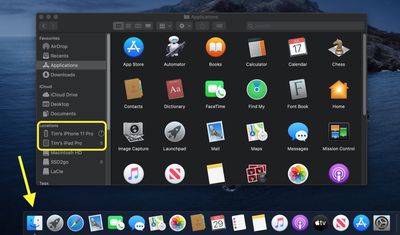
- Open a Finder window by clicking the Finder icon in the Dock.
- Click your iOS device's name in the sidebar.
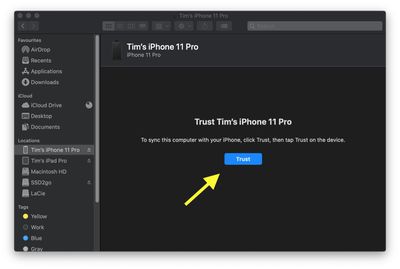
- If this is the first time connecting your device to your Mac, click Trust in the Finder window.

- Tap Trust on your device when prompted, then enter your passcode to confirm.
- In the General tab, click the circle next to where it says Back up all of the data on your [iPhone/iPad/iPod touch] to this Mac.
- If you don't want to create an encrypted backup, or you've already set up encrypted backups, click Back Up Now at the bottom of the General tab.
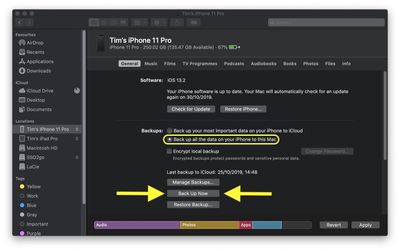
When the backup is finished, you can find the date and time of the last backup in the General tab, just above the Manage Backups button.
How to Install iOS 14 and iPadOS 14 Developer Betas
To download and install the iOS 14 developer beta, you need to have a developer account, which is a paid membership. If you don't have one yet, you can sign up here.
- On your iPhone or iPad, head to Apple's Developer Program enrollment website.
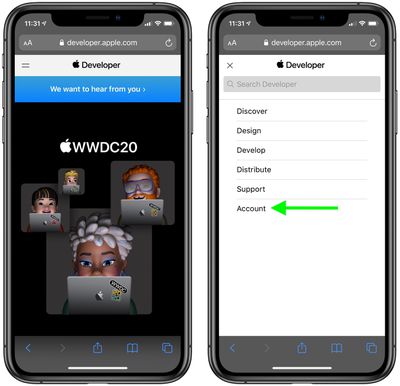
- Tap the two-line icon in the top-left corner of the page and select Account to sign in.
- Once you're signed in, tap the two-line icon again and select Downloads.
- Swipe down and tap Install Profile under iOS 14 beta or iPadOS beta.
- Tap Allow to download the profile, then tap Close.
- Launch the Settings app on your iOS device and tap Profile Downloaded, which should appear under your Apple ID banner.
- Tap Install in the top-right corner of the screen.
- Enter your passcode.
- Tap Install in the top-right corner to agree to the consent text, then tap Install again when prompted.
- Tap Done, then tap General in the top-left corner of the screen.
- Tap Software Update.
- Tap Download and Install.
- Tap Install Now.
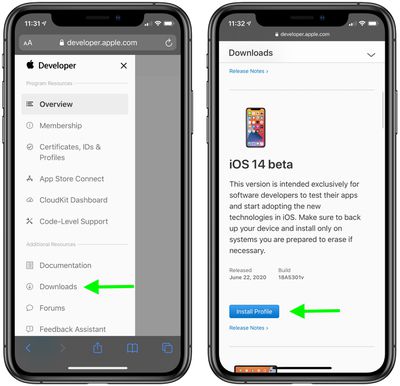
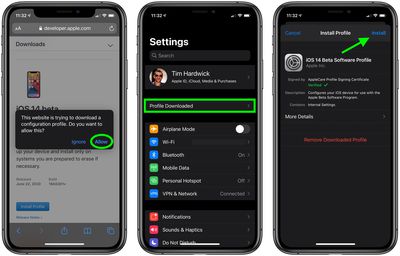
The update is about 5GB in size, so you'll have to wait a while for it to download, but once it does, your device will restart and automatically install iOS 14 or iPadOS 14.
How to Get and Install the iOS 14 and iPadOS 14 Public Beta
Apple has released the first public betas of iOS 14 and iPadOS 14 for compatible iPhone and iPad models, enabling users who aren't signed up for the Apple Developer Program to test the software updates ahead of their official release in the fall.
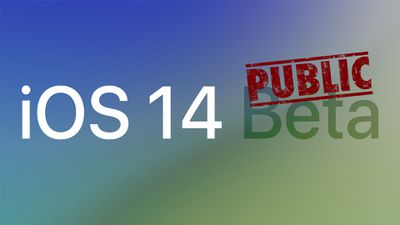
To get things up and running, you'll need to enroll your iPhone or iPod touch in the free Apple Beta Software Program. Here's how.
- Open Safari on your iOS device and navigate to the Apple Beta Software Program.
- Tap the Sign up button, or sign in if you're already a member.
- Enter your Apple ID credentials and tap the Sign in button.
- Agree to the Apple Beta Software Program terms and conditions if necessary.
- A Guide for Public Betas screen will appear. Select the iOS tab, scroll down to the Get Started section and tap enroll your iOS device.
- On the Enroll Your Devices screen, with the iOS tab selected, scroll down and tap the Download profile button.
- Tap "iPhone" or "iPad" when prompted to choose a device.
- Tap Allow.
- Launch the Settings app on your iOS device and then tap Profile Downloaded below your Apple ID banner.
- Tap Install in the top-right corner of the screen.
- Enter your passcode.
- Tap Install in the top-right corner to agree to the consent text, then tap Install again when prompted.
- Tap Done, then tap General in the top-left corner of the screen.
- Tap Software Update.
- Tap Download and Install.
- Tap Install Now.
The update is about 5GB in size, so you'll have to wait a while for it to download, but once it does, your device will restart and automatically install iOS 14 or iPadOS 14.
If you come across any issues installing the iOS 14 or iPadOS 14 Public Beta, it may help to clear any previous profiles lingering on your device. You can find these in the Settings app under General -> Profile.
























![Apple Pulls Keynote, Pages and Numbers From App Store [Update: Back]](https://images.macrumors.com/t/Okb7kitB_gNr6qe5Pex9nQIysD8=/112x112/article-new/2026/01/Apple-Creator-Studio-iWork-suite.jpg)





















