

 Messages don't always arrive on your iPhone or iPad at the most convenient time. Fortunately, iOS allows you to mute conversations conducted over the stock Messages app, so you don't have to silence your device or turn it off completely to press pause on those constant message alerts.
Using the mute feature in Apple's Messages app, you can silence group conversations and conversations with one other person, and the feature works for both iMessages (indicated by blue chat bubbles) and SMS texts (green bubbles).
The first set of steps below show you how to mute a Messages conversation in iOS. The second set of steps show you how to unmute a conversation.
How to Mute Message Conversations on iPhone and iPad
- Launch the Messages app on your iPhone or iPad.
- In the messages list, swipe left across the conversation you wish to mute.
- Tap the crossed out bell icon.
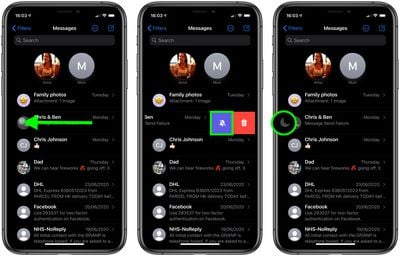
You should now see a crescent moon icon next to the conversation that you just muted.
How to Unmute Message Conversations on iPhone and iPad
- Launch the Messages app on your iPhone or iPad.
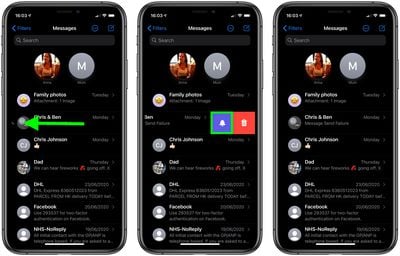
- In the messages list, swipe left across the muted conversation you wish to unmute (look for the crescent moon on the left).
- Tap the bell icon.
Did you know that you can get Siri to announce incoming messages over AirPods? Click here to learn how.



























![Apple Pulls Keynote, Pages and Numbers From App Store [Update: Back]](https://images.macrumors.com/t/Okb7kitB_gNr6qe5Pex9nQIysD8=/112x112/article-new/2026/01/Apple-Creator-Studio-iWork-suite.jpg)
















