iOS 14: How to Search for Emoji on iPhone - MacRumors
Skip to Content

iOS 14: How to Search for Emoji on iPhone

by

In iOS 14 and iPadOS, Apple introduced many new headline features, but it also made several small improvements that make a big impact to the way you do things on iPhone. One of those improvements is to the way emoji works: Apple added a much-requested search feature.

emoji
Users have been able to search emoji on Mac for years now, so it's good to see Apple listen to feedback and finally bring parity to its the iPhone, where emoji are arguably used a lot more often. Here's how the new emoji search works.

Before you follow the steps below, make sure you've enabled emoji in the Settings app: go to General -> Keyboard -> Keyboards -> Add New Keyboard, then select Emoji.

How to Search for Emoji on iPhone

  1. Launch an app that lets you use the keyboard, like Messages or Notes.
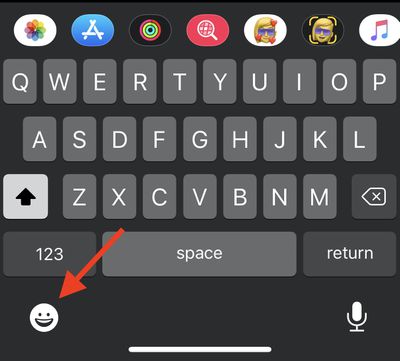
  2. Bring up the keyboard and tap the smiley face or globe in the bottom left corner of the screen.
    emoji

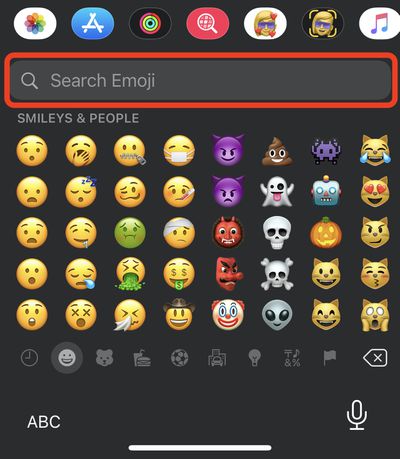
  3. Just above the list of emoji, tap Search Emoji.
    emoji

  4. Enter your search term (vehicle, for example). If more than seven filtered emoji match your search, you can swipe across them to see more results.
    emoji

  5. Simply tap an emoji to use it.

Wondering how you can use emoji on your desktop in macOS? Click here to learn how.

Related Forum: iOS 14

Popular Stories

Four iPhone 18 Pro Colors Mock Feature

iPhone 18 Pro Launching in September With These 10 New Features

Monday April 20, 2026 7:13 am PDT by
While the iPhone 18 Pro and iPhone 18 Pro Max are not launching until September, there are already plenty of rumors about the devices. It was initially reported that the iPhone 18 Pro models would have fully under-screen Face ID, with only a front camera visible in the top-left corner of the screen. However, the latest rumors indicate that only one Face ID component will be moved under the...
Tim Cook Rainbow

Apple CEO Tim Cook Stepping Down, John Ternus Taking Over

Monday April 20, 2026 1:33 pm PDT by
Apple CEO Tim Cook is stepping down as Apple's chief executive officer, and hardware engineering chief John Ternus is set to take over, Apple announced today. Cook will continue on as Apple CEO through the summer, with Ternus set to join Apple's Board of Directors and take over as CEO on September 1, 2026. Cook is going to transition to executive chairman, and he will "assist with certain...
iphone 17 ceramic shield

Leaker: Apple Downgrading iPhone 18 to Cut Costs

Monday April 20, 2026 9:12 am PDT by
Apple is downgrading the planned specifications of the standard iPhone 18 to cut costs, a leaker claims. In a new post on Weibo, the user known as "Fixed Focus Digital" said that the iPhone 18 features "certain manufacturing downgrades" that bring it more into line with the low-cost iPhone 18e model. The decision is said to be "a cost-cutting measure." Apple has apparently chosen to...