
Apple AirPods offer around five hours of listening time and two hours of talk time (or with second-generation AirPods, three hours of talk time) on a single charge. And if you pop your AirPods for 15 minutes in their case, you can get up to three hours of listening time or over an hour of talk time.

airpods
During use, you'll hear a tone when your AirPods' batteries are low, and another tone just before they run out. But you don't have to wait for these tones to know how much charge they have remaining. Here are a few other ways that you can keep a closer eye on your AirPods' battery life.

On iPhone

If you're not using your AirPods, open the charging case lid with the AirPods inside and hold the case close to your iPhone. The charge status of your AirPods and their case should appear on the device's screen, and if you take out an AirPod, you'll see individual percentages for the two earpieces.

You can also check the charge status of your AirPods using the Batteries widget in your ‌iPhone‌'s Today View, accessed by swiping right on the Lock screen or on your Home screen's first screen of apps.
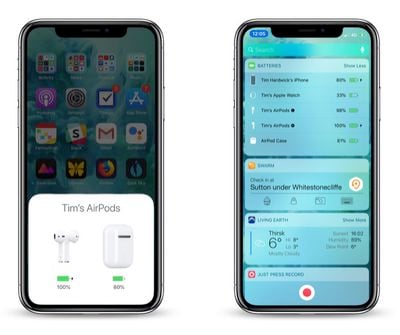
how to check AirPods battery life on iPhone
If you're wearing both AirPods, the Batteries widget will show a single percentage for the two of them that's rounded down to the earpiece with the lowest battery. If you place one of the AirPods in your charging case, the widget will show you individual percentages, as well as the current charge level of the charging case itself.

If you don't have it installed already, you can add the Batteries widget manually. To do so, enter the Today view, scroll to the bottom of the column of widgets and press the Edit button. Then simply tap the green plus button in the list next to Batteries and tap Done in the upper right of the screen.
how to check AirPods battery
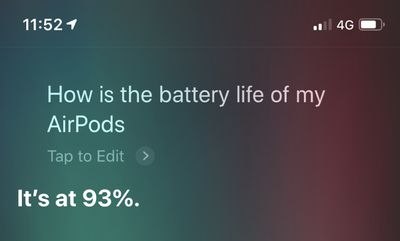
If you're a fan of Siri and you're wearing your AirPods, you can always ask the virtual assistant "How is the battery life of my AirPods?" and you should get an answer.

On Apple Watch

You can check the battery level of your AirPods from your wrist, whether they're paired with your ‌iPhone‌ or directly with your Apple Watch.

To do so, bring up the Control Center on your Apple Watch: Swipe up on a watch face, or when in an app, press the bottom edge of the screen then drag up the Control Center. Then tap the Apple Watch battery icon, indicated by a percentage.
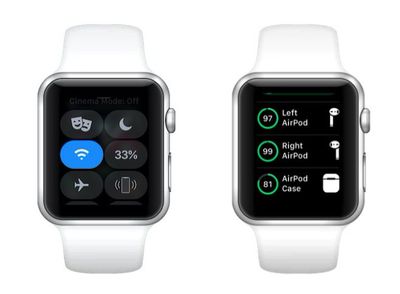
how to check AirPods battery on Apple Watch
Your AirPods' battery level will be displayed as a ring below the Apple Watch battery percentage, and if you place a pod in its charging case, you'll see individual percentage charges for the lot.

On the Charging Case

If your AirPods are in their case, the light inside the case shows the charge status of your AirPods. (On second-generation AirPods, this light is located on the front of the case.)

airpodslight
If not, the light shows the status of the case. Green means charged, and amber indicates less than one full charge remains.


Related Roundup: AirPods 4
Buyer's Guide: AirPods (Neutral)
Related Forum: AirPods

Top Rated Comments

oneMadRssn Avatar
93 months ago
Same here. I got mine on release day. I tried to go through Apple Support numerous times about it, and they said it's normal degredation of the battery. You can pay to get a battery replacement ($49 for each airpod and $49 for the charging case), so you're basically better off just buying new airpods.

I've admittedly used the **** out of mine, so I ended up caving and buying a new pair. That tiny lithium ion battery can't last forever I guess...
A decent single lithium cell will hold close to its original charge for about 300 cycles, and it will become pretty bad after around 500-600 cycles. The reason Apple is able to say their iPhone, iPad, and Macbook batteries hold a decent charge for 1000 cycles is because those devices have numerous cells and Apple's battery controller distributes the load and usage as evenly as possible. Whereas in the past, the first cell would get hit the most and the last cell would almost never see a single cycle; and thus the cells would "age" unevenly.

The Airpod batteries are just so small that there is just a single cell in each one. So there is no usage balancing that can be done by a controller. It's therefore expected that you would see some degradation appear after about 300 cycles, where it becomes quite noticeable after 600 cycles.

Totally off-topic, but the battery controller is one of the things that makes Tesla's battery tech so amazing. It's one thing to have a controller manage a few dozen cells in a stable environment as Apple does with Macbooks. It is entirely another thing to have a controller managing many thousands of lithium cells in a variety of harsh environments. Making a good controller is of that scale is a hard science.
Score: 8 Votes (Like | Disagree)
GC251114 Avatar
93 months ago
Never knew you could see battery % of AirPods on watch !

I’ve only had AirPods & Watch combo for 18 months !!
Score: 3 Votes (Like | Disagree)
wwooden Avatar
92 months ago
I would think it should be simple for Apple to add a feature where you tap one of the AirPods a certain number of times for it to tell you what percentage remains, e.g. 5 taps = battery percentage announcement.

Personally I wouldn't ever buy earphones you had to recharge within 5 hours' use of charging the last time... seems like a fairly glaring flaw in the product to me. I guess it works for lots of people though, so good luck to all those they work for.
I've never had an issue with the 4-5 hour time limit on the battery. I would imagine anyone takes a break during that time to....go to the bathroom, get a drink, get food, really anything. During that break just put the Airpods back in their case and they gain another 3 hours of running time in 15 minutes. I've never had my Airpods run out of battery on me during any use situations. I never worry or think about battery life with the Airpods, it's very liberating really.
Score: 2 Votes (Like | Disagree)
racerhomie Avatar
93 months ago
3 batteries to manage! I'll stick with my single battery Bose headphones thanks.
You don’t have to manage anything. I just plug in my case once a week.
Score: 2 Votes (Like | Disagree)
Kanyay Avatar
92 months ago
on the real tho. who else hates the sound the airpods make when low battery? it scares me every damn time. too loud.
Score: 2 Votes (Like | Disagree)
RowellE Avatar
93 months ago
Is there a way to do this for the 12-inch Macbook while it’s charging? Wanna figure out when it’s fully charged without having to open the MacBook.

Miss the LED light indicator on the old charging cords.
Score: 1 Votes (Like | Disagree)

Popular Stories

Apple Logo Zoomed

Tim Cook Teases Plans for Apple's Upcoming 50th Anniversary

Thursday February 5, 2026 12:54 pm PST by
Apple turns 50 this year, and its CEO Tim Cook has promised to celebrate the milestone. The big day falls on April 1, 2026. "I've been unusually reflective lately about Apple because we have been working on what do we do to mark this moment," Cook told employees today, according to Bloomberg's Mark Gurman. "When you really stop and pause and think about the last 50 years, it makes your heart ...
Finder Siri Feature

Why Apple's iOS 26.4 Siri Upgrade Will Be Bigger Than Originally Promised

Friday February 6, 2026 3:06 pm PST by
In the iOS 26.4 update that's coming this spring, Apple will introduce a new version of Siri that's going to overhaul how we interact with the personal assistant and what it's able to do. The iOS 26.4 version of Siri won't work like ChatGPT or Claude, but it will rely on large language models (LLMs) and has been updated from the ground up. Upgraded Architecture The next-generation...
wwdc sans text feature

Apple Rumored to Announce New Product on February 19

Thursday February 5, 2026 12:22 pm PST by
Apple plans to announce the iPhone 17e on Thursday, February 19, according to Macwelt, the German equivalent of Macworld. The report, citing industry sources, is available in English on Macworld. Apple announced the iPhone 16e on Wednesday, February 19 last year, so the iPhone 17e would be unveiled exactly one year later if this rumor is accurate. It is quite uncommon for Apple to unveil...
iOS 26

iOS 26.3 and iOS 26.4 Will Add These New Features to Your iPhone

Tuesday February 3, 2026 7:47 am PST by
While the iOS 26.3 Release Candidate is now available ahead of a public release, the first iOS 26.4 beta is likely still at least a week away. Following beta testing, iOS 26.4 will likely be released to the general public in March or April. Below, we have recapped known or rumored iOS 26.3 and iOS 26.4 features so far. iOS 26.3 iPhone to Android Transfer Tool iOS 26.3 makes it easier...
iphone 17 pro dark blue 1

iPhone 18 Pro Max Rumored to Deliver Next-Level Battery Life

Friday February 6, 2026 5:14 am PST by
The iPhone 18 Pro Max will feature a bigger battery for continued best-in-class battery life, according to a known Weibo leaker. Citing supply chain information, the Weibo user known as "Digital Chat Station" said that the iPhone 18 Pro Max will have a battery capacity of 5,100 to 5,200 mAh. Combined with the efficiency improvements of the A20 Pro chip, made with TSMC's 2nm process, the...















