Apple today released macOS 12 Monterey, and whenever a new operating system is released for the Mac, some users prefer to perform a clean installation. This article explains how to perform what is effectively a clean install of Monterey using a brand new option that's available on Apple silicon-powered Macs and Intel Macs with a T2 security chip.
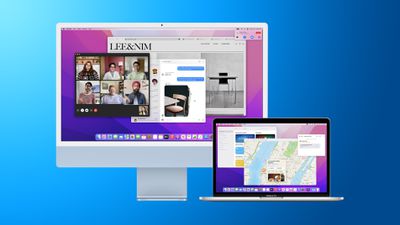
Monterey Mac as External Monitor Feature
Clean installing macOS is often done to remove annoying quirks and strange behaviors that a Mac may have inherited over time, and can also help to reclaim disk space caused by junk files left by third-party apps. However, even if neither of these issues have arisen for you, sometimes it's just nice to start afresh for that "brand new Mac" feeling and then migrate your apps, documents, and data, either manually, or by migrating from a Time Machine backup.

Clean installing previous versions of macOS usually involves creating a bootable copy of the macOS installer on a flash drive or USB stick and then reformatting your drive before installing the bootable copy on your Mac, or using macOS Recovery to reinstall the Mac operating system over an internet connection. In Monterey, however, a third option has come into play on newer Macs that offers a very simple and straightforward way to erase your Mac without needing to reinstall the operating system.

Following in the footsteps of the iPhone and iPad, Apple silicon Macs and Intel Macs with a T2 security chip (2017-2020 models) now have an "Erase All Content and Settings" option available in macOS Monterey. Because storage is always encrypted on Mac systems with Apple silicon or the T2 chip, the system is instantly and securely "erased" by destroying the encryption keys.
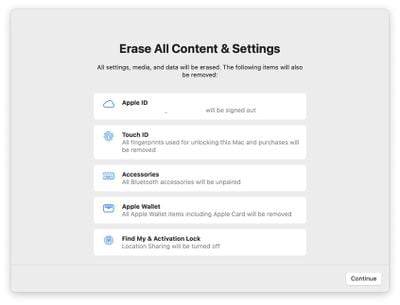
erase Mac
Not only does this effectively erase all user data and user-installed apps from your Mac without reinstalling macOS, it also signs out your Apple ID, removes your Touch ID fingerprints, purchases, and all Apple Wallet items, and turns off Find My and Activation Lock, making it far easier to restore your Mac to like-new factory settings.

This ability means you can simply download and install macOS Monterey over your current macOS version when prompted, and then select the new erase function in Monterey, which will erase your Mac and leave the core macOS system intact. After erasing the Mac, it will display the Setup Assistant and be ready to be set up like new. You can then migrate your data manually or by using the Setup Assistant's migration option. The following walkthrough breaks down the steps involved.

  1. Before you do anything else, back up your data using Time Machine or your preferred backup method.
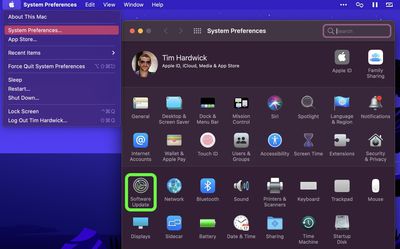
  2. In macOS, click the Apple () symbol in the menu bar and select System Preferences.
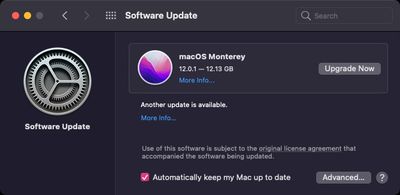
  3. Click Software Update in the preferences pane.
    macOS

  4. Allow Software Update to ping Apple's servers, then click Upgrade Now to download the Monterey installer when it appears. You can continue to use your Mac while the installer is being downloaded. Once the installer has downloaded, you'll receive a prompt. Click to install the new version of macOS and wait for the installation to complete.
    software update

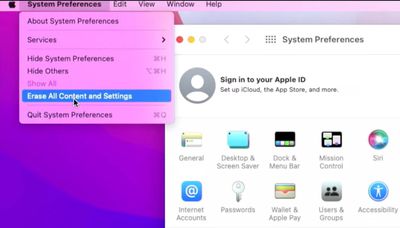
  5. Once your Mac has restarted into Monterey, click the Apple () symbol in the menu bar and select System Preferences....
  6. When the preferences pane appears, select System Preferences -> Erase All Content and Settings from the menu bar.
    macOS

  7. Enter your admin password in the Erase Assistant dialog prompt and click OK.
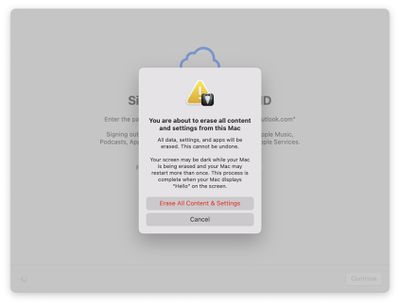
  8. Note all the settings, data, media, and other items that will be removed. Click Continue if you're sure.
    erase Mac

  9. Click to sign out of your ‌Apple ID‌, then click Erase All Content & Settings in the prompt to confirm.
    erase mac

  10. Allow the erase process to complete. Your Mac may restart more than once during the process, after which you may be prompted to activate your Mac over Wi-Fi.
  11. Once finished, you'll see the "hello" message on your Mac's screen, indicating the Setup Assistant is ready. Follow the onscreen instructions, and if desired, elect to migrate your data from a Time Machine backup when the option appears.
    hello Mac

That's all there is to it. Even if you're not clean installing Monterey today, the new option makes it far more convenient to restore your Mac to factory settings, whether you simply want to start afresh with your Mac in future or plan to sell or gift it to another person.


Related Forum: macOS Monterey

Top Rated Comments

kalsta Avatar
56 months ago

Clean installing macOS is often done to remove annoying quirks and strange behaviors that a Mac may have inherited over time, and can also help to reclaim disk space caused by junk files left by third-party apps. However, even if neither of these issues have arisen for you, sometimes it's just nice to start afresh for that "brand new Mac" feeling and then migrate your apps, documents, and data, either manually, or by migrating from a Time Machine backup.
Good luck with that. Migrating from a Time Machine backup will restore your Library folder, along with all those 'junk files' you just got rid of. A real clean install is not for the faint-hearted! I've done it several times over the years and should probably write a book about it. Possibly worth it if your Mac is behaving poorly. Definitely not worth it for 'that "brand new Mac" feeling'.
Score: 21 Votes (Like | Disagree)
TriBruin Avatar
56 months ago

This is not really a clean install, to be fair. You might end up in the same state, settings and user created files wise, but I’m not sure it’s an equivalent of formatting a partition and installing macOS on it from scratch.

Regardless, this is not Windows, so this should be more than enough.
Nope, this is a clean install. NOTHING related to the user is left on the drive. The reason this works is that starting with Catalina, Apple split the O/S volume from the Data volume. With Big Sur, Apple took one stop further and has cryptographically signed the O/S volume to prevent modification. In addition, during regular operation, the system volume is copied to a disk image and run from there. You are never running the system directly from the O/S volume.

Erasing the drive clears the encryption keys for the data volume, rendering it unusable. The system then recreates the data volume and activates the O/S.
Score: 12 Votes (Like | Disagree)
Kylo83 Avatar
56 months ago
I would rather fresh install, this will still keep main files that could be corrupted
Score: 8 Votes (Like | Disagree)
kalsta Avatar
56 months ago

I was so excited reading the headline, but then my hopes were dashed since I have a 2015 iMac. I have some quirks that I'd like to try and get rid of by doing a clean install, so I guess it's the old-school method for me. If they release that iMac with M2 or M1 Pro/Max (and space gray please!), then I'll leave the old-school method behind!
Erasing macOS was never the hard bit. Sure, the real 'old-school method' of creating a bootable installer was a little bit of effort, but installing from macOS Recovery is a doddle. See How to reinstall macOS ('https://support.apple.com/en-au/HT204904'). The hard bit is restoring your Mac to the way you like it without copying over all the old Library files.
Score: 7 Votes (Like | Disagree)
IamTimCook Avatar
56 months ago
I do this with every Major OS update and seem to never get those “unique” quirky issues that others complain about… Bluetooth, display sleep/connection, audio, etc.
Score: 7 Votes (Like | Disagree)
Apple_Robert Avatar
56 months ago

I must be getting old. To me Clean Install is basically wiping the drive and reinstalling Mac OS for DISK, Another bootable external volume or Net Boot, Shift options command R. Am i right or just a ghost in the past. lol
I am used to old school as well. Monterey changed that for me and I am so glad I don't have to do the old school route any more.
Score: 3 Votes (Like | Disagree)

Popular Stories

Apple Logo Zoomed

Tim Cook Teases Plans for Apple's Upcoming 50th Anniversary

Thursday February 5, 2026 12:54 pm PST by
Apple turns 50 this year, and its CEO Tim Cook has promised to celebrate the milestone. The big day falls on April 1, 2026. "I've been unusually reflective lately about Apple because we have been working on what do we do to mark this moment," Cook told employees today, according to Bloomberg's Mark Gurman. "When you really stop and pause and think about the last 50 years, it makes your heart ...
Finder Siri Feature

Why Apple's iOS 26.4 Siri Upgrade Will Be Bigger Than Originally Promised

Friday February 6, 2026 3:06 pm PST by
In the iOS 26.4 update that's coming this spring, Apple will introduce a new version of Siri that's going to overhaul how we interact with the personal assistant and what it's able to do. The iOS 26.4 version of Siri won't work like ChatGPT or Claude, but it will rely on large language models (LLMs) and has been updated from the ground up. Upgraded Architecture The next-generation...
wwdc sans text feature

Apple Rumored to Announce New Product on February 19

Thursday February 5, 2026 12:22 pm PST by
Apple plans to announce the iPhone 17e on Thursday, February 19, according to Macwelt, the German equivalent of Macworld. The report, citing industry sources, is available in English on Macworld. Apple announced the iPhone 16e on Wednesday, February 19 last year, so the iPhone 17e would be unveiled exactly one year later if this rumor is accurate. It is quite uncommon for Apple to unveil...
iOS 26

iOS 26.3 and iOS 26.4 Will Add These New Features to Your iPhone

Tuesday February 3, 2026 7:47 am PST by
While the iOS 26.3 Release Candidate is now available ahead of a public release, the first iOS 26.4 beta is likely still at least a week away. Following beta testing, iOS 26.4 will likely be released to the general public in March or April. Below, we have recapped known or rumored iOS 26.3 and iOS 26.4 features so far. iOS 26.3 iPhone to Android Transfer Tool iOS 26.3 makes it easier...
iphone 17 pro dark blue 1

iPhone 18 Pro Max Rumored to Deliver Next-Level Battery Life

Friday February 6, 2026 5:14 am PST by
The iPhone 18 Pro Max will feature a bigger battery for continued best-in-class battery life, according to a known Weibo leaker. Citing supply chain information, the Weibo user known as "Digital Chat Station" said that the iPhone 18 Pro Max will have a battery capacity of 5,100 to 5,200 mAh. Combined with the efficiency improvements of the A20 Pro chip, made with TSMC's 2nm process, the...