On Apple Watch models running watchOS 7 and later, Apple includes a Battery Health feature that's similar to the one found on iPhones and iPads running iOS 11.3 and later.
apple watch se gen 2
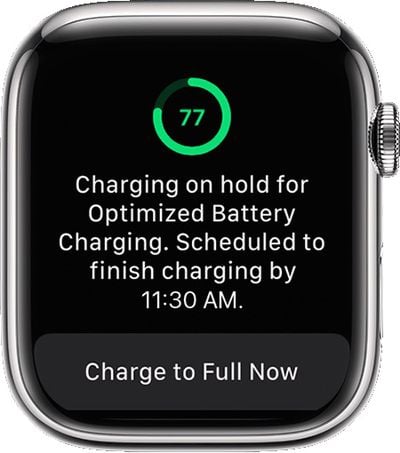
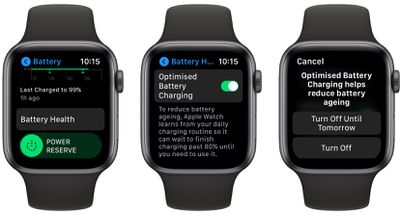
In basic terms, Battery Health provides information about the state of the device's battery and includes an option called "Optimized Battery Charging," which is designed to extend the total battery life of your Apple Watch.

When enabled, Optimized Battery Charging learns from your personal device habits and waits to finish charging all the way up until you need your ‌Apple Watch.

For example, if you regularly charge up your watch at night while you're asleep, the device may opt to limit its charging to the 80 percent mark, and then wait for an hour or so before you wake up to charge the remaining 20 percent.

This keeps your watch at an optimal capacity for battery health by reducing the amount of time that it's sat on the charger at 100 percent charged, which can reduce its life over time.

Optimized charging is designed to activate only in locations where you spend the most time, such as your home and place of work. The feature doesn't turn on when your usage habits are more variable, such as when you travel.

Make Your Watch Fully Charge Before It's Scheduled to Do So

You can make your watch charge to full before it's scheduled to do so by following these steps.

  1. Make sure your Apple Watch is connected to its charger.
  2. Tap your watch to show the charging screen, then tap the circle with the green or yellow charging icon.
  3. Tap Charge to Full Now.

charge watch to full

How to Turn Off Optimized Battery Charging

Optimized Battery Charging is enabled by default on an Apple Watch running watchOS 7. If you need your Apple Watch fully charged sooner than normal and you want to disable Optimized Battery Charging, follow these simple steps.

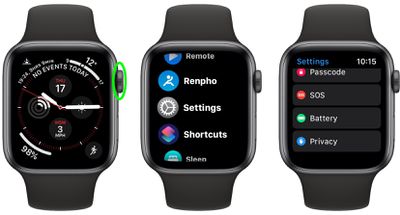
  1. Press the Digital Crown on your Apple Watch to bring up the App View.
  2. Select the Settings app.
  3. Scroll down and select Battery.
    settings

  4. Scroll down and select Battery Health.
  5. Tap the switch next to Optimized Battery Charging to turn it to the grey OFF position.
  6. Tap Turn Off or Turn Off Until Tomorrow.
    settings

To re-enable Optimized Battery Charging on your Apple Watch at any time, simply repeat the above steps and toggle the switch to the green ON position.

Checking the Health of Your Apple Watch Battery

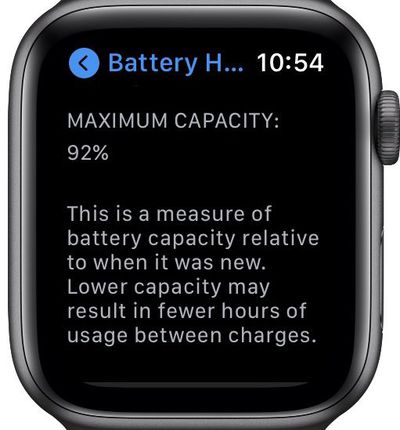
Notice that the Battery Health screen contains useful additional information about the status of your Apple Watch battery, which you can use to decide if it needs replacing.
settings

Apple Watch Series 4 used daily since launch

The "Maximum Capacity" percentage gives you a measure of battery capacity compared to when your battery was brand new. If the maximum capacity percentage falls, you'll likely get less usage out of your Apple Watch between charges. In other words, it's an indicator of how your battery is performing overall and directly correlates with how long your ‌watch will last on a single charge.

Help Optimized Charging Identify Locations

Optimized charging is designed to activate only in locations where you spend the most time, such as your home and place of work. The feature doesn't turn on when your usage habits are more variable, such as when you travel.

To help Optimized Battery Charging identify situations where it shouldn't be used, turn on the following location settings in the Settings app on your Apple Watch:

  • Privacy -> Location Services -> Location Services
  • Privacy > Location Services > System Services > System Customization
  • Privacy > Location Services > System Services > Significant Locations > Significant Locations

The location information for this feature remains on your watch and none of it is sent to Apple.

Related Roundup: Apple Watch 11
Buyer's Guide: Apple Watch (Neutral)
Related Forum: iOS 14

Top Rated Comments

rurza Avatar
71 months ago
Holy ****, ma watch has 87% of the original capacity and it's Series 5
Score: 10 Votes (Like | Disagree)
WilliamG Avatar
71 months ago
My Series 4 is reporting 100% battery. Worn every day since launch. Seems unlikely to be true...
Score: 8 Votes (Like | Disagree)
kiranmk2 Avatar
71 months ago
What would be good is the customisation to only charge to 80 or 90% period (as is recommended for electric cars). I'm never even close to running out of charge on my watch so I would rather forego 10% charge to prolong the battery life. I think this would be more effective that Apple's solution. (Same request for phones and Macs)
Score: 4 Votes (Like | Disagree)
MrGimper Avatar
71 months ago
Why does the iPad not have battery optimisation options??
Score: 3 Votes (Like | Disagree)
Dee2001 Avatar
71 months ago
My Series 3 is also reporting 100% battery. Seriously doubt that after 3 years.
Score: 3 Votes (Like | Disagree)
MrGimper Avatar
71 months ago
Series 4, 99%
Score: 1 Votes (Like | Disagree)

Popular Stories

wwdc sans text feature

Apple Rumored to Announce New Product on February 19

Thursday February 5, 2026 12:22 pm PST by
Apple plans to announce the iPhone 17e on Thursday, February 19, according to Macwelt, the German equivalent of Macworld. The report, citing industry sources, is available in English on Macworld. Apple announced the iPhone 16e on Wednesday, February 19 last year, so the iPhone 17e would be unveiled exactly one year later if this rumor is accurate. It is quite uncommon for Apple to unveil...
Apple Logo Zoomed

Tim Cook Teases Plans for Apple's Upcoming 50th Anniversary

Thursday February 5, 2026 12:54 pm PST by
Apple turns 50 this year, and its CEO Tim Cook has promised to celebrate the milestone. The big day falls on April 1, 2026. "I've been unusually reflective lately about Apple because we have been working on what do we do to mark this moment," Cook told employees today, according to Bloomberg's Mark Gurman. "When you really stop and pause and think about the last 50 years, it makes your heart ...
Finder Siri Feature

Why Apple's iOS 26.4 Siri Upgrade Will Be Bigger Than Originally Promised

Friday February 6, 2026 3:06 pm PST by
In the iOS 26.4 update that's coming this spring, Apple will introduce a new version of Siri that's going to overhaul how we interact with the personal assistant and what it's able to do. The iOS 26.4 version of Siri won't work like ChatGPT or Claude, but it will rely on large language models (LLMs) and has been updated from the ground up. Upgraded Architecture The next-generation...
maxresdefault

Apple Shows Off a Key Reason to Upgrade to the iPhone 17

Saturday February 7, 2026 9:26 am PST by
Apple today shared an ad that shows how the upgraded Center Stage front camera on the latest iPhones improves the process of taking a group selfie. "Watch how the new front facing camera on iPhone 17 Pro takes group selfies that automatically expand and rotate as more people come into frame," says Apple. While the ad is focused on the iPhone 17 Pro and iPhone 17 Pro Max, the regular iPhone...
iOS 26

iOS 26.3 and iOS 26.4 Will Add These New Features to Your iPhone

Tuesday February 3, 2026 7:47 am PST by
While the iOS 26.3 Release Candidate is now available ahead of a public release, the first iOS 26.4 beta is likely still at least a week away. Following beta testing, iOS 26.4 will likely be released to the general public in March or April. Below, we have recapped known or rumored iOS 26.3 and iOS 26.4 features so far. iOS 26.3 iPhone to Android Transfer Tool iOS 26.3 makes it easier...