

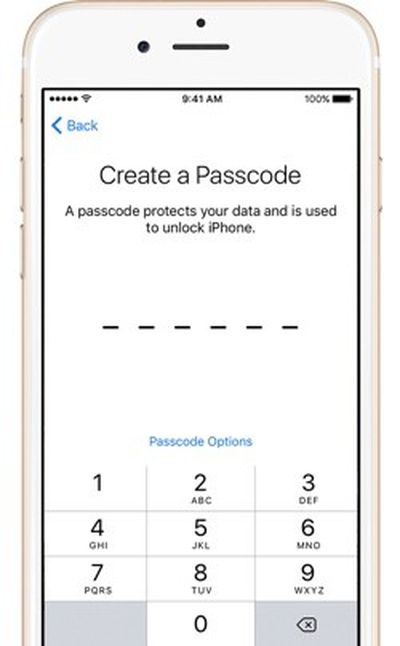
 Apple's iPhones have long been protected by numeric passcodes, giving iOS users a way to protect keep their devices safe from hackers and prying eyes. Over the years, passcodes have been supplemented by Touch ID, Apple's fingerprint recognition system, but the passcode is still the iPhone's main line of defense.
A passcode is required to set up Touch ID, and Touch ID is automatically disabled after 48-hours until a passcode is input by an iPhone or iPad's owner. In the United States, passcodes are especially important because the law suggests that while law enforcement officers can require you to provide a fingerprint to unlock a device, the same is not true of a passcode.
For a long time, passcodes were four-digit numeric codes by default, but with iOS 9, Apple began using a six-digit passcode as the default option. Six-digit passcodes offer 1 million possible combinations instead of 10,000, making a passcode harder to crack.
Apple doesn't advertise it, but the iOS operating system offers an option to make your passcode even more secure through the use of an alphanumeric passcodes or custom length numeric passcodes. Alphanumeric passcodes contain letters and numbers. Both alphanumeric and custom numeric passcodes can be much longer than four or six digits.
Passcodes are currently in the spotlight because of an ongoing security debate between Apple and the FBI. Apple has been ordered to help the FBI access data on the iPhone 5c owned by one of the shooters involved in the 2015 San Bernadino attacks.
To do so, the FBI has asked Apple to create software that would eliminate the iOS feature that erases an iPhone after 10 failed passcode attempts, removes the time limits between passcode entries, and allows passcodes to be input electronically. Apple is opposing this order and it's not clear how the issue will play out, but should the FBI gain a tool to access iPhones in this manner, it would take just upwards of a half an hour to break into a phone with a 4-digit passcode. With an alphanumeric passcode, such a tool would be next to useless because of the sheer amount of time it would take to guess a passcode with millions of possible combinations.
Creating an Alphanumeric Passcode
Creating an alphanumeric passcode is a process that can be done with a few taps and about five minutes of your time.
- Open the Settings app on your iPhone or iPad.
- Scroll down to "Touch ID & Passcode" and tap on it.
- If you already have a passcode enabled, you will need to enter it to access the passcode options.
- Select "Change Passcode" and enter your existing passcode again.
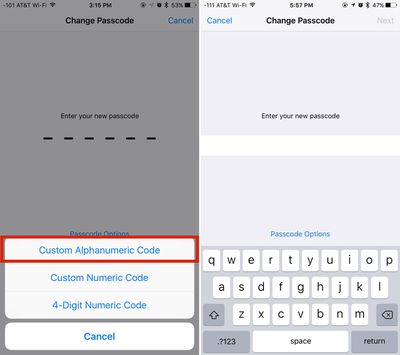
- At the screen where you're asked to enter a new passcode, tap on "Passcode Options" located just above the numbered.
- Choose "Custom Alphanumeric Code." You can also select "Custom Numeric Code" for a number-only passcode.
- Enter your chosen passcode. It can include numbers, letters, and symbols.
- Tap "Next."
- You'll be prompted to enter the same passcode again to verify the spelling. Enter it again and tap "Done."
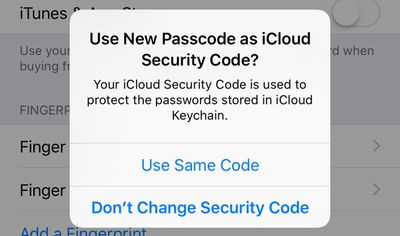
After entering an alphanumeric passcode or changing your passcode, Apple will prompt you to use the new passcode as your iCloud Security Code, which is used to protect passwords stored in iCloud Keychain. Click on "Use Same Code" to change it or "Don't Change Security Code" to continue using your old passcode.
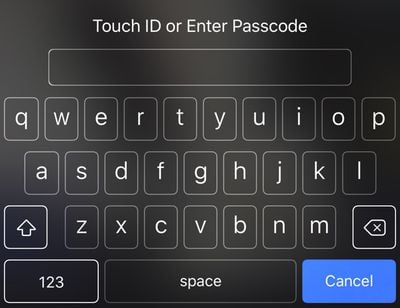
With an alphanumeric passcode set on an iPhone, instead of a number pad to enter a numeric passcode, you'll see a full QWERTY keyboard complete with access to numbers, letters, and symbols.
While not as convenient as a simple number code, an alphanumeric password can be harder to crack and just as easy to remember if you use randomly generated combinations of words. For example, "sarcasm-blacken-guilder-epilepsy" or "stitch-quasi-peppery-tuneless," two password phrases generated by 1Password, aren't difficult to remember because they're simple words, but with upwards of 29 characters, they're impossible to guess or brute force. Using an alphanumeric passcode will be more of a hassle than a standard passcode, but with Touch ID, a passcode doesn't need to be entered too often.
Any alphanumeric code used to protect an iPhone should be unique set of words or numbers that are not used for other products, services, or websites, which will make it impossible to obtain through social engineering or phishing attempts.

















Top Rated Comments
Another alternative would be to encrypt the whole disk with something like FileVault 2 (built into OS X), but then you'd also need to encrypt any backups of your computer you maintain - on a TimeCapsule, for instance. They remain unencrypted even if the computer's disk is encrypted, unless you specifically encrypt the backups too.
And the reason for my doubt? The media, "credible" or not, gets things wrong. Frequently. Nearly every time I read an article about something about which I have personal knowledge, I see errors. So, I've learned to question un-sourced assertions. And if the source is cited, I sometimes check out the source itself. Not so often, I find the source is mis-quoted, or quoted out-of-context.
If I'm wrong, I'll accept that. But at this time, I don't see anything to support this assertion that has been repeated by Techcrunch and others.
Frankly, I wouldn't expect Cook to make a statement about this to anyone. But, I'll wait until someone with the authority to speak for Apple on-the-record, and the knowledge to provide a complete answer, before I'll accept it as confirmed.