
How to Create a More Secure Passcode on Your iPhone or iPad - GeekWebGuides
Skip to Content

How to Create a More Secure Passcode on Your iPhone or iPad

by

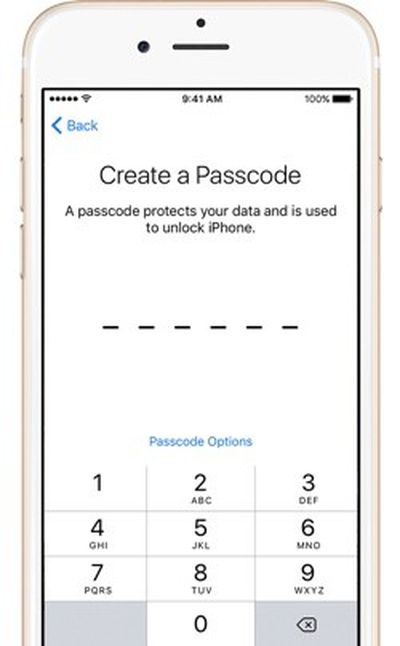
iphonecreateapasscodeApple's iPhones have long been protected by numeric passcodes, giving iOS users a way to protect keep their devices safe from hackers and prying eyes. Over the years, passcodes have been supplemented by Touch ID, Apple's fingerprint recognition system, but the passcode is still the iPhone's main line of defense.

A passcode is required to set up Touch ID, and Touch ID is automatically disabled after 48-hours until a passcode is input by an iPhone or iPad's owner. In the United States, passcodes are especially important because the law suggests that while law enforcement officers can require you to provide a fingerprint to unlock a device, the same is not true of a passcode.

For a long time, passcodes were four-digit numeric codes by default, but with iOS 9, Apple began using a six-digit passcode as the default option. Six-digit passcodes offer 1 million possible combinations instead of 10,000, making a passcode harder to crack.

Apple doesn't advertise it, but the iOS operating system offers an option to make your passcode even more secure through the use of an alphanumeric passcodes or custom length numeric passcodes. Alphanumeric passcodes contain letters and numbers. Both alphanumeric and custom numeric passcodes can be much longer than four or six digits.

Passcodes are currently in the spotlight because of an ongoing security debate between Apple and the FBI. Apple has been ordered to help the FBI access data on the iPhone 5c owned by one of the shooters involved in the 2015 San Bernadino attacks.

To do so, the FBI has asked Apple to create software that would eliminate the iOS feature that erases an iPhone after 10 failed passcode attempts, removes the time limits between passcode entries, and allows passcodes to be input electronically. Apple is opposing this order and it's not clear how the issue will play out, but should the FBI gain a tool to access iPhones in this manner, it would take just upwards of a half an hour to break into a phone with a 4-digit passcode. With an alphanumeric passcode, such a tool would be next to useless because of the sheer amount of time it would take to guess a passcode with millions of possible combinations.

Creating an Alphanumeric Passcode

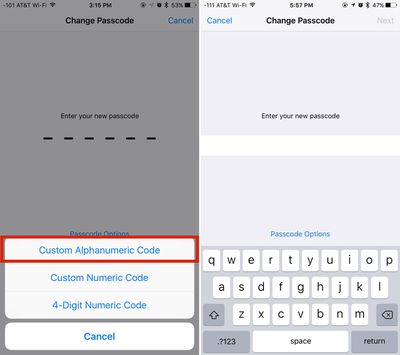
Creating an alphanumeric passcode is a process that can be done with a few taps and about five minutes of your time.
creatinganalphanumericpasscode

  1. Open the Settings app on your iPhone or iPad.
  2. Scroll down to "Touch ID & Passcode" and tap on it.
  3. If you already have a passcode enabled, you will need to enter it to access the passcode options.
  4. Select "Change Passcode" and enter your existing passcode again.
  5. At the screen where you're asked to enter a new passcode, tap on "Passcode Options" located just above the numbered.
  6. Choose "Custom Alphanumeric Code." You can also select "Custom Numeric Code" for a number-only passcode.
  7. Enter your chosen passcode. It can include numbers, letters, and symbols.
  8. Tap "Next."
  9. You'll be prompted to enter the same passcode again to verify the spelling. Enter it again and tap "Done."

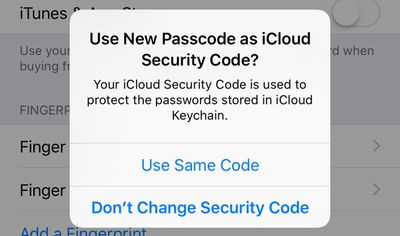
After entering an alphanumeric passcode or changing your passcode, Apple will prompt you to use the new passcode as your iCloud Security Code, which is used to protect passwords stored in iCloud Keychain. Click on "Use Same Code" to change it or "Don't Change Security Code" to continue using your old passcode.
passcodeicloudsecuritycode
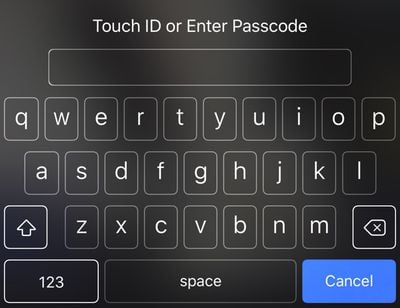
With an alphanumeric passcode set on an iPhone, instead of a number pad to enter a numeric passcode, you'll see a full QWERTY keyboard complete with access to numbers, letters, and symbols.
alphanumericpasscode
While not as convenient as a simple number code, an alphanumeric password can be harder to crack and just as easy to remember if you use randomly generated combinations of words. For example, "sarcasm-blacken-guilder-epilepsy" or "stitch-quasi-peppery-tuneless," two password phrases generated by 1Password, aren't difficult to remember because they're simple words, but with upwards of 29 characters, they're impossible to guess or brute force. Using an alphanumeric passcode will be more of a hassle than a standard passcode, but with Touch ID, a passcode doesn't need to be entered too often.

Any alphanumeric code used to protect an iPhone should be unique set of words or numbers that are not used for other products, services, or websites, which will make it impossible to obtain through social engineering or phishing attempts.


Top Rated Comments

139 months ago
Doesn't matter when the FBI gets their way and gets the backdoor they have been itching for.
That is up to you and I. Apple has stuck their neck out. Now the government is quietly trying to cut their head off. They only way they, the government win, is if you an I are silent and don't say anything. Now is the time to call and write and tweet, and make whatever noise can be made because next month will too late.
Score: 6 Votes (Like | Disagree)
139 months ago
For it to be effective, against the FBI, NSA etc. tryimg to brute force your phone (assuming they get through the courts) you would need to not be iCloud enabled with anything you don't want the Feds to have (Apple can give them access to all that via a warrant) and be backing up locally (not in iCloud) as well as synching locally on your computer via iTunes.

Not to mention that the local backups of the phone would need to be encrypted. iTunes offers encryption for them as an option.

Another alternative would be to encrypt the whole disk with something like FileVault 2 (built into OS X), but then you'd also need to encrypt any backups of your computer you maintain - on a TimeCapsule, for instance. They remain unencrypted even if the computer's disk is encrypted, unless you specifically encrypt the backups too.
Score: 3 Votes (Like | Disagree)
139 months ago
I'd love an app that when I removed my Apple Watch, it turned off thumbprint on all my devices and required the passcode.
Score: 3 Votes (Like | Disagree)
dwaltwhit Avatar
139 months ago
I was not aware that I could be compelled to unlock my phone via fingerprint but not passcode.
Score: 3 Votes (Like | Disagree)
BeefCake 15 Avatar
139 months ago
It is easy to force your fingerprint onto the sensor. So that way they have the ability to force you to unlock your phone.
They cannot "force" a passcode out of your brain.
Score: 2 Votes (Like | Disagree)
139 months ago
I don't see why the doubt. For me, article from credible website is "good enough" for this type of thing. Here's another source:

https://twitter.com/fmanjoo/status/700092451348942849
https://twitter.com/fmanjoo/status/700092718114975744
From what I can tell from the trail of assertions, this IS the source. And if you read the replies to his tweet, you'll see several challenges, asking for attribution. He has provided no answer, other than "Apple". I won't claim he made it up, but I'll ask if he was talking to someone in Apple who can't be considered an authoritative source.

And the reason for my doubt? The media, "credible" or not, gets things wrong. Frequently. Nearly every time I read an article about something about which I have personal knowledge, I see errors. So, I've learned to question un-sourced assertions. And if the source is cited, I sometimes check out the source itself. Not so often, I find the source is mis-quoted, or quoted out-of-context.

If I'm wrong, I'll accept that. But at this time, I don't see anything to support this assertion that has been repeated by Techcrunch and others.


Sorry, I can't get Tim Cook to meet you personally to tell you it's true. :)
Frankly, I wouldn't expect Cook to make a statement about this to anyone. But, I'll wait until someone with the authority to speak for Apple on-the-record, and the knowledge to provide a complete answer, before I'll accept it as confirmed.
Score: 2 Votes (Like | Disagree)

Popular Stories

M5 MacBook Pro

RIP, MacBook Ultra

Monday October 19, 2026 9:37 am PDT by
Apple today sent out invites for an experience in Los Angeles on Wednesday, October 28, and the "Pro and tell" tagline on the invitation likely means that the rumored MacBook models with touch-enabled OLED displays will stick with MacBook Pro branding instead of the once-rumored "MacBook Ultra" name. The long-rumored "iPhone Ultra" ended up being named iPhone Duo, so speculation that Apple...
iPhone Duo Trio

Here's What Apple's Apps Look Like on the iPhone Duo

Tuesday October 20, 2026 11:12 am PDT by
With just three days to go until the iPhone Duo is released, Apple is getting ready for the launch. Behind the scenes, the App Store now has screenshots of Apple's built-in apps running on the Duo. We've seen some apps in marketing materials, but images of the ones we haven't seen give us an idea of what it will be like using the iPhone Duo day to day. Many apps are shown in landscape...
apple pro tell logo

Apple Announcing New Products Next Week: 'Pro and Tell'

Monday October 19, 2026 9:05 am PDT by
Apple's Greg Joswiak today hinted at new product announcements coming next week, sharing a social media post that says "Can't wait to pro and tell next week." Rumors suggest Apple is planning to debut the new MacBook Pro with an OLED touchscreen display, an M6 entry-level MacBook Pro, an M6 iMac, an iPad mini with an OLED display. Can't wait to pro and tell next week....
Latest Stories
Apple Updates More Apps With iPhone Duo Support
28 minutes ago
Apple Will Label Apps 'Made for iPhone Duo' in App Store
3 hours ago
Amazon Takes $49 Off iPad With Prices Starting at $399.99
4 hours ago
F1 on Apple TV Now Available in Dolby Atmos
4 hours ago
Apple Reveals More Than 50 Apps That Will Be Updated for iPhone Duo
5 hours ago
Apple Blocks Certificates That Could Help Attackers Fake Websites
6 hours ago
Giant iPhone Duo Installations Spotted at Apple Fifth Avenue
7 hours ago
iPhone Duo 2 Prototypes Include Under-Display Face ID
7 hours ago
Tesla App Gains iPad and iPhone Duo Support
11 hours ago
Apple Reportedly Boosts iPhone Duo Orders by 44%
12 hours ago
Fortnite Returning to Australian App Store After Court Ruling
12 hours ago
Apple Ordered to Open iPhone to Rival App Stores in Australia
12 hours ago
Apple Suppliers Face Hurdles Cutting Circuit Board Emissions
13 hours ago
Things Updated for iPhone Duo With Adaptive Layout
13 hours ago
Simplicity and Siri AI Are HomeView's Killer Features, Apple Says
14 hours ago
iPhone Duo Reviewers Really Miss Face ID
19 hours ago
Does the iPhone Duo Run Hot? Here's What Reviews Found
20 hours ago
Apple Music's New Look is Now Live on Apple's Website
21 hours ago
Anthropic Launches Claude Duet, a Proactive AI Agent
21 hours ago
What 32,000 Folds Did to the iPhone Duo's Hinge
22 hours ago
iPhone Duo's Hidden FaceTime Camera Takes 'Trash' Photos
23 hours ago
iPhone Duo Has 'Edge Light' Feature That Debuted on Macs Last Year
1 day ago
Apple Support App Updated for iPhone Duo's Larger Display
1 day ago
Amazon Sweetens the Deal on Entry-Level 16-Inch MacBook Pro With $570 Off
1 day ago
iPhone Duo Tips Over on MagSafe Stands When Unfolded
1 day ago
Apple Music's New Look Officially Announced
1 day ago
iPhone Duo Supports Apple Pencil Starting With iOS 27.2
1 day ago
iPhone Duo Accessories Roundup: Cases and Screen Protectors From OtterBox, ZAGG, and More
1 day ago
Apple Stores Will Have 'Limited' Availability of iPhone Duo for Walk-In Customers
1 day ago
iPhone Duo Reviews Explain Why Device is Both 'Fun' and 'Frustrating'
1 day ago









































