HomePod, much like an iPhone or iPad, can be used as an alarm clock replacement to wake you up in the morning or remind you of important tasks.

Using ‌HomePod‌ as an alarm clock is simple, but it is controlled separately than alarms on your ‌iPhone‌ and there are a few tricks to be aware of.
homepodalarm

Setting Using Siri

The easiest way to set an alarm on the ‌HomePod‌ is to ask Siri. ‌Siri‌ can set a one-time alarm for you, or ‌Siri‌ can set recurring alarms that go off every day. Some sample commands:

  • Hey ‌Siri‌, set an alarm for 10:00 a.m
  • Hey ‌Siri‌, set an alarm for 9:00 a.m. every weekday
  • Hey ‌Siri‌, set an alarm for 10:00 a.m. every Tuesday and Thursday
  • Hey ‌Siri‌, set an alarm for 2:00 p.m. labeled Flight Check-In
  • Hey ‌Siri‌, set an alarm for 9:00 a.m. every weekend

TIP: Labeling your alarms makes it easier for you to remember them and to reference them again when giving commands to ‌Siri‌.

Managing Alarms Using Siri

You can manage your alarms with ‌Siri‌, too. For example, if you want to delete an alarm, you can say something like "Hey ‌Siri‌, delete the 2:00 p.m. alarm," or "Hey ‌Siri‌, delete all of my alarms."

Changing an alarm is also possible, with a command like "Hey ‌Siri‌, change the 2:00 p.m. alarm to 3:00 p.m, and if you want to know what alarms you have set up, say "Hey ‌Siri‌, what alarms do I have on?"

‌Siri‌ will run through all alarms that are set up on the ‌HomePod‌ with that command.

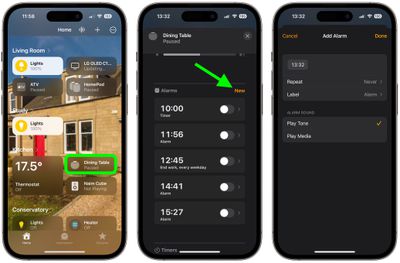
Managing and Setting Alarms in the Home App

Alarms that you set up on the ‌HomePod‌ through ‌Siri‌ can be viewed and managed in the Home app.

  1. Open up the Home app.
  2. Tap on a ‌HomePod‌ card on the main screen.
  3. Scroll down to the "Alarms" section and tap New.
  4. Tap the time to adjust when you want the alarm to go off.
  5. Use the Repeat and Label options to select whether this is a recurring alarm and to give your alarm a name, respectively.
  6. Under "Alarm Sound," choose to Play Tone or Play Media. If you choose the latter, additional options will appear for you to select the media to play, as well as the volume.
  7. When you're finished, tap Done.

home

You can set multiple alarms on a single ‌HomePod‌ all of which will be listed under the Alarms section on the ‌HomePod‌'s card in the Home app.

Disabling an Alarm

When an alarm goes off on the ‌HomePod‌, an alarm sound activates and the top of the ‌HomePod‌ flashes with a white light. To turn it off, you simply need to tap the top of the ‌HomePod‌.

If you don't have a free hand, you can also ask ‌Siri‌ to turn off the alarm: "Hey ‌Siri‌, turn off the alarm." To snooze an alarm, you can say "Hey ‌Siri‌, snooze" and it will snooze for a short period of time before the alarm goes off again.

Related Roundups: HomePod, HomePod mini

Top Rated Comments

JoEw Avatar
104 months ago
Damn shameful you can't have the alarm set to a playlist, song or radio station on AM. This seems like a day 1 kind of feature for a device like this.
Score: 8 Votes (Like | Disagree)
Jobindoza Avatar
104 months ago
It is possible to snooze an alarm. The catch is that your have to speak the command: “Hey Siri, snooze”
Score: 4 Votes (Like | Disagree)
341328 Avatar
104 months ago
This is really TERRIBLE.... the alarm feature should:
1) be able to play Apple Music playlist or radio station or genre
2) be able to fade on over X minutes
3) allow you to set the volume of the alarm
Score: 2 Votes (Like | Disagree)
PlutoPrime Avatar
104 months ago
How about setting a "sleep" alarm for an audio device? The fact that you can't have your podcasts shut off after a certain amount of time kills about 33% of the usefulness of the home pod for me. It's a shame that so many day-1 features are missing.

I have a feeling that Apple knows all of this, and it was either ship HomePod with V1.0 Hardware V0.75 software, or ship Q1 2019 with 1.0 Hardware and 1.0 software.
Score: 2 Votes (Like | Disagree)
nicho Avatar
104 months ago
It is possible to snooze an alarm. The catch is that your have to speak the command: “Hey Siri, snooze”
This is what happens when a website focuses on quantity of articles rather than quality. Thanks for being their fact checker!
Score: 1 Votes (Like | Disagree)
chfilm Avatar
104 months ago
Damn shameful you can't have the alarm set to a playlist, song or radio station on AM. This seems like a day 1 kind of feature for a device like this.
Absolutely- especially since Sonos offers such a nice way of doing this, absolutely love their alarm with an Apple Music playlist and a smooooth fade in! It’s really a nice way of waking up! And Apple has such good curated playlists at Apple ,sic, that work perfectly in conjunction with Sonos. Would have totally expected the HomePod to do the same thing. Disappointing. Hope we’ll see a massive software update for this thing later this year!
Score: 1 Votes (Like | Disagree)

Popular Stories

Apple Logo Zoomed

Tim Cook Teases Plans for Apple's Upcoming 50th Anniversary

Thursday February 5, 2026 12:54 pm PST by
Apple turns 50 this year, and its CEO Tim Cook has promised to celebrate the milestone. The big day falls on April 1, 2026. "I've been unusually reflective lately about Apple because we have been working on what do we do to mark this moment," Cook told employees today, according to Bloomberg's Mark Gurman. "When you really stop and pause and think about the last 50 years, it makes your heart ...
wwdc sans text feature

Apple Rumored to Announce New Product on February 19

Thursday February 5, 2026 12:22 pm PST by
Apple plans to announce the iPhone 17e on Thursday, February 19, according to Macwelt, the German equivalent of Macworld. The report, citing industry sources, is available in English on Macworld. Apple announced the iPhone 16e on Wednesday, February 19 last year, so the iPhone 17e would be unveiled exactly one year later if this rumor is accurate. It is quite uncommon for Apple to unveil...
Finder Siri Feature

Why Apple's iOS 26.4 Siri Upgrade Will Be Bigger Than Originally Promised

Friday February 6, 2026 3:06 pm PST by
In the iOS 26.4 update that's coming this spring, Apple will introduce a new version of Siri that's going to overhaul how we interact with the personal assistant and what it's able to do. The iOS 26.4 version of Siri won't work like ChatGPT or Claude, but it will rely on large language models (LLMs) and has been updated from the ground up. Upgraded Architecture The next-generation...
iOS 26

iOS 26.3 and iOS 26.4 Will Add These New Features to Your iPhone

Tuesday February 3, 2026 7:47 am PST by
While the iOS 26.3 Release Candidate is now available ahead of a public release, the first iOS 26.4 beta is likely still at least a week away. Following beta testing, iOS 26.4 will likely be released to the general public in March or April. Below, we have recapped known or rumored iOS 26.3 and iOS 26.4 features so far. iOS 26.3 iPhone to Android Transfer Tool iOS 26.3 makes it easier...
iphone 17 pro dark blue 1

iPhone 18 Pro Max Rumored to Deliver Next-Level Battery Life

Friday February 6, 2026 5:14 am PST by
The iPhone 18 Pro Max will feature a bigger battery for continued best-in-class battery life, according to a known Weibo leaker. Citing supply chain information, the Weibo user known as "Digital Chat Station" said that the iPhone 18 Pro Max will have a battery capacity of 5,100 to 5,200 mAh. Combined with the efficiency improvements of the A20 Pro chip, made with TSMC's 2nm process, the...