After testing some apps on an old iPhone 6 recently, I started to notice the device's Home button was becoming less and less responsive to finger presses, especially when it came to double-clicking it. Sure enough, after a few more days' use, the Home button stopped working completely.
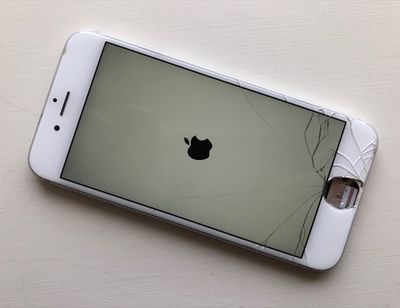
broken home button iphone

In memory of the Home button

Now, ordinarily this would have left me in the unenviable position of having to power off my iPhone and turn it on again whenever I wanted to exit out of a launched app, until I relinquished the device and sent it away for a costly repair.

Fortunately, however, the event jogged my memory of a friend who was able to continue using their iPhone even after a drop had left its Home button dangling by a wire (by some miracle, Touch ID still worked). They had set up iOS's Assistive Touch feature as a virtual Home button while they waited until they could afford a replacement.

If your iPhone's Home button is dead or dying and you want to take similar action, or if you just fancy reminding yourself what using a Home button was like before Apple removed them from its latest iPhones, here's how to set up Assistive Touch to mimic a virtual one.

Note that if your Home button is already broken and your iPhone is stuck in a launched app, simply power off the device and turn it on again to boot back into the Home screen and follow these steps.

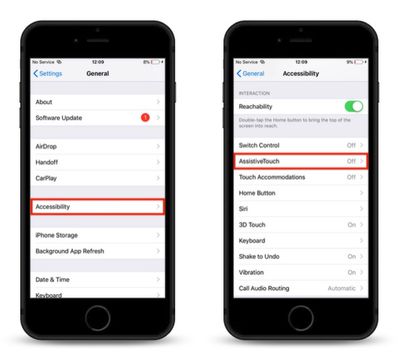
  1. Launch the Settings app on your iPhone or iPad.

  2. Tap General.
    how to create a virtual home button with assistive touch 1

  3. Tap Accessibility.
  4. Scroll down and tap AssistiveTouch.
    how to create a virtual home button with assistive touch 2

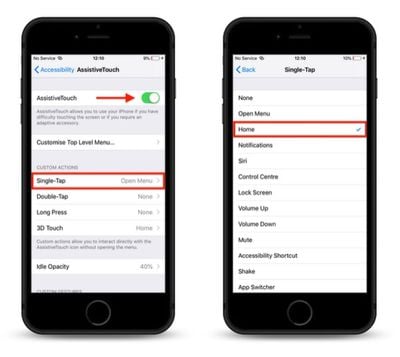
  5. Slide the AssistiveTouch toggle to the green position to turn it on.
  6. Next, under Custom Actions, select Single-Tap.
    how to create a virtual home button with assistive touch 3

  7. In the next screen, tap Home to check it in the list.
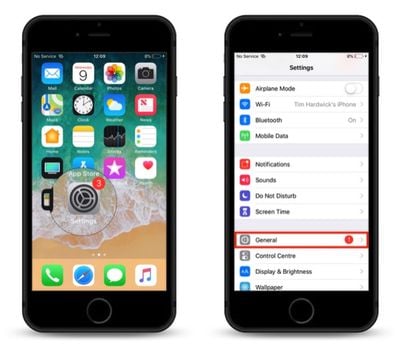
With the AssistiveTouch virtual button enabled, simply touch it and it will behave just like a physical Home button.
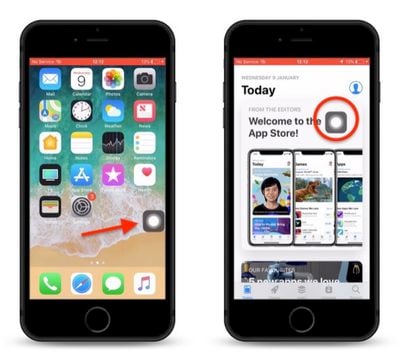
how to use assistive touch as a virtual home button
Note that you can drag it around the screen to another location, and it will remain there until you move it again. You can also access it in running apps, as well as the Control Center.


Top Rated Comments

BootsWalking Avatar
93 months ago
I have never run across or had it happen where my home button was broken. What are you guys doing to it?
I've never had cancer before. What are you guys doing to your cells?
Score: 4 Votes (Like | Disagree)
Xgx Avatar
93 months ago
On a 6s it would be much quicker to just hard press the left side of the screen to launch the app switcher via 3D Touch, can’t see any benefit to turning the device off and on again...
Score: 3 Votes (Like | Disagree)
now i see it Avatar
93 months ago
Thanks Tim for that tip!!
This is a great feature to use even if the home button works fine when using a Plus sized traditional iPhone. Just tried it out. Works great ++
Score: 3 Votes (Like | Disagree)
Johnny365 Avatar
93 months ago
I have never run across or had it happen where my home button was broken. What are you guys doing to it?
Score: 2 Votes (Like | Disagree)
Infinite Vortex Avatar
93 months ago
I have never run across or had it happen where my home button was broken. What are you guys doing to it?
Of the 4 iPhones I've had I've needed to replace button in 2 of them (iPhone 4s and iPhone 5). They go hinky and/or stop working. Come to think of it the button in my iPad mini crapped out as well. I see a lot of people using this. While I don't permanently mount my iPhones and bow to it of an evening I do look after my things. The problem is the buttons themselves.
Score: 1 Votes (Like | Disagree)
44267547 Avatar
93 months ago
I have never run across or had it happen where my home button was broken. What are you guys doing to it?
So, what are you trying to see here, Just because it didn’t happen you, how does it happen to others? Even if you drop your iPhone on a certain angle, it’s not difficult to break the home button or where it lose its functionality with consistency.

Also, I would suggest reading through the iPhone forum, there have been multiple threads where others have broken their home button simply by dropping the phone or intermittent hardware issues.
Score: 1 Votes (Like | Disagree)

Popular Stories

Apple Logo Zoomed

Tim Cook Teases Plans for Apple's Upcoming 50th Anniversary

Thursday February 5, 2026 12:54 pm PST by
Apple turns 50 this year, and its CEO Tim Cook has promised to celebrate the milestone. The big day falls on April 1, 2026. "I've been unusually reflective lately about Apple because we have been working on what do we do to mark this moment," Cook told employees today, according to Bloomberg's Mark Gurman. "When you really stop and pause and think about the last 50 years, it makes your heart ...
iOS 26

iOS 26.3 and iOS 26.4 Will Add These New Features to Your iPhone

Tuesday February 3, 2026 7:47 am PST by
While the iOS 26.3 Release Candidate is now available ahead of a public release, the first iOS 26.4 beta is likely still at least a week away. Following beta testing, iOS 26.4 will likely be released to the general public in March or April. Below, we have recapped known or rumored iOS 26.3 and iOS 26.4 features so far. iOS 26.3 iPhone to Android Transfer Tool iOS 26.3 makes it easier...
imac video apple feature

Apple Makes Its Second-Biggest Acquisition Ever

Tuesday February 3, 2026 12:45 pm PST by
Apple recently acquired Israeli startup Q.ai for close to $2 billion, according to Financial Times sources. That would make this Apple's second-biggest acquisition ever, after it paid $3 billion for the popular headphone maker Beats in 2014. This is also the largest known Apple acquisition since the company purchased Intel's smartphone modem business and patents for $1 billion in 2019....
wwdc sans text feature

Apple Rumored to Announce New Product on February 19

Thursday February 5, 2026 12:22 pm PST by
Apple plans to announce the iPhone 17e on Thursday, February 19, according to Macwelt, the German equivalent of Macworld. The report, citing industry sources, is available in English on Macworld. Apple announced the iPhone 16e on Wednesday, February 19 last year, so the iPhone 17e would be unveiled exactly one year later if this rumor is accurate. It is quite uncommon for Apple to unveil...
Finder Siri Feature

Why Apple's iOS 26.4 Siri Upgrade Will Be Bigger Than Originally Promised

Friday February 6, 2026 3:06 pm PST by
In the iOS 26.4 update that's coming this spring, Apple will introduce a new version of Siri that's going to overhaul how we interact with the personal assistant and what it's able to do. The iOS 26.4 version of Siri won't work like ChatGPT or Claude, but it will rely on large language models (LLMs) and has been updated from the ground up. Upgraded Architecture The next-generation...