ios 11 mail icon pnIn iOS 11, Apple's Mail app includes a handful of neat swipe gestures that can help significantly reduce the amount of time you spend managing messages in your inbox on iPhone and iPad. In this article, we'll show you how to perform these gestures and how to customize some of the actions they reveal according to your personal preference.

The basic inbox gestures are swiping right or left on an email to reveal tappable actions that you can perform instantly, without having to call up additional menus.

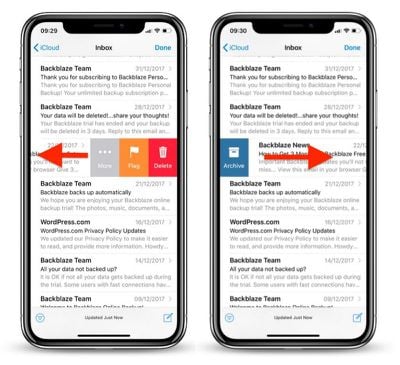
For example, swiping left on an email reveals three options: the default Flag action which can be customized, a Delete or Archive button (depending on the account), and a More option that takes you to a pop-up menu with additional email management functions.

Swiping right on an email reveals a single customizable action. By default, this is either Archive or Delete (again, depending on the account). This can be a tad confusing, but basically, accounts that include Archive in the swipe left menu will by default show Delete when swiping right.
mail inbox swipe gestures iphone1
Tip: The right swipe menu action and the Archive/Delete action on the left swipe menu can both be performed without having to tap them at all. For example, to delete (or archive) an email, swipe left all the way across the message in one continuous sweep and it will vanish from your inbox instantly.

This single extended swipe action is nice and swift, but it can leave you open to deleting emails a bit too hastily. Fortunately, you can shake your iOS device to bring up the Undo button and revert the last action. (Make sure the option is toggled on in the Settings app, under General -> Accessibility -> Shake to Undo.)

Finally, don't forget that a tap of the Edit button in the upper right of your inbox lets you select multiple emails in the messages list, allowing you to Mark, Move, or Delete them all in one go.

How to Change Mail Swipe Gestures in iOS

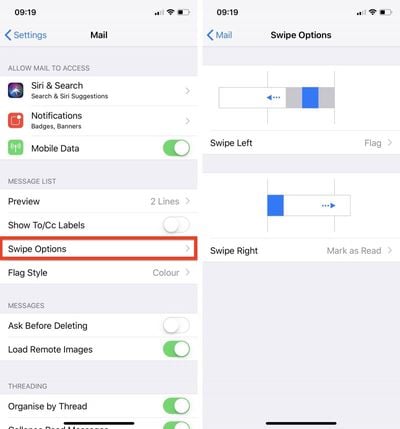
  1. Launch the Settings app on your iPhone or iPad.

  2. Scroll down and tap Mail.

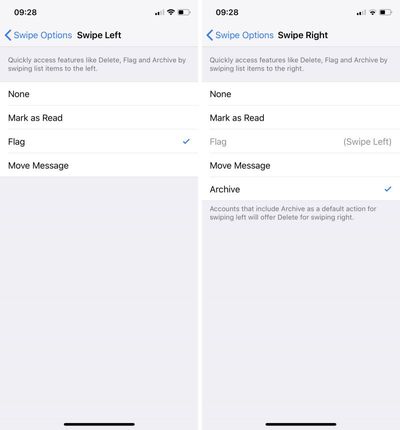
  3. Tap Swipe Options.
    customize mail gestures 1

  4. Tap Swipe Left or Swipe Right under the gesture example images.
    customize mail gestures2

  5. Tap a function to assign it to the selected swipe gesture. Your options include None, Mark as Read, Flag, Move Message, and Archive.
Related Forum: iOS 11

Top Rated Comments

Ritmo Avatar
101 months ago
And why the heck swipe left doesn’t have delete option? That’s how the whole damn OS works by default.
Score: 2 Votes (Like | Disagree)
Kangastu Avatar
101 months ago
Hoping for snooze to be added in MacOS iOS 12 this year. Spark is nice - but I’d prefer to be using native apps.
Score: 2 Votes (Like | Disagree)
B60boy Avatar
101 months ago
Also need to add a reminder feature that ties into the Reminder app. I can’t belive in this day and age that it’s so difficult to turn an email into a task or reminder.

Yes, I know that you can do this with Siri, but adding it to the slider here is what is needed.
Score: 2 Votes (Like | Disagree)
LarryMcJ Avatar
101 months ago
Like many, I prefer to use the native iOS email app, but cant because of all its problems. No push notifications with Gmail or paid G Suite Gmail...even when configured as an Exchange account (which causes you to lose STARRED messages). And even worse, it will not notify you of new email until you open the app. Then all new email comes into the inbox and the app icon badge for new mail is finally displayed. This used to work fine before iOS 11 broke it. Come on, Apple...is this abomination of an email app the best you can do?
Score: 1 Votes (Like | Disagree)
thefourthpope Avatar
101 months ago
There are some very meagre swipe options ('http://osxdaily.com/2015/12/02/change-mail-swipe-gesture-mac-os-x/') in MacOS Mail. I have never for the life of me been able to figure out why we can't have more options here.
Absolutely. At least have consistent options across both platforms. Maybe this is where they’ll go with the more universal apps said to be coming?
Score: 1 Votes (Like | Disagree)

Popular Stories

Apple Logo Zoomed

Tim Cook Teases Plans for Apple's Upcoming 50th Anniversary

Thursday February 5, 2026 12:54 pm PST by
Apple turns 50 this year, and its CEO Tim Cook has promised to celebrate the milestone. The big day falls on April 1, 2026. "I've been unusually reflective lately about Apple because we have been working on what do we do to mark this moment," Cook told employees today, according to Bloomberg's Mark Gurman. "When you really stop and pause and think about the last 50 years, it makes your heart ...
Finder Siri Feature

Why Apple's iOS 26.4 Siri Upgrade Will Be Bigger Than Originally Promised

Friday February 6, 2026 3:06 pm PST by
In the iOS 26.4 update that's coming this spring, Apple will introduce a new version of Siri that's going to overhaul how we interact with the personal assistant and what it's able to do. The iOS 26.4 version of Siri won't work like ChatGPT or Claude, but it will rely on large language models (LLMs) and has been updated from the ground up. Upgraded Architecture The next-generation...
wwdc sans text feature

Apple Rumored to Announce New Product on February 19

Thursday February 5, 2026 12:22 pm PST by
Apple plans to announce the iPhone 17e on Thursday, February 19, according to Macwelt, the German equivalent of Macworld. The report, citing industry sources, is available in English on Macworld. Apple announced the iPhone 16e on Wednesday, February 19 last year, so the iPhone 17e would be unveiled exactly one year later if this rumor is accurate. It is quite uncommon for Apple to unveil...
iOS 26

iOS 26.3 and iOS 26.4 Will Add These New Features to Your iPhone

Tuesday February 3, 2026 7:47 am PST by
While the iOS 26.3 Release Candidate is now available ahead of a public release, the first iOS 26.4 beta is likely still at least a week away. Following beta testing, iOS 26.4 will likely be released to the general public in March or April. Below, we have recapped known or rumored iOS 26.3 and iOS 26.4 features so far. iOS 26.3 iPhone to Android Transfer Tool iOS 26.3 makes it easier...
iphone 17 pro dark blue 1

iPhone 18 Pro Max Rumored to Deliver Next-Level Battery Life

Friday February 6, 2026 5:14 am PST by
The iPhone 18 Pro Max will feature a bigger battery for continued best-in-class battery life, according to a known Weibo leaker. Citing supply chain information, the Weibo user known as "Digital Chat Station" said that the iPhone 18 Pro Max will have a battery capacity of 5,100 to 5,200 mAh. Combined with the efficiency improvements of the A20 Pro chip, made with TSMC's 2nm process, the...