This article shows you how to change the icon of any file or folder on your Mac. Apart from adding a bit of personal style to your desktop, there are good practical reasons why you might want to do so.

before changing icons
For example, perhaps you've dragged some folders to your Dock so that you can easily drop items into them, but you don't want to have to keep hovering your mouse over their generic blue icons to identify which is which.

after changing icons

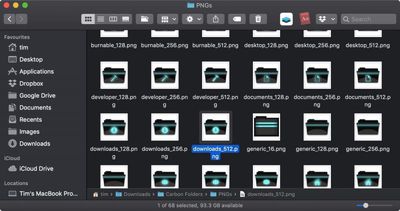
Carbon Folders by necramar

To customize a file or folder icon, simply follow the steps below. You can use your own pictures as icons. Alternatively, there are a wealth of icon libraries hosted online, so you could try a web search for free icon pack downloads for Mac.

Note: If you find icons online in the .icns format, you can drag these icon types directly onto the icon in a file or folder's Info panel, thereby skipping the Preview steps described below.

  1. Double-click the picture or icon you want to use to open it in your Mac's built-in Preview app.
    how to change icons 1

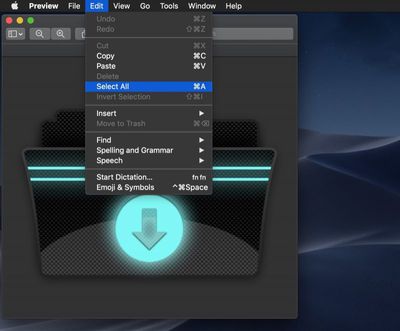
  2. Choose Edit -> Select All in Preview's menu bar, or use the keyboard shortcut Command-A.
    how to change icons 2

  3. Choose Edit -> Copy in Preview's menu bar, or use the keyboard shortcut Command-C.
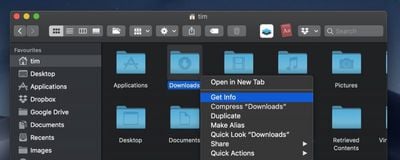
  4. Next, right-click (or Ctrl-click) the file or folder whose icon you want to change and select Get Info from the contextual menu.
    how to change icons 3

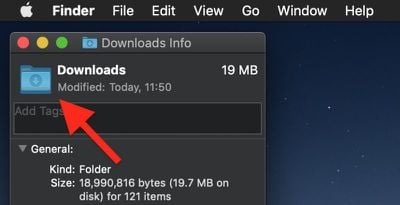
  5. Click the icon in the top left of the Info panel to select it.
    how to change icons 3b

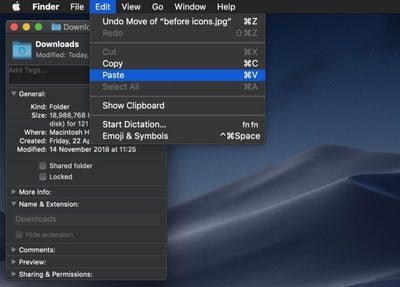
  6. Choose Edit -> Paste from the menu bar, or use the keyboard shortcut Command-V.
    how to change icons 4

  7. Click the red traffic light to close the Info panel, and you're done.
If you want to revert a file or folder to its default icon, open its Get Info panel again, click the icon in the panel to select it, and choose Edit -> Cut or use the keyboard shortcut Command-X. You can also select and copy (Edit -> Copy) a file or folder's icon in its Info panel for use elsewhere.


Top Rated Comments

Starflyer Avatar
95 months ago
Everyone remember this app back in the day and when Post Your Desktop was the most popular forum on Macrumors?
Score: 9 Votes (Like | Disagree)
simonmet Avatar
95 months ago
Everyone remember this app back in the day and when Post Your Desktop was the most popular forum on Macrumors?
And those of us even older will remember ResEdit and resexcellence.com!

Desktop hackery used to be such a big thing!
Score: 7 Votes (Like | Disagree)
orbital~debris Avatar
95 months ago
Everyone remember this app back in the day and when Post Your Desktop was the most popular forum on Macrumors?
CandyBar, Kaleidoscope… apps such as these gave a little more life to the Mac. I miss them.
Score: 4 Votes (Like | Disagree)
MrGimper Avatar
95 months ago
If you want to change the icons for all types of file/folder, then this handy free tool does just that.

https://freemacsoft.net/liteicon/

Not affiliated in any way, just a happy user of this software over the years
Score: 4 Votes (Like | Disagree)
lunarworks Avatar
95 months ago
And those of us even older will remember ResEdit and resexcellence.com!

Desktop hackery used to be such a big thing!
I wasted so much time editing icons in ResEdit. I made a radioactive Trash can once.
Score: 3 Votes (Like | Disagree)
jaster2 Avatar
95 months ago
I would be a lot more excited about this again if custom folder icons would show up in the Finder sidebar. Did not appreciate that when Apple eliminated the feature awhile ago. Just tried it and it's still the case.
Score: 2 Votes (Like | Disagree)

Popular Stories

Apple Logo Zoomed

Tim Cook Teases Plans for Apple's Upcoming 50th Anniversary

Thursday February 5, 2026 12:54 pm PST by
Apple turns 50 this year, and its CEO Tim Cook has promised to celebrate the milestone. The big day falls on April 1, 2026. "I've been unusually reflective lately about Apple because we have been working on what do we do to mark this moment," Cook told employees today, according to Bloomberg's Mark Gurman. "When you really stop and pause and think about the last 50 years, it makes your heart ...
Finder Siri Feature

Why Apple's iOS 26.4 Siri Upgrade Will Be Bigger Than Originally Promised

Friday February 6, 2026 3:06 pm PST by
In the iOS 26.4 update that's coming this spring, Apple will introduce a new version of Siri that's going to overhaul how we interact with the personal assistant and what it's able to do. The iOS 26.4 version of Siri won't work like ChatGPT or Claude, but it will rely on large language models (LLMs) and has been updated from the ground up. Upgraded Architecture The next-generation...
wwdc sans text feature

Apple Rumored to Announce New Product on February 19

Thursday February 5, 2026 12:22 pm PST by
Apple plans to announce the iPhone 17e on Thursday, February 19, according to Macwelt, the German equivalent of Macworld. The report, citing industry sources, is available in English on Macworld. Apple announced the iPhone 16e on Wednesday, February 19 last year, so the iPhone 17e would be unveiled exactly one year later if this rumor is accurate. It is quite uncommon for Apple to unveil...
iOS 26

iOS 26.3 and iOS 26.4 Will Add These New Features to Your iPhone

Tuesday February 3, 2026 7:47 am PST by
While the iOS 26.3 Release Candidate is now available ahead of a public release, the first iOS 26.4 beta is likely still at least a week away. Following beta testing, iOS 26.4 will likely be released to the general public in March or April. Below, we have recapped known or rumored iOS 26.3 and iOS 26.4 features so far. iOS 26.3 iPhone to Android Transfer Tool iOS 26.3 makes it easier...
iphone 17 pro dark blue 1

iPhone 18 Pro Max Rumored to Deliver Next-Level Battery Life

Friday February 6, 2026 5:14 am PST by
The iPhone 18 Pro Max will feature a bigger battery for continued best-in-class battery life, according to a known Weibo leaker. Citing supply chain information, the Weibo user known as "Digital Chat Station" said that the iPhone 18 Pro Max will have a battery capacity of 5,100 to 5,200 mAh. Combined with the efficiency improvements of the A20 Pro chip, made with TSMC's 2nm process, the...