
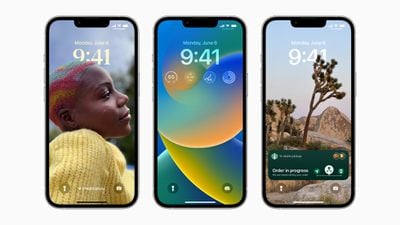
With iOS 16, Apple introduced a complete overhaul of the iOS Lock Screen, making it more customizable than ever and able to display information-rich widgets. This article shows you how to personalize your iPhone's Lock Screen in iOS 16.
image
In iOS 16, you can customize the Lock Screen with unique fonts, colors, and, for the first time, widgets. To get started, all you need to do is unlock your ‌iPhone‌ with Face ID or Touch ID, and then long press on the Lock Screen to enter the Lock Screen gallery.

The Lock Screen Gallery

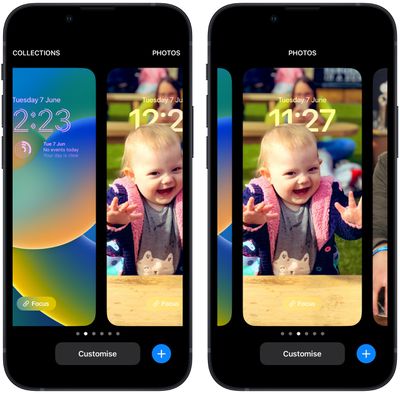
If you have an Apple Watch, the interface you see will be familiar, since it's very similar to the way watch face customization works. Lock Screens are categorized here into Collections (stock Apple Lock Screens), Photos, and Colors. You can swipe left and right to choose a different existing Lock Screen, and then long press one to set it.
Lock Screen
Alternatively, you can tap Customize to personalize the currently selected Lock Screen, or tap the blue + button to create a completely new one. Here we'll focus on customizing an existing Lock Screen.

Customizing Your Lock Screen

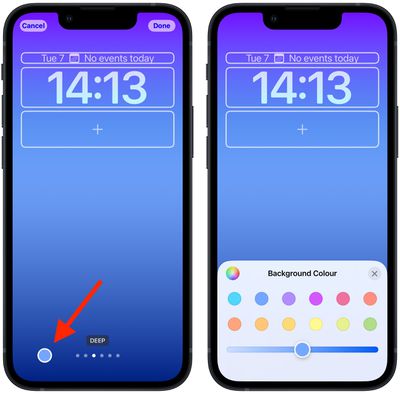
Tapping Customize brings up an interactive view of your Lock Screen with several options at your disposal depending on the type of Lock Screen. If you're customizing a "Color" Lock Screen, you can tap the colored circle on the left to change the color and hue, and you can swipe left and right to apply different styles to the image.
Lock Screen
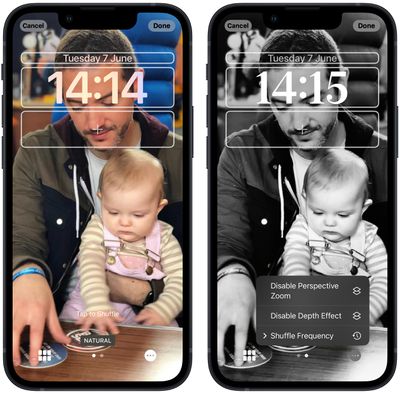
If you're customizing a "Photo" Lock Screen, the bottom options let you choose another picture (or a selection of pictures if its a Shuffle wallpaper) from your photo library, set a filter, and enable or disable the Perspective Zoom/Depth Effect.
lock screen photo
Note that the filters available to you by swiping left and right are intelligently generated automatically for the chosen image, so you'll see different options here depending on whether, say, it's a depth photo or a Color wallpaper. (If it's a photo, bear in mind that choosing different filters may also apply different typeface styles to the time and date.) If you're customizing a Lock Screen from Apple's "Collections," the options at the bottom of the screen are more limited.

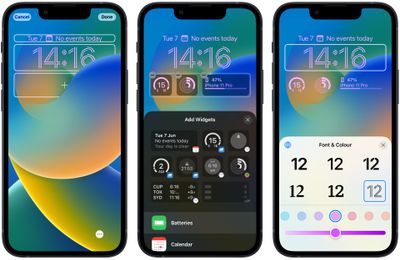
Up top, you'll see frames surrounding the time and date, as well as an area of space below the time. The center frame indicates that you can tap to edit the style of the time, while the frames above and below it can be tapped to add optional widgets.
Lock Screen
The widgets that you can add above the time include another time zone, a set alarm, the next calendar event, a weather condition, your activity rings, the next reminder, and a chosen stock. Widgets that can be placed below the time are more info-rich and include device battery levels, Calendar, Clock, Fitness, Home, News, Reminders, Stocks, and Weather.

When you've finished customizing your Lock Screen, simply tap Done, and then tap the screen again to exit the Lock Screen gallery. Note that you can also customize the current Lock Screen by going into Settings -> Wallpaper & Lock Screens.


Related Forum: iOS 16

Top Rated Comments

bballers29 Avatar
48 months ago
Am I the only one disappointed that widgets are limited to just one row?
Score: 19 Votes (Like | Disagree)
TheYayAreaLiving ?️ Avatar
48 months ago
It looks very complicated and too much yet it is very simple. It's crazy.

Hopefully Apple will let us customize the lock screen bottom buttons as well. Sometimes, I find myself turning on the flash light by accident. So, I definitely don't want that.
Score: 17 Votes (Like | Disagree)
adammusic Avatar
48 months ago
The worst time font selection in the history of fonts
Score: 11 Votes (Like | Disagree)
jav6454 Avatar
48 months ago

if Apple utilized the dead space on the home screen properly , we could get like 5 rows of widgets with up to like 6 small widgets slots in each row.
apple is the king of dead space.
The new Home app is filled with it.
Huge buttons that could be small.
Blank spaces everywhere.

They design for 80 year olds who can’t see their phone
Or rather it's a design meant so that people can enjoy the background picture selected.
Score: 10 Votes (Like | Disagree)
TheYayAreaLiving ?️ Avatar
48 months ago

The worst time font selection in the history of fonts
Well, there are plenty of options available and you can customize it the way you want to. I'm sure Apple will be offering more font selection in future beta releases. This is just beta 1. Long way to go!
Score: 10 Votes (Like | Disagree)
_Spinn_ Avatar
48 months ago

If you have an Apple Watch, the interface you see will be familiar, since it's very similar to the way watch face customization works.
Yeah getting major watch face vibes from the gallery and ability to add widgets.
Score: 5 Votes (Like | Disagree)

Popular Stories

Apple Logo Zoomed

Tim Cook Teases Plans for Apple's Upcoming 50th Anniversary

Thursday February 5, 2026 12:54 pm PST by
Apple turns 50 this year, and its CEO Tim Cook has promised to celebrate the milestone. The big day falls on April 1, 2026. "I've been unusually reflective lately about Apple because we have been working on what do we do to mark this moment," Cook told employees today, according to Bloomberg's Mark Gurman. "When you really stop and pause and think about the last 50 years, it makes your heart ...
wwdc sans text feature

Apple Rumored to Announce New Product on February 19

Thursday February 5, 2026 12:22 pm PST by
Apple plans to announce the iPhone 17e on Thursday, February 19, according to Macwelt, the German equivalent of Macworld. The report, citing industry sources, is available in English on Macworld. Apple announced the iPhone 16e on Wednesday, February 19 last year, so the iPhone 17e would be unveiled exactly one year later if this rumor is accurate. It is quite uncommon for Apple to unveil...
Finder Siri Feature

Why Apple's iOS 26.4 Siri Upgrade Will Be Bigger Than Originally Promised

Friday February 6, 2026 3:06 pm PST by
In the iOS 26.4 update that's coming this spring, Apple will introduce a new version of Siri that's going to overhaul how we interact with the personal assistant and what it's able to do. The iOS 26.4 version of Siri won't work like ChatGPT or Claude, but it will rely on large language models (LLMs) and has been updated from the ground up. Upgraded Architecture The next-generation...
iOS 26

iOS 26.3 and iOS 26.4 Will Add These New Features to Your iPhone

Tuesday February 3, 2026 7:47 am PST by
While the iOS 26.3 Release Candidate is now available ahead of a public release, the first iOS 26.4 beta is likely still at least a week away. Following beta testing, iOS 26.4 will likely be released to the general public in March or April. Below, we have recapped known or rumored iOS 26.3 and iOS 26.4 features so far. iOS 26.3 iPhone to Android Transfer Tool iOS 26.3 makes it easier...
iphone 17 pro dark blue 1

iPhone 18 Pro Max Rumored to Deliver Next-Level Battery Life

Friday February 6, 2026 5:14 am PST by
The iPhone 18 Pro Max will feature a bigger battery for continued best-in-class battery life, according to a known Weibo leaker. Citing supply chain information, the Weibo user known as "Digital Chat Station" said that the iPhone 18 Pro Max will have a battery capacity of 5,100 to 5,200 mAh. Combined with the efficiency improvements of the A20 Pro chip, made with TSMC's 2nm process, the...















