

Meta's Instagram allows you to delete your account from directly within the Instagram app. This article shows you how it's done.

To comply with Apple's updated App Store guidelines, Instagram in June 2022 added an option in its app for users to delete their account on the service.
Previously it was only possible to delete your Instagram account by logging into a web browser on a desktop browser or mobile device. However, Apple told developers that apps offering account creation must also support account deletion from June 30, 2022, so Instagram had to add the feature.
If you want to delete your account, be aware that account deletion is permanent and it removes your profile, photos, videos, comments, likes, and followers.
Note that instead of deleting your account, you could always deactivate your Instagram account temporarily, and all of your content will be hidden until your enable it again by logging back in.
Here are the steps to deleting (or deactivating) your Instagram account on iPhone.
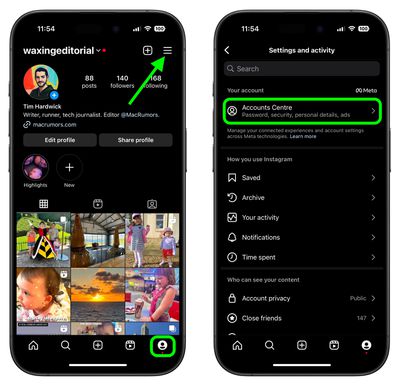
- Open the Instagram app and tap the profile icon in the bottom-right corner, then tap the More (three lines) icon in the top-right corner of your profile.
- Tap Accounts Center.

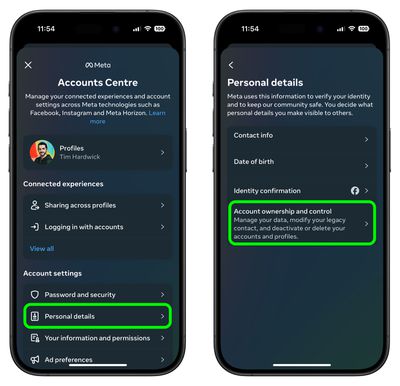
- Under "Account settings," tap Personal details.
- Tap Account ownership and control.
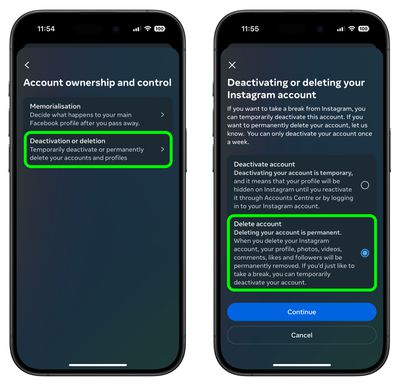
- Tap Deactivation or deletion.
- Choose your Instagram account.
- Tap Delete account or Deactivate account, then tap Continue.
If you decide to delete your account, it's worth remembering that you can sign up again with the same username or add that username to another account as long as it hasn't been taken by a new person on Instagram. Just bear in mind that it may take up to 90 days to complete the deletion process after it begins.
Instagram also lets you hide your status, which prevents anyone from knowing when you were last online or last active on the service. To learn how it works, check out our dedicated how-to article.
















