Delete Redundant Burst Mode Photos on iPhone and iPad - MacRumors
Skip to Content

Delete Redundant Burst Mode Photos on iPhone and iPad

by

Burst Mode refers to when the camera on your iOS device captures a series of photos in rapid succession, at a rate of ten frames per second. It's a great way to shoot an action scene or an unexpected event, since you're always more likely to end up with the picture you were aiming for.

burstmode
Whenever you take a series of burst photos, they automatically appear in the Photo app under the Album name Bursts. You'll also find them in the Recent Days section. Here's how to view your burst photos, pick out the best image for safe keeping, and delete the rest to save on storage space.

How to Delete Redundant Burst Photos

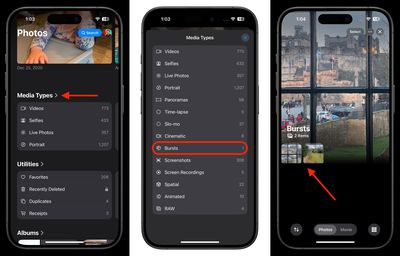
  1. In Photos, scroll down and tap Media Types.
  2. Select the Bursts album from the list. (If you don't see it, you haven't taken any Burst shots.)
  3. Tap a Burst collection to view it.
    photos

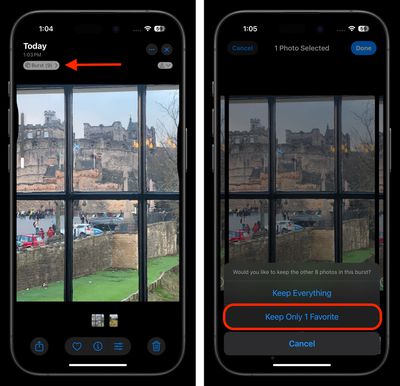
  4. Tap the Burst pill above the image in the upper left corner.
  5. Tap each image in the series that you want to keep. Any dots you see below images in a burst indicate that Apple's algorithms think they have the best focus and detail in the set, but you may think differently.
  6. Tap Done in the top-right corner of the screen.
  7. To keep only the images that you ticked in the burst series, select Keep Only Favorites from the pop-up menu.
    photos

That's all there is to it. To reclaim further device storage, be sure to check out our dedicated guide.


Popular Stories

iOS 26

iOS 26.4 Adds Two New Features to CarPlay

Tuesday March 24, 2026 1:55 pm PDT by
iOS 26.4 was released today, and it includes a couple of new features for CarPlay: an Ambient Music widget and support for voice-based chatbot apps. To update your iPhone 11 or newer to iOS 26.4, open the Settings app and tap on General → Software Update. CarPlay will automatically offer the new features so long as the iPhone connected to your vehicle is running iOS 26.4 or later....
Apple Business hero

Apple Unveils 'Apple Business' All-in-One Platform

Tuesday March 24, 2026 8:53 am PDT by
Apple today announced Apple Business, a new all-in-one platform that unifies device management, productivity tools, and customer outreach features. The service is designed to be a consolidated replacement for several of Apple's existing business-focused offerings, including Apple Business Essentials, Apple Business Manager, and Apple Business Connect. It provides organizations with a single...
AirPods Pro Firmware Feature

Apple Releases New Firmware for AirPods Pro 3, AirPods Pro 2 and AirPods 4

Tuesday March 24, 2026 12:31 pm PDT by
Apple today released new firmware for the AirPods Pro 2, AirPods Pro 3, and the AirPods 4. The firmware has a version number of 8B39, up from 8B34 on the AirPods Pro 3, 8B28 on the AirPods Pro 2, and 8B21 on the AirPods 4. There is no word on what's included in the firmware, but Apple has a support document with limited notes. Most updates are limited to bug fixes and performance...