
How to Disable Auto-Playing Video Previews on Apple TV - MacRumors
Skip to Content

How to Disable Auto-Playing Video Previews on Apple TV

by

With the release of tvOS 13, Apple brought new features like Apple Arcade to Apple TV as well as a number of changes to the set-top box's interface. One of those changes includes autoplaying trailers on the Home screen.
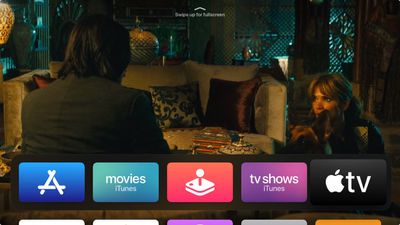
tv app
The new content previews on the Home screen make interacting with your ‌Apple TV‌ a little different. For example, in previous tvOS versions, using the Siri Remote to highlight Apple's TV app would make your Up Next queue appear in the Top Shelf of the Home screen. Now, it plays video trailers advertising content available on the iTunes Store.

This is similar to what you'd expect to see on Netflix, which routinely auto-plays trailers in the hope that it will help you discover content more easily. Not everyone wants to see the same behavior on their ‌Apple TV‌ though, and the good news is that you can turn it off with an option buried in the device's settings.

  1. Launch the Settings app on your ‌Apple TV‌.
  2. Select General -> Accessibility -> Motion.
  3. Toggle off the switch for Auto-Play Video Previews.
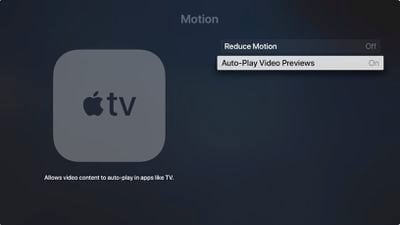
Apple TV
You can also move the TV app from the top row of the your ‌Apple TV‌'s Home screen and the videos should stop autoplaying. To do so, hover the selector over the TV app, then click and hold down on the Remote's touch surface for a couple of seconds.

The app icon will start jiggling, at which point you can swipe to place it where you want. Simply click the touch surface again once you have moved the TV app from the top row to another location.


Related Roundup: Apple TV
Tag: tvOS 13
Buyer's Guide: Apple TV (Don't Buy)

Top Rated Comments

macduke Avatar
85 months ago
This never should have been a default setting.
Score: 15 Votes (Like | Disagree)
DDustiNN Avatar
85 months ago
Good. I hate this. So incredibly annoying. I wish I could also turn it off in Netflix.
Score: 13 Votes (Like | Disagree)
NickName99 Avatar
85 months ago
I sometimes browse Netflix on my iPhone rather than my TV, because of how annoying the auto play is.
Score: 8 Votes (Like | Disagree)
DNichter Avatar
85 months ago
I just want MY stuff to show. Pisses me off.
Score: 7 Votes (Like | Disagree)
Porco Avatar
85 months ago
Without the option to turn this off I simply would not have ever updated my AppleTV. That is how much I loathe it. Good for Apple for providing a better choice on the matter than Netflix (i.e. providing a choice at all!).
Score: 7 Votes (Like | Disagree)
clcnyc Avatar
85 months ago
Can we get the UP Next back on the home screen instead of having to click into TV?
Score: 7 Votes (Like | Disagree)

Popular Stories

iOS 26

iOS 26.4 Adds Two New Features to CarPlay

Tuesday March 24, 2026 1:55 pm PDT by
iOS 26.4 was released today, and it includes a couple of new features for CarPlay: an Ambient Music widget and support for voice-based chatbot apps. To update your iPhone 11 or newer to iOS 26.4, open the Settings app and tap on General → Software Update. CarPlay will automatically offer the new features so long as the iPhone connected to your vehicle is running iOS 26.4 or later....
Apple Business hero

Apple Unveils 'Apple Business' All-in-One Platform

Tuesday March 24, 2026 8:53 am PDT by
Apple today announced Apple Business, a new all-in-one platform that unifies device management, productivity tools, and customer outreach features. The service is designed to be a consolidated replacement for several of Apple's existing business-focused offerings, including Apple Business Essentials, Apple Business Manager, and Apple Business Connect. It provides organizations with a single...
AirPods Pro Firmware Feature

Apple Releases New Firmware for AirPods Pro 3, AirPods Pro 2 and AirPods 4

Tuesday March 24, 2026 12:31 pm PDT by
Apple today released new firmware for the AirPods Pro 2, AirPods Pro 3, and the AirPods 4. The firmware has a version number of 8B39, up from 8B34 on the AirPods Pro 3, 8B28 on the AirPods Pro 2, and 8B21 on the AirPods 4. There is no word on what's included in the firmware, but Apple has a support document with limited notes. Most updates are limited to bug fixes and performance...















