How to Disable AutoPlaying Trailers in Netflix - MacRumors
Skip to Content

How to Disable AutoPlaying Trailers in Netflix

by

If you're tired of seeing trailers for shows or movies start to play as you browse the Netflix home screen, we have some good news for you. Netflix has listened to user feedback and now offers a way to disable autoplaying videos.

netflixlatest
What you need to know is that the setting can only be changed by signing into Netflix from a web browser. As it stands, there's no way to do it from within the Netflix app on your smartphone, tablet, or smart TV. Here's how it's done.

How to Disable AutoPlay Previews in Netflix

  1. Open a browser on a smartphone or computer and go to www.netflix.com.
    Netflix

  2. Sign in to your Netflix account with your username and password.
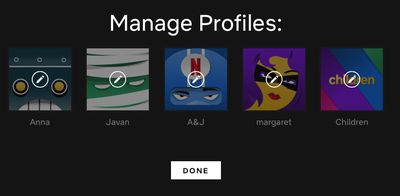
  3. Click your profile picture in the top-right corner of the screen and select Manage Profiles. If you see the profiles selection screen instead of the Netflix home screen, simply click the Manage Profiles button underneath the row of profiles.
    Netflix

  4. Click the profile that you want to customize settings for.
    Netflix

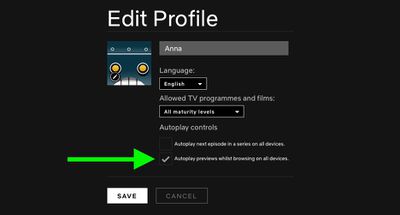
  5. Untick the checkbox next to Autoplay previews while browsing on all devices.
    Netflix

  6. Click Save.

Note that from the Edit Profile screen you can also uncheck Autoplay next episode in a series on all devices to prevent Netflix from automatically starting the next episode when you're streaming a TV series.

If you notice a delay before your settings take effect, switch to another profile on your Netflix account and then switch right back to your own. If that doesn't work, log out of Netflix and log back in again.


Tag: Netflix

Popular Stories

iOS 26

iOS 26.4 Adds Two New Features to CarPlay

Tuesday March 24, 2026 1:55 pm PDT by
iOS 26.4 was released today, and it includes a couple of new features for CarPlay: an Ambient Music widget and support for voice-based chatbot apps. To update your iPhone 11 or newer to iOS 26.4, open the Settings app and tap on General → Software Update. CarPlay will automatically offer the new features so long as the iPhone connected to your vehicle is running iOS 26.4 or later....
Apple Business hero

Apple Unveils 'Apple Business' All-in-One Platform

Tuesday March 24, 2026 8:53 am PDT by
Apple today announced Apple Business, a new all-in-one platform that unifies device management, productivity tools, and customer outreach features. The service is designed to be a consolidated replacement for several of Apple's existing business-focused offerings, including Apple Business Essentials, Apple Business Manager, and Apple Business Connect. It provides organizations with a single...
AirPods Pro Firmware Feature

Apple Releases New Firmware for AirPods Pro 3, AirPods Pro 2 and AirPods 4

Tuesday March 24, 2026 12:31 pm PDT by
Apple today released new firmware for the AirPods Pro 2, AirPods Pro 3, and the AirPods 4. The firmware has a version number of 8B39, up from 8B34 on the AirPods Pro 3, 8B28 on the AirPods Pro 2, and 8B21 on the AirPods 4. There is no word on what's included in the firmware, but Apple has a support document with limited notes. Most updates are limited to bug fixes and performance...