

If you're listening to audio on your iPhone and bring it near to a HomePod mini, the Handoff feature will be activated. This article explains what Handoff is and how you can disable it.
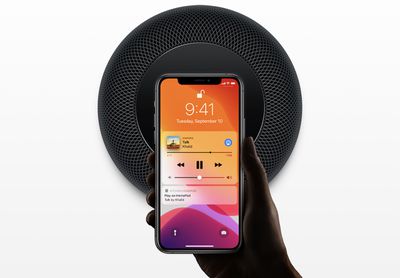
The HomePod mini and iPhone 11 and later models all have Apple's U1 Ultra Wideband chip, which allows the devices to more precisely locate and keep track of one another. The U1 chip also allows for more advanced Handoff features, which means it's a lot easier to transfer playing audio from iPhone to HomePod.
If you're listening to a song on your iPhone and bring the phone near a HomePod mini, you will notice visual, audio, and haptic effects indicating Handoff is active. As the iPhone gets closer to the HomePod mini's location, it begins a soft haptic touch rhythm that gets faster and faster as the iPhone continues to approach the HomePod mini. Eventually, the song transfer interface options up, and the song transitions from the iPhone to the mini.
Transferring a song is quicker and more reliable with these visual and haptic-based transfer cues, but what if you find the Handoff feature annoying? Perhaps you have the HomePod mini sat on your desk, making the haptic cues a continual distraction. Fortunately, you can disable Handoff so that your devices ignore each other when in close proximity. The following steps show you how it's done.
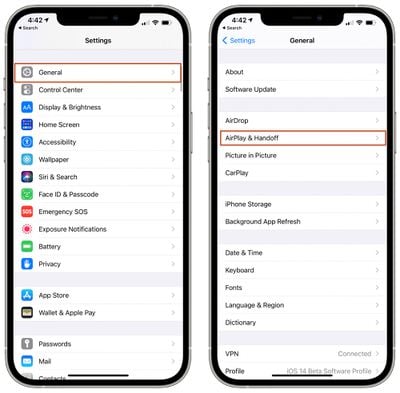
- On your iPhone, launch the Settings app.
- Tap General.
- Tap AirPlay & Handoff.
- Toggle off the switch next to Transfer to HomePod.
That's all there is to it. You will no longer receive haptic feedback from your iPhone when playing audio near your HomePod mini. Note that your iPhone will no longer display playback controls that you can access without unlocking it, so you'll also lose this way to manually control content playing on the HomePod mini.
















