
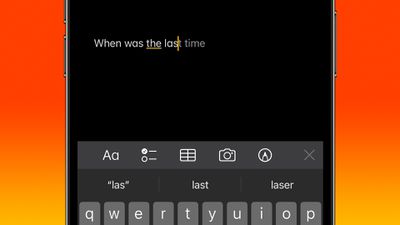
Apple in iOS 17 added inline predictive text for iPhones, but did not include a way to turn it off independently of predictive suggestions above the keyboard. In the latest iOS 17.2 update, that's changed.
inline predictive text
Apple has improved its machine learning technology on iPhones in an effort to make iOS a lot more helpful, and one of the features in which this tech has been deployed is inline predictive text.

Predictive text does just what it says - it predicts what you're going to type next, and offers to autocomplete it. As you type, the predicted text appears ahead of the cursor. If it has accurately predicted what you intend to type, all you need to do is tap the spacebar and iOS fills it in for you.

In previous versions of iOS 17, you could only disable inline predictive text by turning off predictive text wholesale – which meant you would also lose the predicted words that appear above the keyboard as you type. Fortunately, in iOS 17.2 you can now toggle off inline predictive text separately without disabling the predictive suggestions.

Turning Off Inline Predictive Text

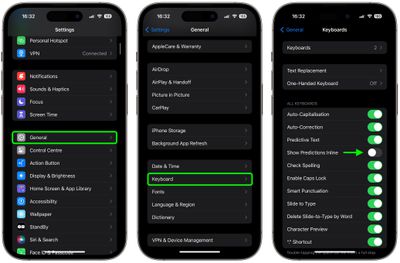
  1. Open Settings on your iPhone.
  2. Tap General.
  3. Under "All Keyboards," toggle off the switch next to Show Predictions Inline.
settings

That's all there is to it. The new option is likely to be welcomed by those who prefer a more manual typing experience or find inline predictive text suggestions distracting. Of course, if you find yourself missing the help that inline predictive text can provide, simply use the above steps to re-instate the feature.


Top Rated Comments

msackey Avatar
28 months ago
I find predictive text very interruptive to thought flow.
Score: 10 Votes (Like | Disagree)
eicca Avatar
28 months ago
“Predictive” text and “autocorrect” have gotten even worse despite all the hype. Autocorrect is barely even worth having turned on anymore.

I guess that’s to be expected with Apple these days.
Score: 9 Votes (Like | Disagree)
Mockletoy Avatar
28 months ago

I find predictive text very interruptive to thought flow.
Yeah, it was super distracting to me. You can turn it off on the Mac, too.

System Settings -> Keyboard -> Input Sources -> Edit -> All Input Sources -> Show inline predictive text

I don't know how anyone can stand it. It's like a bunch of flies buzzing around my cursor while I'm trying to write.
Score: 8 Votes (Like | Disagree)
citysnaps Avatar
28 months ago
Works great for me - it's a real time saver. The prediction aspect works well, especially anticipating likely multi-word phrases, and is usually what I would be needing to type one character at a time.

I realize I'll not be earning any forum cred stating the above. So, how about... Apple likes profits! Ooooooh...
Score: 7 Votes (Like | Disagree)
carlsson Avatar
28 months ago
I think it works quite well.
Score: 5 Votes (Like | Disagree)
Apple_Robert Avatar
28 months ago
I like the in-line text suggestion. Works well for me.
Score: 3 Votes (Like | Disagree)

Popular Stories

Apple Logo Zoomed

Tim Cook Teases Plans for Apple's Upcoming 50th Anniversary

Thursday February 5, 2026 12:54 pm PST by
Apple turns 50 this year, and its CEO Tim Cook has promised to celebrate the milestone. The big day falls on April 1, 2026. "I've been unusually reflective lately about Apple because we have been working on what do we do to mark this moment," Cook told employees today, according to Bloomberg's Mark Gurman. "When you really stop and pause and think about the last 50 years, it makes your heart ...
Finder Siri Feature

Why Apple's iOS 26.4 Siri Upgrade Will Be Bigger Than Originally Promised

Friday February 6, 2026 3:06 pm PST by
In the iOS 26.4 update that's coming this spring, Apple will introduce a new version of Siri that's going to overhaul how we interact with the personal assistant and what it's able to do. The iOS 26.4 version of Siri won't work like ChatGPT or Claude, but it will rely on large language models (LLMs) and has been updated from the ground up. Upgraded Architecture The next-generation...
wwdc sans text feature

Apple Rumored to Announce New Product on February 19

Thursday February 5, 2026 12:22 pm PST by
Apple plans to announce the iPhone 17e on Thursday, February 19, according to Macwelt, the German equivalent of Macworld. The report, citing industry sources, is available in English on Macworld. Apple announced the iPhone 16e on Wednesday, February 19 last year, so the iPhone 17e would be unveiled exactly one year later if this rumor is accurate. It is quite uncommon for Apple to unveil...
iOS 26

iOS 26.3 and iOS 26.4 Will Add These New Features to Your iPhone

Tuesday February 3, 2026 7:47 am PST by
While the iOS 26.3 Release Candidate is now available ahead of a public release, the first iOS 26.4 beta is likely still at least a week away. Following beta testing, iOS 26.4 will likely be released to the general public in March or April. Below, we have recapped known or rumored iOS 26.3 and iOS 26.4 features so far. iOS 26.3 iPhone to Android Transfer Tool iOS 26.3 makes it easier...
iphone 17 pro dark blue 1

iPhone 18 Pro Max Rumored to Deliver Next-Level Battery Life

Friday February 6, 2026 5:14 am PST by
The iPhone 18 Pro Max will feature a bigger battery for continued best-in-class battery life, according to a known Weibo leaker. Citing supply chain information, the Weibo user known as "Digital Chat Station" said that the iPhone 18 Pro Max will have a battery capacity of 5,100 to 5,200 mAh. Combined with the efficiency improvements of the A20 Pro chip, made with TSMC's 2nm process, the...















