Apple in the second macOS Catalina 10.15.5 beta added a new Battery Health Management feature for Macs, which is designed to prolong the battery life and battery health of modern Mac notebooks (aka those with Thunderbolt 3 ports) by reducing the rate of chemical aging.
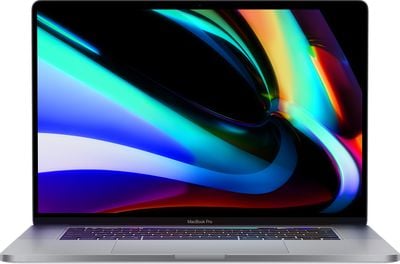
16inchmacbookpromain
Battery Health Management is an intelligent feature that analyzes the battery status of a Mac notebook and its charging pattern, and based on this information, it may preserve battery health by not charging a MacBook to full capacity.

Charging a MacBook to 100 percent and then letting it sit plugged in without draining the battery through use can lead to reduced battery life, which is what Apple is aiming to avoid. Macs that are often used plugged in and with the battery full may have the Battery Management feature kick in to stop charging short of a full charge.

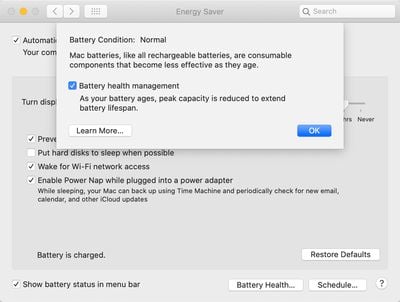
Battery Health Management is entirely opt-in and can be disabled for those who do not want to use the feature. Protecting battery health will be useful for most Mac users, but there may be some situations where Battery Health Management is not ideal, such as if you're about to leave the house and need maximum battery life, so it's worth knowing how to turn it off and on.

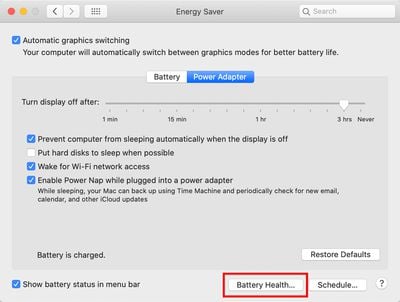
All Battery Health Management controls can be found in the Energy Saver section of System Preferences, as outlined below.

  1. Open the System Preferences app.
  2. Choose the Energy Saver section, which is denoted by a light bulb.
  3. Select the Battery Health section. batteryhealthmac1
  4. Click the box next to Battery Health Management to deselect it. batteryhealthmac2
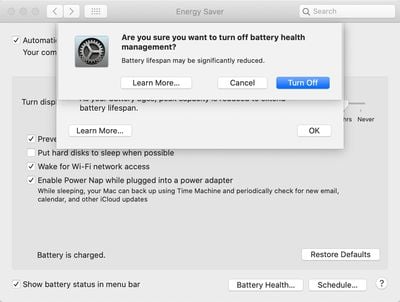
  5. Click Turn Off to confirm. batteryhealthmac3

When upgrading to macOS Catalina 10.15.5, Battery Health Management will be enabled by default and will need to be manually turned off by those who don't want to use it.

macOS Catalina 10.15.5 is limited to developers at the current time, but will see a public release in the not too distant feature, bringing Battery Health Management to all users with a 2016 or later MacBook Pro and 2018 or later MacBook Air.


Related Forum: macOS Catalina

Top Rated Comments

zorinlynx Avatar
76 months ago
Why the hell are they limiting this to 2016 and newer Macs? Older Macs can benefit from this too.
Score: 10 Votes (Like | Disagree)
roar08 Avatar
76 months ago

Perhaps I'm being dense, but what would be the benefit of turning it off?
Not being trolled in the media for forcing customers to update their machines when their batteries naturally degrade. Providing the choice mitigates the perception of control and is probably more of a sociopolitical decision than a technical one.
Score: 7 Votes (Like | Disagree)
_torgo_ Avatar
76 months ago
Perhaps I'm being dense, but what would be the benefit of turning it off?
Score: 4 Votes (Like | Disagree)
MauiPa Avatar
76 months ago
More battery life? I got 5 years on my first one without it
Score: 4 Votes (Like | Disagree)
Fusionskies Avatar
76 months ago

No need to do anything if it's excellent. Or just Option-click the battery in the menu bar and see what it says for the condition.
Condition: Normal

Crazy to think its 7 years old and still running fine.
Score: 3 Votes (Like | Disagree)
Natzoo Avatar
76 months ago
I think I’ll just stick with Mojave
Score: 3 Votes (Like | Disagree)

Popular Stories

Apple Logo Zoomed

Tim Cook Teases Plans for Apple's Upcoming 50th Anniversary

Thursday February 5, 2026 12:54 pm PST by
Apple turns 50 this year, and its CEO Tim Cook has promised to celebrate the milestone. The big day falls on April 1, 2026. "I've been unusually reflective lately about Apple because we have been working on what do we do to mark this moment," Cook told employees today, according to Bloomberg's Mark Gurman. "When you really stop and pause and think about the last 50 years, it makes your heart ...
wwdc sans text feature

Apple Rumored to Announce New Product on February 19

Thursday February 5, 2026 12:22 pm PST by
Apple plans to announce the iPhone 17e on Thursday, February 19, according to Macwelt, the German equivalent of Macworld. The report, citing industry sources, is available in English on Macworld. Apple announced the iPhone 16e on Wednesday, February 19 last year, so the iPhone 17e would be unveiled exactly one year later if this rumor is accurate. It is quite uncommon for Apple to unveil...
Finder Siri Feature

Why Apple's iOS 26.4 Siri Upgrade Will Be Bigger Than Originally Promised

Friday February 6, 2026 3:06 pm PST by
In the iOS 26.4 update that's coming this spring, Apple will introduce a new version of Siri that's going to overhaul how we interact with the personal assistant and what it's able to do. The iOS 26.4 version of Siri won't work like ChatGPT or Claude, but it will rely on large language models (LLMs) and has been updated from the ground up. Upgraded Architecture The next-generation...
iOS 26

iOS 26.3 and iOS 26.4 Will Add These New Features to Your iPhone

Tuesday February 3, 2026 7:47 am PST by
While the iOS 26.3 Release Candidate is now available ahead of a public release, the first iOS 26.4 beta is likely still at least a week away. Following beta testing, iOS 26.4 will likely be released to the general public in March or April. Below, we have recapped known or rumored iOS 26.3 and iOS 26.4 features so far. iOS 26.3 iPhone to Android Transfer Tool iOS 26.3 makes it easier...
iphone 17 pro dark blue 1

iPhone 18 Pro Max Rumored to Deliver Next-Level Battery Life

Friday February 6, 2026 5:14 am PST by
The iPhone 18 Pro Max will feature a bigger battery for continued best-in-class battery life, according to a known Weibo leaker. Citing supply chain information, the Weibo user known as "Digital Chat Station" said that the iPhone 18 Pro Max will have a battery capacity of 5,100 to 5,200 mAh. Combined with the efficiency improvements of the A20 Pro chip, made with TSMC's 2nm process, the...