

When Apple introduced the iPhone 13 Pro and Pro Max models, it debuted a new camera feature that enables macro photography, allowing users to take close-up photos of flowers, insects, and other objects that are as close as 2cm to the camera lens.
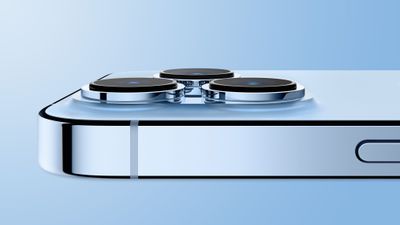
When Macro Mode is enabled, the iPhone camera automatically switches from the Wide lens to the Ultra Wide lens when an object is placed within 5.5 inches of the rear camera. (The viewfinder still shows "1x" framing, but the camera relies on the Ultra Wide lens for autofocus.)
From the user's perspective, this results in the viewfinder jittering as it attempts to choose between a regular wide or wide-macro shot. While this automatic camera switching is intentional to help users better capture close-up details, it can be annoying because it can be difficult to get a shot with the camera constantly swapping back and forth.
For that reason, in iOS 15.2, Apple added an optional manual toggle for macro mode, in the form of a flower icon that can be tapped to toggle Macro mode off when the camera is close to an object.
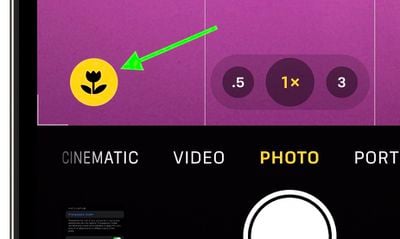
To turn on the option to see the toggle when taking close-up shots, follow these steps.
- Launch the Settings app on your iPhone.
- Scroll down and tap Camera.
- Scroll down and toggle the switch next to Macro Control so that it's in the green ON position.
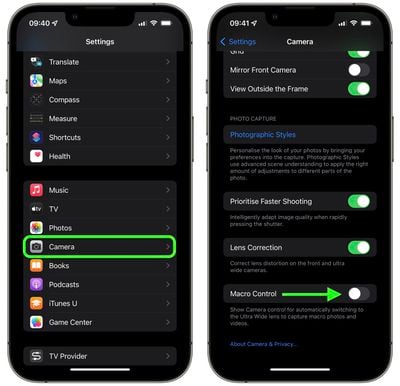
Now, when your iPhone's camera is close enough to an object, the flower icon will appear in the Camera app and can be tapped to enable or disable Macro mode.
Apple has also added a new Preserve Settings option for Macro Control (Settings -> Camera -> Preserve Settings -> Macro Control). If Macro Control is disabled, the Camera will automatically switch into Macro mode when close enough to an object, so this feature is meant to give users unhappy with that function more control over when Macro mode activates.




















