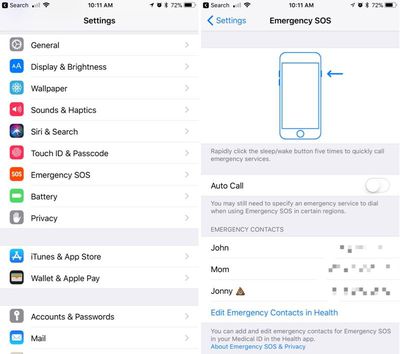
There's an Emergency SOS feature built into iOS 11 that has hidden functionality -- it automatically disables Touch ID and makes it so your passcode has to be entered to unlock your iPhone.

Because it essentially shuts down the biometrics on your device, you can't be compelled by a police officer or malicious person to unlock your iPhone with a fingerprint, nor can your fingerprint be used to get into your device should you be unconscious after an emergency. On iPhone X, this also applies to Face ID.

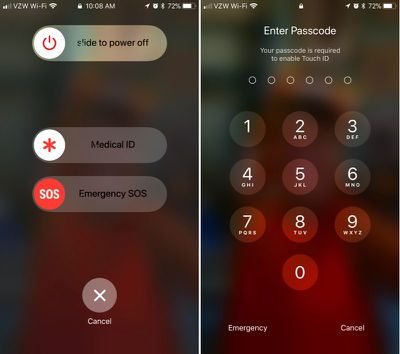
Emergency SOS is enabled by default, and there's only one step to activate it: Press on the sleep/wake (Side) button of your iPhone five times in rapid succession. On the iPhone X, iPhone 8, and iPhone 8 Plus, instead of pressing the Side button five times rapidly, you hold down the Side button and one of the volume buttons at the same time. It's essentially a quick squeeze on either side of the device.
disabletouchidios11
These gestures initiates a screen that gives you the option to power the iPhone off, make a call to emergency services, or access your Medical ID.

Though not expressly stated, once your iPhone is in this emergency state, Touch ID is disabled. You will, however, have to press the cancel button to get back to the Home screen, so it's not an entirely secretive process.

If you're using Emergency SOS to disable the lock screen and don't want to set the feature up to automatically call 911 when the sleep/wake button is pressed, make sure to disable Auto Call in the Settings app. Here's how:

  1. Open the Settings app.
  2. Scroll down to Emergency SOS.emergencysossettings
  3. Disable Auto Call.

With Auto Call disabled, pressing sleep/wake will bring up the aforementioned screen with the option to slide to make the emergency call. With Auto Call enabled, emergency services are called automatically when the sleep/wake button is pressed five times, following a five second countdown timer.

It's best to leave Auto Call on if you want to be able to get in touch with emergency services immediately should you be in danger.

While this feature was likely built to keep your iPhone secure in a situation where you might be incapacitated, it can also prevent authority figures from forcing you to unlock your device.

This is notable because there have been legal rulings where a defendant has been compelled to provide a fingerprint, but not a passcode. Most people will never need to disable Touch ID, but it's worth knowing the option is there should there be a situation where it is necessary.


Related Forum: iOS 11

Top Rated Comments

-Ryan- Avatar
109 months ago
Useful feature. Hopefully I'll never have to use it, but good to know it's there.
Score: 6 Votes (Like | Disagree)
JetTester Avatar
109 months ago
And to turn it back on, hold it over your head tilted at a 47 degree angle, hop 3 times, and say "Hey Siri, who is John Galt?", then boom, you're back in business.
Score: 4 Votes (Like | Disagree)
0970373 Avatar
109 months ago
And to turn it back on, hold it over your head tilted at a 47 degree angle, hop 3 times, and say "Hey Siri, who is John Galt?", then boom, you're back in business.
You just need to enter your pass code to unlock and biometrics is automatically back on. No need to sarcastically scroll through settings to enable it.
Score: 3 Votes (Like | Disagree)
44267547 Avatar
109 months ago
Useful feature. Hopefully I'll never have to use it, but good to know it's there.
I agree. Under stress, someone may not know how to utilize this feature or simply forget it. I would practice it just so the user has an understanding of how it works and access it if ever needed.
Score: 2 Votes (Like | Disagree)
mindsaspire Avatar
109 months ago
Useful feature. Hopefully I'll never have to use it, but good to know it's there.
Yes, a nice feature hope to never have to use. Maybe a small detail, but I noticed that the message shown is "Touch ID does not recognize your fingerprint", which also provides a little more protection since it doesn't indicate that you disabled Touch ID or even own the phone necessarily.
Score: 2 Votes (Like | Disagree)
shamus99 Avatar
109 months ago
nor can your fingerprint be used to get into your device should you be unconscious after an emergency.
If you are unconscious, how do you hit the button five times.

People... enough of this crazy paranoid stuff. Unless you are a murderer, kiddie molester or big time drug dealer the police don’t really care about your phone. If a cop gets in your phone illegally, it is thrown out in court.

And for Gods sake, if you are being robbed, give them the damn phone. Disable it later or track it with the police. They can’t do anything without your icloud passcode.
Score: 2 Votes (Like | Disagree)

Popular Stories

wwdc sans text feature

Apple Rumored to Announce New Product on February 19

Thursday February 5, 2026 12:22 pm PST by
Apple plans to announce the iPhone 17e on Thursday, February 19, according to Macwelt, the German equivalent of Macworld. The report, citing industry sources, is available in English on Macworld. Apple announced the iPhone 16e on Wednesday, February 19 last year, so the iPhone 17e would be unveiled exactly one year later if this rumor is accurate. It is quite uncommon for Apple to unveil...
Apple Logo Zoomed

Tim Cook Teases Plans for Apple's Upcoming 50th Anniversary

Thursday February 5, 2026 12:54 pm PST by
Apple turns 50 this year, and its CEO Tim Cook has promised to celebrate the milestone. The big day falls on April 1, 2026. "I've been unusually reflective lately about Apple because we have been working on what do we do to mark this moment," Cook told employees today, according to Bloomberg's Mark Gurman. "When you really stop and pause and think about the last 50 years, it makes your heart ...
maxresdefault

Apple Shows Off a Key Reason to Upgrade to the iPhone 17

Saturday February 7, 2026 9:26 am PST by
Apple today shared an ad that shows how the upgraded Center Stage front camera on the latest iPhones improves the process of taking a group selfie. "Watch how the new front facing camera on iPhone 17 Pro takes group selfies that automatically expand and rotate as more people come into frame," says Apple. While the ad is focused on the iPhone 17 Pro and iPhone 17 Pro Max, the regular iPhone...
Finder Siri Feature

Why Apple's iOS 26.4 Siri Upgrade Will Be Bigger Than Originally Promised

Friday February 6, 2026 3:06 pm PST by
In the iOS 26.4 update that's coming this spring, Apple will introduce a new version of Siri that's going to overhaul how we interact with the personal assistant and what it's able to do. The iOS 26.4 version of Siri won't work like ChatGPT or Claude, but it will rely on large language models (LLMs) and has been updated from the ground up. Upgraded Architecture The next-generation...
iOS 26

iOS 26.3 and iOS 26.4 Will Add These New Features to Your iPhone

Tuesday February 3, 2026 7:47 am PST by
While the iOS 26.3 Release Candidate is now available ahead of a public release, the first iOS 26.4 beta is likely still at least a week away. Following beta testing, iOS 26.4 will likely be released to the general public in March or April. Below, we have recapped known or rumored iOS 26.3 and iOS 26.4 features so far. iOS 26.3 iPhone to Android Transfer Tool iOS 26.3 makes it easier...