

workout appUsing the Segments feature in the Apple Watch Workout app is a great way to track changes in exercise intensity over the course of a workout. It can also help you find out which activities in a mixed session push your body the most.

If your regular running route includes a hilly section, for example, using segments to indicate where it begins and/or ends lets you review how much time it takes to complete compared to the rest of your workout.

Or maybe you use your Apple Watch to track gym sessions that include various high-intensity strength training or mixed cardio exercises. Marking a new segment every time you move to another piece of equipment or perform a different exercise will give you a better idea of how effective each activity is at burning calories.

How to Mark a Segment During a Workout

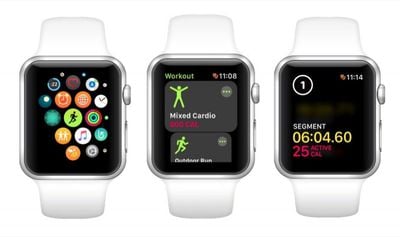
  1. Launch the Workout app on your Apple Watch.

  2. Choose a workout type to track from the list, then go ahead and start your workout.
    segments in an apple watch workout

  3. To divide your workout into two segments, simply raise your wrist and double-tap on the screen. The time elapsed becomes Segment 1 of your workout, while the remaining time becomes Segment 2.

  4. To create a third segment in your workout, just double-tap on the screen again. Repeat this action as many times as you want.
How to View Segment Metrics on Your iPhone

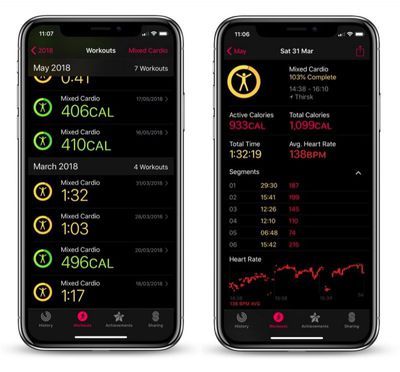
  1. Launch the Activity app on your iPhone.

  2. Tap the Workouts tab.
    activity app segments iphone

  3. Select the workout in which you recorded segments.

  4. In the workout summary screen, locate the Segments section just above the heart rate graph, and tap the chevron alongside it to reveal your numbered segments with stats for duration and calories burned.
Related Roundup: Apple Watch 11
Buyer's Guide: Apple Watch (Neutral)

Top Rated Comments

JRobinsonJr Avatar
100 months ago
I was looking for that too but it seems like these are splits rather than a multi-event training that's needed for a triathlon, am I missing something?
Nope. These are just splits.

I've sent Apple a long tirade of feature requests around this. In the "good ol' days" even the electronic trackers were essentially dumb. With the Watch, IMO, there is zero technical reason it could not be location / speed / altitude / cadence / movement aware... and integrate that into the exercise app. For example, there are exercise tracking programs for both indoor and outdoor walking AND running... as four separate activities. Given that the watch has a built-in accelerometer, plus GPS and altitude info, it could easily detect the difference between walking, jogging and running (based on speed), plus note the difference in performance metrics on flat land, up-hill, down-hill, etc. In theory it should even be able to detect the rapid back-and-forth movements of doing cardio on machines, such as elliptical, treadmills, perhaps even rowing machines.

I've even suggested opening the exercise app to 3rd party add-ons. Imagine integrating "track my X" into the exercise app. Not only would it track body metrics, but actually show your efforts on a map. This could permit extending the watch's capabilities to support many different movement-based exercises.

For the triathlon scenario, the watch should already be able to detect the difference in movement types between running, swimming and cycling.

Sure, we're still early in the Watch development cycle, and I'm very happy with what is does now. With continued evolution the future could be great!
Score: 3 Votes (Like | Disagree)
roncito Avatar
100 months ago
I wish there was a way to turn this off. When I’m running in the winter or fall and wearing a long sleeve shirt it messes with the watch and I end up with these segments scattered through my run. To to avoid this, sometimes if I remember, I start the workout then I have to go to the home screen and then flip up the control center and turn on the water mode to lock the screen all while starting to run. Pretty annoying. Just wish they had and option to turn them off in the watch app.
Why don't you just swipe once you start the workout and tap lock?
Score: 2 Votes (Like | Disagree)
eagle33199 Avatar
100 months ago
I was looking for that too but it seems like these are splits rather than a multi-event training that's needed for a triathlon, am I missing something?
No, these are just splits. To properly track a triathlon, you would swipe over and select New, then select the proper activity for that stage of the event. But that takes time. It's a lot quicker to select a more generic cardio work out and use splits to indicate the boundaries of the activities. You know whats up with that, and can use that info later to track progress from one event to the next.
Score: 1 Votes (Like | Disagree)
JRobinsonJr Avatar
99 months ago
Garmin already has the ability to switch events for triathlon scenario and their users make fun of the Apple Watch all the time due to the lack of it; it's even a meme at this point :(
Ha! Well then... it's time for Apple to be courageous and follow the leader!
Score: 1 Votes (Like | Disagree)
imagineadam Avatar
100 months ago
Why don't you just swipe once you start the workout and tap lock?
Oh man! They must have added this in watch os 4?! I’ve never noticed the lock water droplet there before!! I always just swipe over there to select end or pause! Thank you!
Score: 1 Votes (Like | Disagree)
Bryan Bowler Avatar
100 months ago
Thanks MacRumors for this tip! I learn something new from you every day!

I agree that the Apple Watch could be so much more. If only Apple would focus less on emojis, Animojis, and other ojis, and simply focused on things that really matter instead. The Apple Watch has so much potential as an exercise device, hopefully they will devote more attention to it one day.
Score: 1 Votes (Like | Disagree)

Popular Stories

Apple Logo Zoomed

Tim Cook Teases Plans for Apple's Upcoming 50th Anniversary

Thursday February 5, 2026 12:54 pm PST by
Apple turns 50 this year, and its CEO Tim Cook has promised to celebrate the milestone. The big day falls on April 1, 2026. "I've been unusually reflective lately about Apple because we have been working on what do we do to mark this moment," Cook told employees today, according to Bloomberg's Mark Gurman. "When you really stop and pause and think about the last 50 years, it makes your heart ...
wwdc sans text feature

Apple Rumored to Announce New Product on February 19

Thursday February 5, 2026 12:22 pm PST by
Apple plans to announce the iPhone 17e on Thursday, February 19, according to Macwelt, the German equivalent of Macworld. The report, citing industry sources, is available in English on Macworld. Apple announced the iPhone 16e on Wednesday, February 19 last year, so the iPhone 17e would be unveiled exactly one year later if this rumor is accurate. It is quite uncommon for Apple to unveil...
Finder Siri Feature

Why Apple's iOS 26.4 Siri Upgrade Will Be Bigger Than Originally Promised

Friday February 6, 2026 3:06 pm PST by
In the iOS 26.4 update that's coming this spring, Apple will introduce a new version of Siri that's going to overhaul how we interact with the personal assistant and what it's able to do. The iOS 26.4 version of Siri won't work like ChatGPT or Claude, but it will rely on large language models (LLMs) and has been updated from the ground up. Upgraded Architecture The next-generation...
iOS 26

iOS 26.3 and iOS 26.4 Will Add These New Features to Your iPhone

Tuesday February 3, 2026 7:47 am PST by
While the iOS 26.3 Release Candidate is now available ahead of a public release, the first iOS 26.4 beta is likely still at least a week away. Following beta testing, iOS 26.4 will likely be released to the general public in March or April. Below, we have recapped known or rumored iOS 26.3 and iOS 26.4 features so far. iOS 26.3 iPhone to Android Transfer Tool iOS 26.3 makes it easier...
iphone 17 pro dark blue 1

iPhone 18 Pro Max Rumored to Deliver Next-Level Battery Life

Friday February 6, 2026 5:14 am PST by
The iPhone 18 Pro Max will feature a bigger battery for continued best-in-class battery life, according to a known Weibo leaker. Citing supply chain information, the Weibo user known as "Digital Chat Station" said that the iPhone 18 Pro Max will have a battery capacity of 5,100 to 5,200 mAh. Combined with the efficiency improvements of the A20 Pro chip, made with TSMC's 2nm process, the...

















