
If you've installed an iOS beta either through Apple's developer program or the public beta testing website, you may find yourself wanting to downgrade if you've run into issues. iOS beta software can be notoriously buggy, especially during the first few betas of a major update.

Apps often don't work, devices crash, battery life is poor, and entire features can be rendered non-functional. In some cases, these problems are a big enough deal that users will want to downgrade back to the more stable release version of iOS.

It's possible to restore your iPhone or iPad to the release version of iOS, but you're going to need an archived iTunes backup to restore your iPhone or iPad to its pre-beta state, so hopefully you have one on hand (this is the first step in any beta installation).

If not, downgrading will require wiping your device, so you'll need to start from scratch with apps, accounts, and preferences. Here are the steps to downgrade:
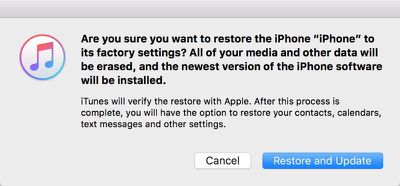
restoreandupdateios

  1. Turn off Find My iPhone in the iCloud section of the Settings app.
  2. Turn off the iPhone or the iPad.
  3. Hold down the Home button while plugging the device into a PC or Mac running iTunes.
  4. Continue to hold down the Home button until the iTunes logo pops up on the device display. This is called recovery mode.
  5. If you don't see the iTunes logo, entering recovery mode did not work. Repeat steps 2 to 4.
  6. When recovery mode is successful, an iTunes popup will show up on your Mac or PC. Click on "Restore." A warning will pop up letting you know the device will be erased.
  7. Click on "Restore and Update" to bring up the iPhone Software Update menu, which will display details about the current publicly available version of iOS. Click "Next" and then "Agree" to agree to the terms and conditions and start the restoration process.
  8. iTunes will download the current version of iOS and the restore will begin.

Restoring this way results in a clean installation of the current release version of iOS. All apps and data will be erased, which is why you want an archived iTunes backup to restore all of your information. It will take a several minutes for the recovery process to complete, but once it's done, the next step is to restore from a backup.
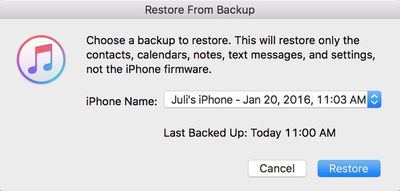
restorefrombackup

  1. Choose "Restore Backup" in iTunes.
  2. Select the archived backup.
  3. Click on "Restore" to confirm that you want to begin the backup restoration process.

When the install is complete, your iOS device will be restored to the condition that it was in prior to the beta. If you do not have an archived backup to work with, your device will need to be set up from scratch.

This how to is part of our iOS beta installation series. To see the rest of the steps involved with upgrading to a beta, make sure to check out our how tos on creating an archived iTunes backup and the steps to download the beta.


Top Rated Comments

Quu Avatar
130 months ago
If you don't want to restore like this (I didn't). Just wait a little while until a normal release comes out, update to that and remove the certificates on your iOS device that force it to seek out the betas from the update system. And of course remove your iOS device from the beta.

I just had to wait a couple weeks while on a Beta to get back on Stable and didn't need to faff around with restorations. Also last time I tried to restore my phone from backup it failed. The backup was not corrupted but an app installed on my Phone got backed up and it was for whatever reason unable to be restored to my iPhone and that stopped the entire restoration from being able to complete.

I had to get a 3rd party app that could open and modify the backup to fix the issue.
Score: 3 Votes (Like | Disagree)
psycho93 Avatar
130 months ago
So is the new 9.3 build garbage or what?
Have read a lot of reports re messed up notifications on Apple Watch after upgrading to iOS 9.3 Public Beta 4.

I'm running iOS Public Beta 9.3 on iPhone 5s with my Apple Watch and no problems
Score: 2 Votes (Like | Disagree)
scott523 Avatar
130 months ago
Someone on Reddit gave a hint that there's a much easier way of restoring from a beta without wiping the phone / clean install.
I'll update if I find it.
You are correct and it's pretty similar to Juli Clover's post.

Just complete steps 1 through 5. Now for step 6, instead of clicking "Restore", just click the "Update" button and continue the process of downgrading to the latest non-beta version, no backup or significant data loss required (see newer post).

If you don't want to take my word for it, check out this link ('http://www.imore.com/how-downgrade-ios-91-beta-back-ios-9') along with the user comments at the bottom of the page.
Score: 1 Votes (Like | Disagree)
jayducharme Avatar
130 months ago
Although I liked the thought that I was helping Apple by debugging the Betas, I stopped participating because I experienced a lot of serious issues with a previous version. My iPhone and my Mac are too important to me to have a lot of down time. I'm glad there's a way to back up from a Beta, but it's not worth the trouble for me any more.
Score: 1 Votes (Like | Disagree)
jclo Avatar
130 months ago
You are correct and it's pretty similar to Juli Clover's post.

Just complete steps 1 through 5. Now for step 6, instead of clicking "Restore", just click the "Update" button and continue the process of downgrading to the latest non-beta version, no backup or data loss required.

If you don't want to take my word for it, check out this link ('http://www.imore.com/how-downgrade-ios-91-beta-back-ios-9') along with the user comments at the bottom of the page.
I tried this method on two different devices and both times the installation was corrupt for me. On one it didn't end up downgrading me from iOS 9.3 and on another, it broke it so bad that while all my apps are installed, they're not visible. It was weird. That's why I didn't end up recommending "update" over "restore." So use with caution!
Score: 1 Votes (Like | Disagree)

Popular Stories

Apple Logo Zoomed

Tim Cook Teases Plans for Apple's Upcoming 50th Anniversary

Thursday February 5, 2026 12:54 pm PST by
Apple turns 50 this year, and its CEO Tim Cook has promised to celebrate the milestone. The big day falls on April 1, 2026. "I've been unusually reflective lately about Apple because we have been working on what do we do to mark this moment," Cook told employees today, according to Bloomberg's Mark Gurman. "When you really stop and pause and think about the last 50 years, it makes your heart ...
wwdc sans text feature

Apple Rumored to Announce New Product on February 19

Thursday February 5, 2026 12:22 pm PST by
Apple plans to announce the iPhone 17e on Thursday, February 19, according to Macwelt, the German equivalent of Macworld. The report, citing industry sources, is available in English on Macworld. Apple announced the iPhone 16e on Wednesday, February 19 last year, so the iPhone 17e would be unveiled exactly one year later if this rumor is accurate. It is quite uncommon for Apple to unveil...
Finder Siri Feature

Why Apple's iOS 26.4 Siri Upgrade Will Be Bigger Than Originally Promised

Friday February 6, 2026 3:06 pm PST by
In the iOS 26.4 update that's coming this spring, Apple will introduce a new version of Siri that's going to overhaul how we interact with the personal assistant and what it's able to do. The iOS 26.4 version of Siri won't work like ChatGPT or Claude, but it will rely on large language models (LLMs) and has been updated from the ground up. Upgraded Architecture The next-generation...
iOS 26

iOS 26.3 and iOS 26.4 Will Add These New Features to Your iPhone

Tuesday February 3, 2026 7:47 am PST by
While the iOS 26.3 Release Candidate is now available ahead of a public release, the first iOS 26.4 beta is likely still at least a week away. Following beta testing, iOS 26.4 will likely be released to the general public in March or April. Below, we have recapped known or rumored iOS 26.3 and iOS 26.4 features so far. iOS 26.3 iPhone to Android Transfer Tool iOS 26.3 makes it easier...
iphone 17 pro dark blue 1

iPhone 18 Pro Max Rumored to Deliver Next-Level Battery Life

Friday February 6, 2026 5:14 am PST by
The iPhone 18 Pro Max will feature a bigger battery for continued best-in-class battery life, according to a known Weibo leaker. Citing supply chain information, the Weibo user known as "Digital Chat Station" said that the iPhone 18 Pro Max will have a battery capacity of 5,100 to 5,200 mAh. Combined with the efficiency improvements of the A20 Pro chip, made with TSMC's 2nm process, the...














