

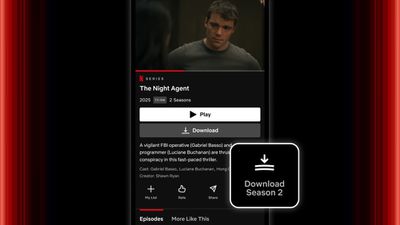
If you watch Netflix on your iPhone, the streamer has made it a lot easier for you to download your favorite shows for offline viewing, introducing a new one-tap season download feature that eliminates the tedious process of downloading episodes individually.

Why Download Entire Seasons?
Downloading entire seasons makes perfect sense for anyone who wants to ensure uninterrupted viewing on the go. Whether you're facing a long flight, planning a camping trip, or just dealing with spotty internet during your daily commute, having your favorite shows ready to watch offline can be a lifesaver.
It's also a smart way to save on mobile data costs – download your content over Wi-Fi at home, and you won't have to worry about streaming over cellular networks later. Even if Netflix experiences service outages or you find yourself in an area with poor connectivity, your downloaded shows will be ready to watch.
The new feature streamlines the download process that previously required tapping to download each episode separately. Here's how to use it:
Download a Complete Netflix Season to iPhone
- Open the Netflix app on your iPhone.
- Navigate to the show you want to download.
- Tap the show to open its detail page.
- Look for the "Download Season" button next to the Share button.
- Tap to begin downloading all episodes in the season.
Managing Your Downloads
You can find your downloaded content in the My Netflix tab. Netflix lets you store up to 100 active downloads per device on ad-free plans, but note that if you're on an ad-supported plan, you'll be limited to 15 downloads per month.
Remember that downloads expire after a certain period and require you to reconnect to the internet periodically to verify your subscription.
The season download option joins Netflix's existing Smart Downloads feature, which automatically deletes watched episodes and downloads the next ones in a series, helping you manage storage space on your device.




















