
Apple originally debuted Live Photos in 2015, alongside the iPhone 6s and iPhone 6s Plus, marking it as a feature that enhances the smartphone's photography with pictures that move when a user performs a 3D Touch on them. With the launch of iOS 11, Live Photos can now be edited in a few useful ways, and this guide will help you make a new key photo (which shows up first in your Photo Album), as well as explain how to add new animation effects to a Live Photo.

To begin, taking a Live Photo hasn't changed with the new iPhone software: simply open your Camera app, tap the circular Live Photos icon at the top center of the screen, and take a picture.

Making a New Key Photo
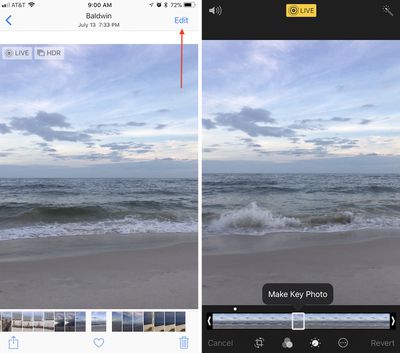
how to edit live photo 1

  1. Open Photos.
  2. Tap the "Albums" tab, then navigate to the Live Photos album to find your image.
  3. Tap "Edit" in the top right corner of the image you select.
  4. At the bottom of the screen, scrub through your Live Photo and find the exact spot you want for a new Key Photo.
  5. Tap "Make Key Photo."
  6. Tap "Done."

Changing a Live Photo Effect
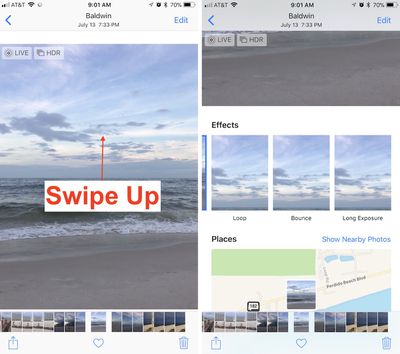
how to edit live photo 2

  1. Find the Live Photo you want to edit and select it.
  2. From the center of the screen, swipe up.
  3. Here you'll find three new Live Photo effects.
  4. Choose Loop, Bounce, or Long Exposure.
  5. Swipe down to see the effect in full screen.

Live Photos now have the full suite of editing options previously available to traditional still photos only, including: rotating, cropping, filters, and light and color balancing. You can also choose to mute the Live Photo (volume icon at the top left in edit mode), and automatically enhance it (wand icon at the top right in edit mode). Markup is one editing feature that does not support Live Photos, however.

After you choose a new Key Photo and find a new effect, you can replay your Live Photo like before by performing a 3D Touch action anywhere on the screen of an iPhone 6s device or later.


Related Forum: iOS 11

Top Rated Comments

zorinlynx Avatar
109 months ago
I've discovered that if you pick a new "Key photo" in a live photo, the quality is quite a bit lower than the original "actual photo".

It seems the live photo video is taken in 4K on the iPhone 7, but 4K video is still less quality than a full resolution still photo. So be careful, and only pick a different "key photo" if the actual photo you took is useless.
Score: 2 Votes (Like | Disagree)
zorinlynx Avatar
109 months ago
Isn’t only the picture itself taken as the photo while the rest is just video?
This would mean that choosing a new key photo would decrease the quality, wouldn’t it??
This is a good assumption to make, but I did wonder if Apple found a way to make the entire live photo full resolution, so I wanted to check for myself.

I confirmed that it's indeed not full resolution, like I expected. But Apple doesn't make this obvious so it's to everyone's benefit to be aware of the reduced quality when you change the key photo.
Score: 1 Votes (Like | Disagree)
unobtainium Avatar
109 months ago
None of the new effects are particularly useful. One of them should have been “export gif” since that’s what non-iOS 11 users can actually see. If you send a photo with the new effects to a non-iOS 11 user they get a short video clip. Lame.
Score: 1 Votes (Like | Disagree)
Ldubrov Avatar
109 months ago
When you export a Live Photo to, say, an email, it will export the JPEG of your selected Key Frame. Be advised that if you select any other frame except the original, you’ll get a 10 megapixel still of a video, which will be not as sharp as the original Key Frame. AirDrop and iMessage will send the full Live Image.
Score: 1 Votes (Like | Disagree)
Ldubrov Avatar
109 months ago
That’s unfortunate. The 10 MP resolution indicates that the iPhone 8 still uses the pic + video for live images. Ah well.

Also, you can mute a live image: edit, and click the audio button in top left corner.
Score: 1 Votes (Like | Disagree)

Popular Stories

Apple Logo Zoomed

Tim Cook Teases Plans for Apple's Upcoming 50th Anniversary

Thursday February 5, 2026 12:54 pm PST by
Apple turns 50 this year, and its CEO Tim Cook has promised to celebrate the milestone. The big day falls on April 1, 2026. "I've been unusually reflective lately about Apple because we have been working on what do we do to mark this moment," Cook told employees today, according to Bloomberg's Mark Gurman. "When you really stop and pause and think about the last 50 years, it makes your heart ...
wwdc sans text feature

Apple Rumored to Announce New Product on February 19

Thursday February 5, 2026 12:22 pm PST by
Apple plans to announce the iPhone 17e on Thursday, February 19, according to Macwelt, the German equivalent of Macworld. The report, citing industry sources, is available in English on Macworld. Apple announced the iPhone 16e on Wednesday, February 19 last year, so the iPhone 17e would be unveiled exactly one year later if this rumor is accurate. It is quite uncommon for Apple to unveil...
Finder Siri Feature

Why Apple's iOS 26.4 Siri Upgrade Will Be Bigger Than Originally Promised

Friday February 6, 2026 3:06 pm PST by
In the iOS 26.4 update that's coming this spring, Apple will introduce a new version of Siri that's going to overhaul how we interact with the personal assistant and what it's able to do. The iOS 26.4 version of Siri won't work like ChatGPT or Claude, but it will rely on large language models (LLMs) and has been updated from the ground up. Upgraded Architecture The next-generation...
iOS 26

iOS 26.3 and iOS 26.4 Will Add These New Features to Your iPhone

Tuesday February 3, 2026 7:47 am PST by
While the iOS 26.3 Release Candidate is now available ahead of a public release, the first iOS 26.4 beta is likely still at least a week away. Following beta testing, iOS 26.4 will likely be released to the general public in March or April. Below, we have recapped known or rumored iOS 26.3 and iOS 26.4 features so far. iOS 26.3 iPhone to Android Transfer Tool iOS 26.3 makes it easier...
iphone 17 pro dark blue 1

iPhone 18 Pro Max Rumored to Deliver Next-Level Battery Life

Friday February 6, 2026 5:14 am PST by
The iPhone 18 Pro Max will feature a bigger battery for continued best-in-class battery life, according to a known Weibo leaker. Citing supply chain information, the Weibo user known as "Digital Chat Station" said that the iPhone 18 Pro Max will have a battery capacity of 5,100 to 5,200 mAh. Combined with the efficiency improvements of the A20 Pro chip, made with TSMC's 2nm process, the...














