Starting with iOS 11, Apple added a new emergency feature to the iPhone, which is designed to allow you to quickly and discreetly place a call to emergency services. In the United States, SOS dials 911, and in other countries, it works with local emergency response teams.

Emergency SOS is activated through a series of button presses on an iPhone running iOS 11 or later, and the buttons you need to press will vary based on your device. On the iPhone 7, iPhone 7 Plus, and older iPhones, rapidly press the Side button on the right of the device five times to activate Emergency SOS.

On the iPhone 8, iPhone 8 Plus, iPhone X, iPhone XS, iPhone XS Max, and iPhone XR, you will need to press and hold on the Side button while also holding one of the two Volume buttons at the same time.

When you use these gestures, it brings up a slider bar that allows you to slide a finger across the screen to quickly place an emergency call. While this slider screen is the default option and is in place to make sure you don't accidentally place a 911 call, there's also an option to enable "Auto Call" for initiating a 911 call as soon as you activate Emergency SOS.
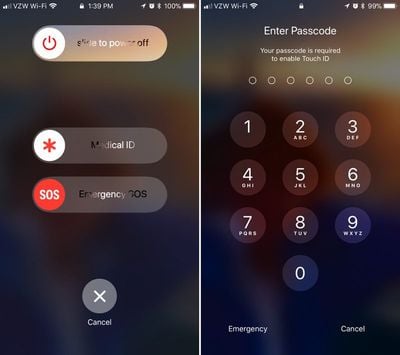
touchiddisabled
When you use Emergency SOS on an iPhone, the feature also disables Touch ID, preventing a would-be thief or other person with malicious intent from accessing your device without entering your passcode. It also automatically alerts any emergency contacts you've set in the Health app, sending them an iMessage with your location.

Enabling Auto Call

SOS is automatically included on every iPhone running iOS 11 and there is no disabling it. Activate it by pressing on the sleep/wake button five times in rapid succession to bring up the swipe interface. If you want the feature to call emergency services automatically without the need for an extra gesture, here's how to toggle it on:

  1. Open the Settings app.
  2. Scroll down to "Emergency SOS."emergencysosiphone
  3. Toggle on "Auto Call."
  4. To turn it off, simply toggle off Auto Call.
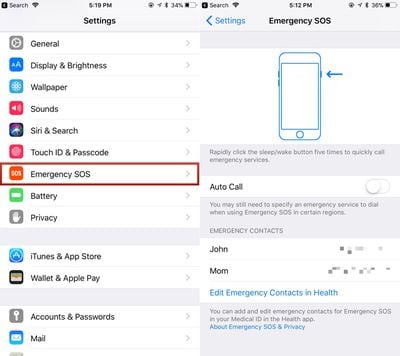
With Auto Call enabled, your phone will dial "911" (or your country's emergency line) after a three second countdown that gives you enough time to cancel the call if it's placed accidentally.

SOS on the Apple Watch

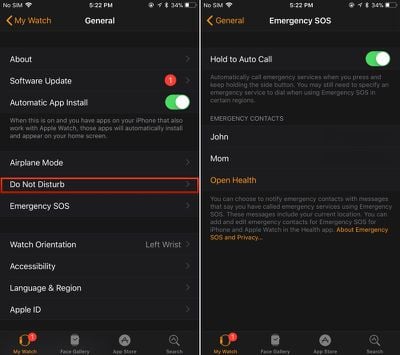
On the Apple Watch, an emergency call can be placed when you press and hold down on the side button for several seconds in a row. When you set up your Apple Watch, Apple prompts you to turn it on, but if you didn't, you can still choose to do so later.

On the Apple Watch, it's a lot easier to accidentally make an emergency call if something presses against the side button, so many people may not want this feature on. Here's how to turn it on:

  1. Open the Apple Watch app on the iPhone.
  2. Scroll down to General and tap it.
  3. Look for Emergency SOS. It's the sixth option.
  4. Tap to the Emergency SOS interface. emergencysosapplewatch
  5. Toggle on "Hold to Auto Call."
  6. To turn it off again, toggle off Hold to Auto Call.
Setting Emergency Contacts

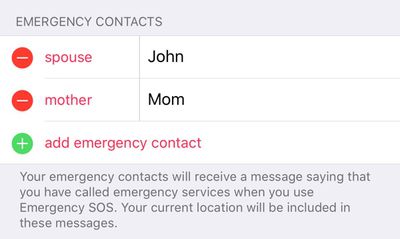
As mentioned above, whenever you use the SOS feature, Apple will automatically notify your emergency contacts if you have them set. Emergency contacts can be set up in the Health app:

  1. Open the Health app.
  2. Choose Medical ID.
  3. Select "Edit" in the top right corner.
  4. Scroll down to the Emergency Contacts section.
  5. Tap the "+" button to add an emergency contact.emergencycontacts

You can add multiple emergency contacts, each of which will receive a text message with your location if you ever use the Emergency SOS feature.


Related Forum: iOS 11

Top Rated Comments

sulpfiction Avatar
110 months ago
Countdown to people being stopped by the police sticking their hands in their pockets to secure their iPhones, and getting shot for it.
Way to take a good feature and twist it all up. That will never happen. Why the heck would u need to “secure” ur iPhone when a cop pulls u over?? Your comment makes absolutely zero sense.
Score: 7 Votes (Like | Disagree)
Böhme417 Avatar
110 months ago
Countdown to people being stopped by the police sticking their hands in their pockets to secure their iPhones, and getting shot for it.
Don't be silly. Most of those people will already have their phone firmly in their hand. Pockets... ha! You can watch most people on the road and know their phones are far from being in their pockets.
Score: 3 Votes (Like | Disagree)
Rajani Isa Avatar
110 months ago
Way to take a good feature and twist it all up. That will never happen. Why the heck would u need to “secure” ur iPhone when a cop pulls u over?? Your comment makes absolutely zero sense.
By secure, they mean disable Touch/FaceID. In part due to the fact that some mid-level courts have held that while passwords are protected by 5th Amendment protections, fingerprints (and most likely, faces) are not.

So you'd do this to prevent the cops from forcing you to unlock your phone for whatever reason with your fingerprint or Face.
[doublepost=1505982982][/doublepost]
I don't think that will happen much either, but look up 'civil forfeiture' and read up on it. It's a real, actual problem in a lot of US states.
I think it's more the forced unlock rather than civil forfeiture.
Score: 3 Votes (Like | Disagree)
mattyj2001 Avatar
110 months ago
Way to take a good feature and twist it all up. That will never happen. Why the heck would u need to “secure” ur iPhone when a cop pulls u over?? Your comment makes absolutely zero sense.
I don't think that will happen much either, but look up 'civil forfeiture' and read up on it. It's a real, actual problem in a lot of US states.
Score: 3 Votes (Like | Disagree)
phillytim Avatar
110 months ago
Regardless, I love that Apple finally gives us this great feature.
Score: 2 Votes (Like | Disagree)
KazKam Avatar
110 months ago
If you are feeling awkward during a serious emergency for pressing a damn button 5 times, you shouldn’t.
It's not about "feeling" awkward, it's about "being" awkward. Maybe awkward is the wrong word... overly-fidley? In many emergency situations, time and timing is of the essence, three vs five button clicks might be the difference between activating the feature and not.
Score: 2 Votes (Like | Disagree)

Popular Stories

Apple Logo Zoomed

Tim Cook Teases Plans for Apple's Upcoming 50th Anniversary

Thursday February 5, 2026 12:54 pm PST by
Apple turns 50 this year, and its CEO Tim Cook has promised to celebrate the milestone. The big day falls on April 1, 2026. "I've been unusually reflective lately about Apple because we have been working on what do we do to mark this moment," Cook told employees today, according to Bloomberg's Mark Gurman. "When you really stop and pause and think about the last 50 years, it makes your heart ...
wwdc sans text feature

Apple Rumored to Announce New Product on February 19

Thursday February 5, 2026 12:22 pm PST by
Apple plans to announce the iPhone 17e on Thursday, February 19, according to Macwelt, the German equivalent of Macworld. The report, citing industry sources, is available in English on Macworld. Apple announced the iPhone 16e on Wednesday, February 19 last year, so the iPhone 17e would be unveiled exactly one year later if this rumor is accurate. It is quite uncommon for Apple to unveil...
Finder Siri Feature

Why Apple's iOS 26.4 Siri Upgrade Will Be Bigger Than Originally Promised

Friday February 6, 2026 3:06 pm PST by
In the iOS 26.4 update that's coming this spring, Apple will introduce a new version of Siri that's going to overhaul how we interact with the personal assistant and what it's able to do. The iOS 26.4 version of Siri won't work like ChatGPT or Claude, but it will rely on large language models (LLMs) and has been updated from the ground up. Upgraded Architecture The next-generation...
iOS 26

iOS 26.3 and iOS 26.4 Will Add These New Features to Your iPhone

Tuesday February 3, 2026 7:47 am PST by
While the iOS 26.3 Release Candidate is now available ahead of a public release, the first iOS 26.4 beta is likely still at least a week away. Following beta testing, iOS 26.4 will likely be released to the general public in March or April. Below, we have recapped known or rumored iOS 26.3 and iOS 26.4 features so far. iOS 26.3 iPhone to Android Transfer Tool iOS 26.3 makes it easier...
iphone 17 pro dark blue 1

iPhone 18 Pro Max Rumored to Deliver Next-Level Battery Life

Friday February 6, 2026 5:14 am PST by
The iPhone 18 Pro Max will feature a bigger battery for continued best-in-class battery life, according to a known Weibo leaker. Citing supply chain information, the Weibo user known as "Digital Chat Station" said that the iPhone 18 Pro Max will have a battery capacity of 5,100 to 5,200 mAh. Combined with the efficiency improvements of the A20 Pro chip, made with TSMC's 2nm process, the...