
iPhone 14: How to Enable the New Power On and Off Sounds - MacRumors
Skip to Content

iPhone 14: How to Enable the New Power On and Off Sounds

by

For the iPhone 14 series, Apple has added an optional new accessibility feature that plays a sound when the iPhone is powered on and off. Here's how to enable them.
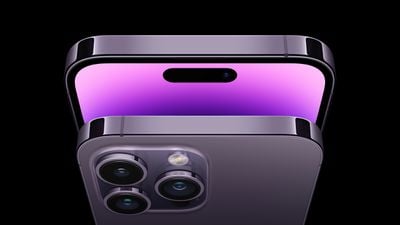
iphone 14 pro max deep purple
Apple added the startup and shutdown chimes as a new accessibility feature after many Blind users and people with low-vision reportedly asked the company for a clear way to tell whether their iPhone had restarted, and now anyone can enable them.


Here's how to enable the new feature on iPhone 14, iPhone 14 Plus, iPhone 14 Pro, and iPhone 14 Pro Max.

  1. Launch the Settings app on your iPhone 14.
  2. Scroll down and tap through to Accessibility.
  3. Under "Hearing," tap Audio/Visual.
  4. Toggle on the switch next to Turn On & Off Sounds.
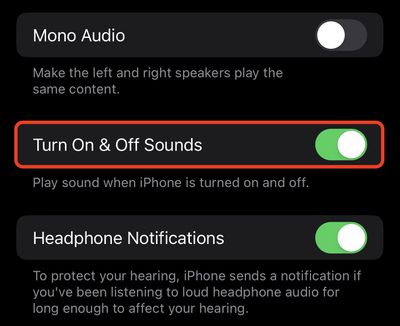
settings

That's all there is to it. You'll now know whenever your iPhone has started up or shut down without even having to look at the screen. To disable the sounds, simply turn off the same toggle in Settings.


Related Forum: iPhone

Top Rated Comments

jdavid_rp Avatar
46 months ago
What kind of magic do those iPhone 14 have inside them to perform such a tremendous function that no other iPhone can do?
Score: 34 Votes (Like | Disagree)
infinitejest Avatar
46 months ago

What kind of magic does those iPhone 14 have inside it to perform such a tremendous function that no other iPhone can't do?
The sound is not actually on your phone. It will be streamed from space via satellite connectivity. Hence, only iPhone 14 can do that.
Score: 30 Votes (Like | Disagree)
46 months ago
Apple is starting to get too stupid now. Only the new models get a startup sound? If I’m disabled and can benefit from a startup sound then I have to buy an iPhone 14? There is now way the older devices can play a sound when turning on? Wow just wow
Score: 8 Votes (Like | Disagree)
46 months ago
“Can’t innovate anymore, my Accessibility!”
Score: 6 Votes (Like | Disagree)
infinitejest Avatar
46 months ago

Woah, awesome! That's some next-level stuff!!!! But that means I always have to point my iPhone directly at a satellite above me, right?! How do I use the directional-connectivity feature of the satellite feature when my iPhone is turned off??? Or can I just never turn my phone off anymore when this feature is enabled???
It's actually recommended that from now on you only turn your iPhone on if you're on top of a mountain with a clear sky. I don't know about you, but I'm certainly not risking turning it on when it's cloudy out there!
Score: 6 Votes (Like | Disagree)
46 months ago

It's actually recommended that from now on you only turn your iPhone on if you're on top of a mountain with a clear sky. I don't know about you, but I'm certainly not risking turning it on when it's cloudy out there!
And if it doesn’t work, you’re holding it wrong
Score: 5 Votes (Like | Disagree)

Popular Stories

iOS 26

iOS 26.4 Adds Two New Features to CarPlay

Tuesday March 24, 2026 1:55 pm PDT by
iOS 26.4 was released today, and it includes a couple of new features for CarPlay: an Ambient Music widget and support for voice-based chatbot apps. To update your iPhone 11 or newer to iOS 26.4, open the Settings app and tap on General → Software Update. CarPlay will automatically offer the new features so long as the iPhone connected to your vehicle is running iOS 26.4 or later....
Apple Business hero

Apple Unveils 'Apple Business' All-in-One Platform

Tuesday March 24, 2026 8:53 am PDT by
Apple today announced Apple Business, a new all-in-one platform that unifies device management, productivity tools, and customer outreach features. The service is designed to be a consolidated replacement for several of Apple's existing business-focused offerings, including Apple Business Essentials, Apple Business Manager, and Apple Business Connect. It provides organizations with a single...
AirPods Pro Firmware Feature

Apple Releases New Firmware for AirPods Pro 3, AirPods Pro 2 and AirPods 4

Tuesday March 24, 2026 12:31 pm PDT by
Apple today released new firmware for the AirPods Pro 2, AirPods Pro 3, and the AirPods 4. The firmware has a version number of 8B39, up from 8B34 on the AirPods Pro 3, 8B28 on the AirPods Pro 2, and 8B21 on the AirPods 4. There is no word on what's included in the firmware, but Apple has a support document with limited notes. Most updates are limited to bug fixes and performance...















