

Rich Communication Services (RCS) is a messaging standard Apple adopted in iOS 18 that is significantly enhancing the messaging experience between iPhone and Android devices. Think of it as SMS 2.0 – a major upgrade to the traditional text messaging we've been using for years.
Key Features of RCS
Apple's decision to embrace RCS came last year after persistent persuasion from Google, which has been championing RCS adoption worldwide – and with good reason. Compared to MMS and SMS, the standards that Apple uses for text messages, RCS offers the following advantages:
- Higher quality photos and videos
- Larger file sizes for attachments
- Audio messages
- Improved group chats
- Read receipts and typing indicators
- Better encryption for chats between iPhone and Android users
- Location sharing within text threads
- Works over both cellular networks and Wi-Fi
RCS vs. iMessage: Bridging the Gap
While RCS offers many features that iPhone users have long enjoyed with iMessage, it's important to understand the differences between these two messaging protocols. The most significant advantage of RCS is its ability to work across different smartphone platforms.
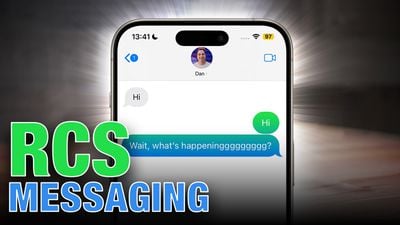
Unlike iMessage, which is exclusive to Apple devices and creates the infamous "green bubble" effect when iPhone users text Android users, RCS attempts to eliminate this disparity, creating a more unified messaging experience regardless of device type. That said, RCS messages will still appear as green bubbles in Apple's Messages app, but they will be accompanied by the label "Text Message – RCS" in the conversation thread to identify them.
In terms of features, RCS brings many of the capabilities iPhone users have come to expect from iMessage to cross-platform conversations. High-quality media sharing, read receipts, and typing indicators – all staples of the iMessage experience – are becoming available when texting Android users through RCS. This marks a significant improvement in the messaging experience between different platforms.
When it comes to security though, iMessage still holds the upper hand. It offers end-to-end encryption for all communications between Apple devices. RCS, while offering improved encryption compared to traditional SMS, doesn't quite reach the same level of security as iMessage. However, it's a significant step up from the unencrypted SMS messages that have been the standard for cross-platform texting.
Another area where iMessage still maintains an edge is in its immediate availability across all Apple devices. RCS, on the other hand, depends on carrier support and implementation on both ends of the conversation. This means that while RCS promises a more unified messaging experience, its availability is not yet as universal as iMessage is within the Apple ecosystem.
Despite these differences, the adoption of RCS by Apple represents a major step towards bridging the gap between iMessage and Android messaging. While it may not completely eliminate the distinctions, it certainly narrows them considerably, promising a richer, more consistent messaging experience for all users, regardless of their choice of smartphone. In summary, here's a breakdown of what users can expect when messaging between iPhone and Android devices:
- Enhanced Media Sharing: No more tiny, pixelated photos or videos when sharing media with Android friends. RCS allows for higher resolution and larger file sizes.
- Rich Messaging Features: iPhone users will be able to see when Android users are typing and know when messages are read.
- Better Group Chats: Group conversations including both iPhone and Android users will be more cohesive, with features like naming group chats and adding/removing participants working smoothly across platforms.
- Wi-Fi Messaging: Like iMessage, RCS can work over Wi-Fi, allowing for messaging even without cellular service.
- Seamless Fallback: If RCS isn't available for some reason, the system will automatically fall back to SMS/MMS, ensuring messages always get through.
How to Enable RCS Messaging in iOS 18
Apple introduced RCS support with iOS 18. However, full functionality will depend on carrier support. The good news is that major U.S. carriers like Verizon, T-Mobile, and AT&T already support RCS. Apple also has a list of carriers that support RCS on its website.
- Open Settings on your iPhone and select Apps at the bottom of the menu.
- Tap Messages.
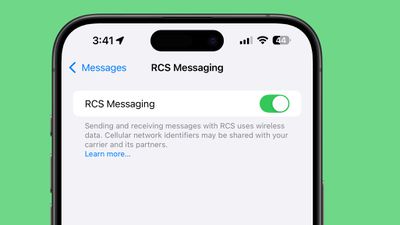
- Under "Text Messaging," select RCS Messaging.
- Toggle RCS Messaging to the green ON position if it isn't already enabled.
If you don't see the setting on your iPhone, that's likely because your carrier does not yet support it. Check Apple's wireless carrier support page to check if yours is listed.
How to Tell If You're Using RCS
There's a simple way to tell that you are sending an RCS message in the Messages app. You'll see "RCS" at the top of the conversation window as soon as you type in the number of someone not using an Apple device.
The Future of RCS
Apple isn't stopping at just implementing RCS. The company plans to work with Google and other members of the Global System for Mobile Communications Association (GSMA) to further improve the RCS standard worldwide. This collaboration should lead to even more advanced features, such as the ability to edit and delete sent RCS messages.




















