Any iPhone, iPad, or Mac with a ProMotion display is capable of rendering buttery smooth 120Hz animations. However, Apple's Safari browser is locked to 60fps page rendering by default, making scrolling feel noticeably choppier for some users than in Chrome or Firefox. Thankfully, recent versions of Safari include a hidden setting that lets you unlock 120Hz rendering.
iphone 14 pro 120hz promotion blue
At 60Hz, your screen refreshes every 16.7 milliseconds, meaning each frame of a scrolling page stays on screen for that duration. At 120Hz, the refresh interval drops to 8.3 milliseconds, so the image updates twice as often. This reduces the perceived blur and judder as content moves across the screen, making motion look more fluid and responsive. For a better idea of the difference, visit Blur Buster's Motion Tests webpage and watch the refresh rate test in Safari.

The difference is most noticeable when scrolling text-heavy pages or panning across detailed content. That said, the improvement is more dramatic for some people than others. If you've never noticed Safari feeling "off" compared to other apps, you may not register much difference. But if you've used Chrome or Firefox on the same device and wondered why Safari felt slightly sluggish, this is the reason.

The 120Hz option is buried in Safari's Feature Flags, a developer-focused menu that doesn't require any special mode to access on iPhone or iPad. On Mac, you'll need to enable developer features first, but it's a straightforward process. Keep in mind that turning on 120Hz may impact your device's battery life if you tend to browse a lot.

Here's how to enable 120Hz scrolling on all your Apple devices.

Enable 120Hz Safari Browsing iPhone and iPad

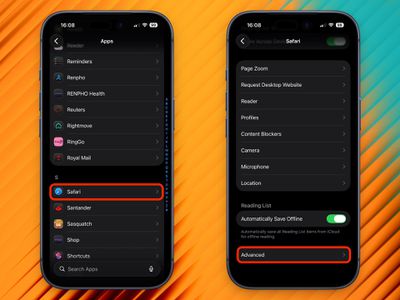
  1. Open the Settings app.
  2. Scroll down and tap Apps.
  3. Tap Safari.
  4. Scroll to the bottom and tap Advanced.
    2120hz safari scrolling promotion

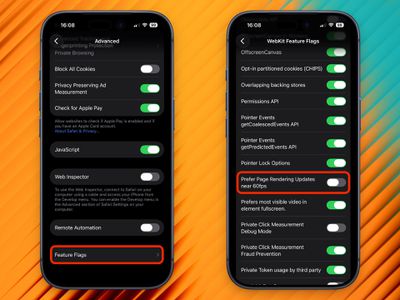
  5. Tap Feature Flags at the bottom of the list.
  6. Scroll to Prefer Page Rendering Updates near 60fps and toggle it off.
  7. Force quit Safari and reopen it.
    1120hz safari scrolling promotion

With this setting disabled, Safari will now render pages at up to 120Hz on ProMotion-equipped devices, including iPhone 13 Pro and later, and iPad Pro models with ProMotion.

Enable 120Hz Safari Browsing on Mac

Enabling 120Hz on Mac requires a few extra steps to reveal the Feature Flags menu.

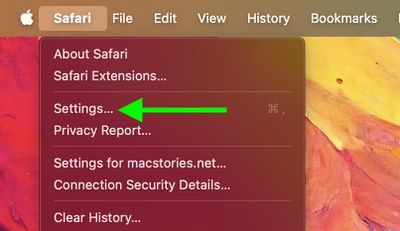
  1. Open Safari, then click Safari in the menu bar and choose Settings....
    safari

  2. Click the Advanced tab.
  3. At the bottom of the pane, check the box next to Show features for web developers.
    safari

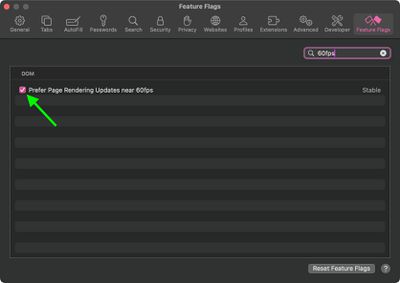
  4. A new Feature Flags tab will appear in the toolbar – click it.
  5. In the search field at the top right, type 60fps.
  6. Uncheck Prefer Page Rendering Updates near 60fps.
  7. Quit Safari completely and reopen it.
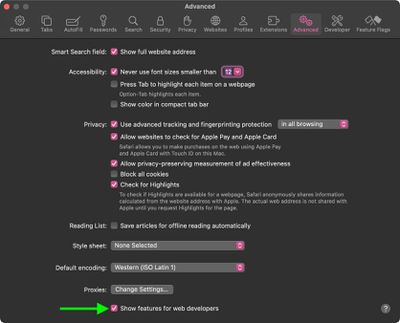
    safari

This works on any Mac with a ProMotion display, which includes the 14-inch and 16-inch MacBook Pro models introduced in 2021 and later. If you have external displays connected to your Mac that are capable of refreshing at 120Hz, they should also benefit from the change.

Kudos goes to MacStories for unearthing the 120Hz scrolling tip recently shared by developer Matt Birchler.


Tag: Safari

Top Rated Comments

johannnn Avatar
3 weeks ago
Why is this disabled by default?
Score: 56 Votes (Like | Disagree)
HouseLannister Avatar
3 weeks ago

Why is this disabled by default?
Battery life. Most people don't need 120hz to read static webpages.
Score: 35 Votes (Like | Disagree)
bg1419 Avatar
3 weeks ago
I can usually tell a difference between 60 and 120, it’s easy to compare on the Home Screen or other apps by toggling low power mode. But in safari I’m not seeing a difference regardless of how I have this setting set; are we’re sure we know how this “feature” works? The toggle says “prefer,” not force. I wonder if someone at macrumors was just poking around in settings and saw this, and wrote an article assuming they knew what it meant. I’d like to see some documentation from Apple explaining it because my eyes aren’t seeing the difference
Score: 30 Votes (Like | Disagree)
cbcasas Avatar
3 weeks ago
If this is hidden by default I wonder if it murders your battery
Score: 28 Votes (Like | Disagree)
MikeZTM Avatar
3 weeks ago

I can usually tell a difference between 60 and 120, it’s easy to compare on the Home Screen or other apps by toggling low power mode. But in safari I’m not seeing a difference regardless of how I have this setting set; are we’re sure we know how this “feature” works? The toggle says “prefer,” not force. I wonder if someone at macrumors was just poking around in settings and saw this, and wrote an article assuming they knew what it meant. I’d like to see some documentation from Apple explaining it because my eyes aren’t seeing the difference
This is only for JavaScript animations on the webpages, not for scrolling.

Scrolling always use 120fps regardless of this flag.
Score: 23 Votes (Like | Disagree)
kalafalas Avatar
3 weeks ago
Just to be clear - scrolling in safari is 120hz by default. This just lets animations in CSS etc run above 60hz, which is rare
Score: 13 Votes (Like | Disagree)

Popular Stories

Apple Logo Zoomed

Tim Cook Teases Plans for Apple's Upcoming 50th Anniversary

Thursday February 5, 2026 12:54 pm PST by
Apple turns 50 this year, and its CEO Tim Cook has promised to celebrate the milestone. The big day falls on April 1, 2026. "I've been unusually reflective lately about Apple because we have been working on what do we do to mark this moment," Cook told employees today, according to Bloomberg's Mark Gurman. "When you really stop and pause and think about the last 50 years, it makes your heart ...
wwdc sans text feature

Apple Rumored to Announce New Product on February 19

Thursday February 5, 2026 12:22 pm PST by
Apple plans to announce the iPhone 17e on Thursday, February 19, according to Macwelt, the German equivalent of Macworld. The report, citing industry sources, is available in English on Macworld. Apple announced the iPhone 16e on Wednesday, February 19 last year, so the iPhone 17e would be unveiled exactly one year later if this rumor is accurate. It is quite uncommon for Apple to unveil...
Finder Siri Feature

Why Apple's iOS 26.4 Siri Upgrade Will Be Bigger Than Originally Promised

Friday February 6, 2026 3:06 pm PST by
In the iOS 26.4 update that's coming this spring, Apple will introduce a new version of Siri that's going to overhaul how we interact with the personal assistant and what it's able to do. The iOS 26.4 version of Siri won't work like ChatGPT or Claude, but it will rely on large language models (LLMs) and has been updated from the ground up. Upgraded Architecture The next-generation...
iOS 26

iOS 26.3 and iOS 26.4 Will Add These New Features to Your iPhone

Tuesday February 3, 2026 7:47 am PST by
While the iOS 26.3 Release Candidate is now available ahead of a public release, the first iOS 26.4 beta is likely still at least a week away. Following beta testing, iOS 26.4 will likely be released to the general public in March or April. Below, we have recapped known or rumored iOS 26.3 and iOS 26.4 features so far. iOS 26.3 iPhone to Android Transfer Tool iOS 26.3 makes it easier...
maxresdefault

Apple Shows Off a Key Reason to Upgrade to the iPhone 17

Saturday February 7, 2026 9:26 am PST by
Apple today shared an ad that shows how the upgraded Center Stage front camera on the latest iPhones improves the process of taking a group selfie. "Watch how the new front facing camera on iPhone 17 Pro takes group selfies that automatically expand and rotate as more people come into frame," says Apple. While the ad is focused on the iPhone 17 Pro and iPhone 17 Pro Max, the regular iPhone...