How to Enable Dolby Atmos Spatial Audio and Apple Lossless on HomePod - MacRumors
Skip to Content

How to Enable Dolby Atmos Spatial Audio and Apple Lossless on HomePod

by

Apple's ‌HomePod‌ (first- and second-generation) and HomePod mini feature support for Apple Music's Lossless Audio and Dolby Atmos Spatial Audio formats. This article explains how to enable them.
homepod lossless spatial audio
Apple's spatial audio feature uses Dolby Atmos to create a richer, more immersive soundstage when listening to songs in the ‌Apple Music‌ catalog that support spatial audio. With Dolby Atmos enabled, the subjective experience is that musical notes are coming from all around you. ‌Meanwhile, ‌Apple Music‌‌ Lossless provides listeners with higher quality audio in a lossless file format, which is great news for audiophiles and purists.

To enable Dolby Atmos and Apple Lossless on your ‌HomePod‌, follow these steps:

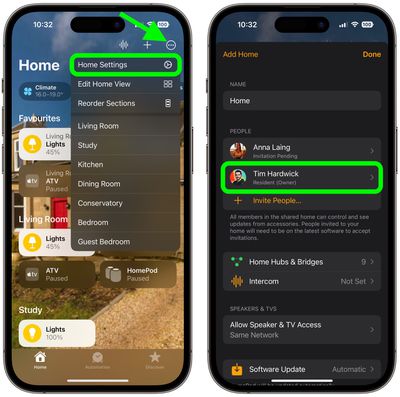
  1. Launch the Home app on your iPhone or iPad.
  2. Tap the ellipsis button (three dots encircled) in the top-right of the screen.

  3. Select Home Settings from the dropdown menu.
  4. Under "People," select your named owner profile.
    home

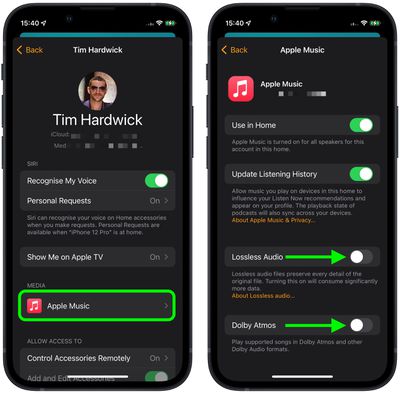
  5. Under "Media," select Apple Music.
  6. Scroll down and toggle the switches beside Dolby Atmos and Lossless Audio to the green ON position.
    Home

Now that you've enabled Dolby Atmos Spatial Audio, you'll be able to enjoy a more immersive audio experience, and if you've enabled Apple Lossless, higher quality music tracks. You can check which songs support the audio effects by looking for the respective logos in the ‌Apple Music‌ app interface.

Related Roundups: HomePod, HomePod mini

Top Rated Comments

58 months ago
Is it just me or has the Home Pod received more new updates and features after it has been discontinued than it did while it was still available?
Score: 36 Votes (Like | Disagree)
kurtfoster Avatar
58 months ago

Why isn't Dolby Atmos on by default? Is there any penalty to having it on, or other reason to leave it off?
Some of us don’t like the sound of Dolby Atmos. To me it sounds tinny and underwater and has a sound reminiscent to 1960s fake stereo sound. Honestly, it gives me a headache and I’m glad that they don’t turn it on by default.
Score: 9 Votes (Like | Disagree)
Kylo83 Avatar
58 months ago
Lossless all the way, special audio is a gimmick that ruins songs and makes them sound like demo tracks
Score: 8 Votes (Like | Disagree)
Cribsheet22 Avatar
58 months ago
The HomePod pair with 15.1 sounds way too good for Apple to have discontinued it cold. There must be something coming to fill the gaping void above the mini or Apple is bananas.
Score: 7 Votes (Like | Disagree)
58 months ago
They should of sold the original at a loss at about £99, got them into peoples homes and increased the price year on year with new more capable ones. They needed to have pushed the original one into peoples homes to show what people are actually missing sound quality wise regardless of Siri.

I think the HomePod mini is a bad approach because Siri is nowhere near good enough and neither is the sound….
Score: 6 Votes (Like | Disagree)
58 months ago

Why isn't Dolby Atmos on by default? Is there any penalty to having it on, or other reason to leave it off?
Mine was on without me doing anything.
Score: 5 Votes (Like | Disagree)

Popular Stories

iOS 26

iOS 26.4 Adds Two New Features to CarPlay

Tuesday March 24, 2026 1:55 pm PDT by
iOS 26.4 was released today, and it includes a couple of new features for CarPlay: an Ambient Music widget and support for voice-based chatbot apps. To update your iPhone 11 or newer to iOS 26.4, open the Settings app and tap on General → Software Update. CarPlay will automatically offer the new features so long as the iPhone connected to your vehicle is running iOS 26.4 or later....
Apple Business hero

Apple Unveils 'Apple Business' All-in-One Platform

Tuesday March 24, 2026 8:53 am PDT by
Apple today announced Apple Business, a new all-in-one platform that unifies device management, productivity tools, and customer outreach features. The service is designed to be a consolidated replacement for several of Apple's existing business-focused offerings, including Apple Business Essentials, Apple Business Manager, and Apple Business Connect. It provides organizations with a single...
AirPods Pro Firmware Feature

Apple Releases New Firmware for AirPods Pro 3, AirPods Pro 2 and AirPods 4

Tuesday March 24, 2026 12:31 pm PDT by
Apple today released new firmware for the AirPods Pro 2, AirPods Pro 3, and the AirPods 4. The firmware has a version number of 8B39, up from 8B34 on the AirPods Pro 3, 8B28 on the AirPods Pro 2, and 8B21 on the AirPods 4. There is no word on what's included in the firmware, but Apple has a support document with limited notes. Most updates are limited to bug fixes and performance...