If you're planning on trading in your old iPhone for a new one, there are some steps you'll want to take beforehand to ensure it's de-linked from your accessories and accounts and that everything on it is erased.
iPhone Home Screen Gradient Blank Spaces 1
The procedures described below shouldn't take long to follow, and at the end of it you can rest assured that you have a clean ‌iPhone‌ reset to default factory settings and ready to trade in. Here's what to do.

Back Up Your iPhone

Before you reset, you should back up your device. You can back up your data to iCloud, but we'd advise you connect your ‌iPhone‌ up to a computer and perform an iTunes backup instead, just to be sure. You can find steps to back up your ‌iPhone‌ by clicking here.

Transfer 2FA Accounts

If you buy a new ‌iPhone‌ to replace your existing one and you use an authenticator app (Google Authenticator, for example) to access online accounts protected by two-factor authentication (2FA), then you should transfer those accounts to your new phone as soon as possible, because without the 2FA codes close at hand, you could find yourself locked out of your online accounts.

Got an Apple Watch? Time to Unpair

If you're trading in your ‌iPhone‌ and have an Apple Watch linked to it, you're going to want to unpair it first. Here's how.

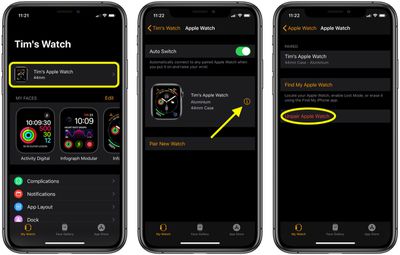
  1. Bring your ‌iPhone‌ and Apple Watch close to each other.
  2. Launch the stock Watch app on your ‌iPhone‌.
  3. Tap the My Watch tab.
  4. Select the Apple Watch you want to unpair, then tap the info button (the encircled "I") next to it on the next screen.
    apple watch

  5. Tap Unpair Apple Watch.
  6. Tap again to confirm.
  7. Enter your Apple ID password when prompted to turn off Activation Lock.
Deactivate Services and Log Out Manually

Erasing your ‌iPhone‌ deactivates Find My ‌iPhone‌ and logs you out of all your ‌iCloud‌ and iTunes accounts automatically – in theory. Occasionally we've heard cases of erased iOS devices still being linked to ‌Find My‌ ‌iPhone‌ or ‌iCloud‌ accounts.

itunes icloud
Whatever the truth of these reports, you can always make doubly sure this won't happen by deactivating and unlinking these services yourself. To learn how to turn off ‌Find My‌ ‌iPhone‌, click here. To sign out of ‌iCloud‌ and the iTunes and App Stores, launch the Settings app on your ‌iPhone‌, tap on your name to open your account settings, tap Sign Out at the bottom, then enter your ‌Apple ID‌ password and tap Turn Off.

Factory Reset Your iPhone

Now that you've backed up your ‌iPhone‌ and manually deactivated services and accounts, it's time to perform a factory reset of the device. These steps will guide you through the process.

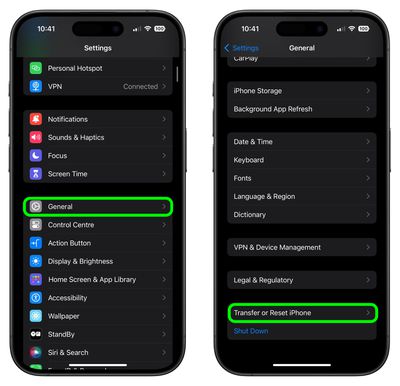
  1. Unlock your ‌iPhone‌ or iPad and launch the Settings app.
  2. Tap General.
  3. Scroll to the bottom and tap Transfer or Reset iPhone (or iPad).
    settings

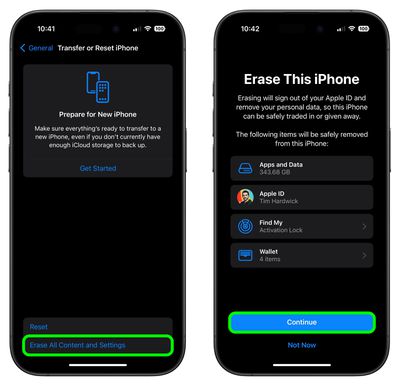
  4. Tap Erase All Content and Settings.
  5. Review the details of the data about to be wiped, then tap Continue.
  6. Tap in your passcode if requested.
  7. Enter your ‌Apple ID‌ password to erase the ‌iPhone‌ and remove it from your account.
  8. Tap Erase.
    settings

Allow the reset process to continue – it shouldn't take any longer than a couple of minutes. Once it's completed, you'll see the iOS welcome screen on your ‌iPhone‌. That's your green light to trade it in.

Top Rated Comments

landski Avatar
84 months ago
Importantly, this guide does not mention to move your Authenticator apps (Google, Microsoft) over to the new phone before resetting the old one.
Score: 8 Votes (Like | Disagree)
BreuerEditor Avatar
84 months ago
Importantly, this guide does not mention to move your Authenticator apps (Google, Microsoft) over to the new phone before resetting the old one.
This is super important so good call! Every iPhone I've upgraded to (with the exception of the XS) I've forgotten to transfer them and I have to go hunting around proving it's me so I can reset it. I wish there was an easier way...

https://www.lifewire.com/switch-google-authenticator-to-new-phone-4582397
Score: 2 Votes (Like | Disagree)
DotCom2 Avatar
84 months ago
Remind me. Do I erase and deactivate my old phone before turning on the new phone?
I NEVER erase my old phone until my new phone is completely setup and working fine. Also,I go through all the settings on the new phone and compare to my old phone to make sure I have it all setup the same way.
Score: 2 Votes (Like | Disagree)
MisterSavage Avatar
84 months ago
Remind me. Do I erase and deactivate my old phone before turning on the new phone?
I don't do that. What if the new phone was defective?
Score: 1 Votes (Like | Disagree)
TeamMojo Avatar
84 months ago
You should also remove your SIM before trading in just to be sure.

Don’t forget to have your Apple ID password handy outside of your phone. if you use a password app like LastPass, your app won’t be live on the new phone for a bit while you do the setup and it can be a real hassle if your phone is also your Authenticator and you have 2FA turned on but can’t get to your new phone because it needs your Apple ID password.
Score: 1 Votes (Like | Disagree)
gsmornot Avatar
84 months ago
I thought the only way to truly erase a device was to shred it.
Score: 1 Votes (Like | Disagree)

Popular Stories

maxresdefault

Apple Shows Off a Key Reason to Upgrade to the iPhone 17

Saturday February 7, 2026 9:26 am PST by
Apple today shared an ad that shows how the upgraded Center Stage front camera on the latest iPhones improves the process of taking a group selfie. "Watch how the new front facing camera on iPhone 17 Pro takes group selfies that automatically expand and rotate as more people come into frame," says Apple. While the ad is focused on the iPhone 17 Pro and iPhone 17 Pro Max, the regular iPhone...
Finder Siri Feature

Why Apple's iOS 26.4 Siri Upgrade Will Be Bigger Than Originally Promised

Friday February 6, 2026 3:06 pm PST by
In the iOS 26.4 update that's coming this spring, Apple will introduce a new version of Siri that's going to overhaul how we interact with the personal assistant and what it's able to do. The iOS 26.4 version of Siri won't work like ChatGPT or Claude, but it will rely on large language models (LLMs) and has been updated from the ground up. Upgraded Architecture The next-generation...
wwdc sans text feature

Apple Rumored to Announce New Product on February 19

Thursday February 5, 2026 12:22 pm PST by
Apple plans to announce the iPhone 17e on Thursday, February 19, according to Macwelt, the German equivalent of Macworld. The report, citing industry sources, is available in English on Macworld. Apple announced the iPhone 16e on Wednesday, February 19 last year, so the iPhone 17e would be unveiled exactly one year later if this rumor is accurate. It is quite uncommon for Apple to unveil...
apple wallet drivers license feature iPhone 15 pro

Apple Says These 7 U.S. States Plan to Offer iPhone Driver's Licenses

Monday February 9, 2026 6:24 am PST by
In select U.S. states, residents can add their driver's license or state ID to the Apple Wallet app on the iPhone and Apple Watch, and then use it to display proof of identity or age at select airports and businesses, and in select apps. The feature is currently available in 13 U.S. states and Puerto Rico, and it is expected to launch in at least seven more in the future. To set up the...
14 inch MacBook Pro Keyboard

New MacBook Pros Could Now Arrive in March

Sunday February 8, 2026 6:02 am PST by
New MacBook Pro models with the M5 Pro and M5 Max chips could arrive as soon as Monday, March 2, according to Bloomberg's Mark Gurman. In today's "Power On" newsletter, Gurman said that the release of new MacBook Pro models is tied to the release of macOS Tahoe 26.3. The launch is said to be slated for as early as the week of March 2. He added that the M4 Pro and M4 Max models on sale today...