
How to Find Your Apple Card Number, Expiration Date, and CVV - MacRumors
Skip to Content

How to Find Your Apple Card Number, Expiration Date, and CVV

by

Apple put a lot of thought into the design of the titanium credit card that you can request when you've successfully applied for Apple Card. As such, it is of course unique among credit cards.

ryanapplecard
The front of the card is laser-etched with your name, but there is no card number or expiration date shown. Likewise on the back, there's no CVV and no space for a signature. Coupled with the weightier material, this minimalist aesthetic gives the ‌Apple Card‌ a decidedly premium feel.

It also likely leaves you wondering what your ‌Apple Card‌ number actually is, not to mention the expiration date and three-digit security code, especially if you need to quote these details over the phone or use them anywhere Apple Pay isn't accepted. Fortunately, Apple makes it easy to find your number right on your iPhone. The following steps show you how.

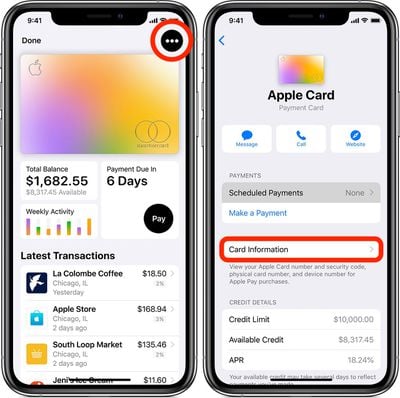
  1. Launch the Wallet app on your iPhone.
  2. Tap your Apple Card.
  3. Tap the ellipsis button (the circular icon containing three dots) in the top-right corner of the screen.
  4. Authenticate using Face ID, or on older devices, via Touch ID or a passcode.
    Apple Card

  5. Tap Card Information.
  6. You can find your Card Number, Expiration Date and three-digit Security Code (CVV) a little further down this screen.
Did you notice Request New Card Number in blue at the bottom of the Card Information screen? You can use this option if you suspect your current number has been compromised – just another neat little security feature that only ‌Apple Card‌ offers.

Popular Stories

iOS 26

iOS 26.4 Adds Two New Features to CarPlay

Tuesday March 24, 2026 1:55 pm PDT by
iOS 26.4 was released today, and it includes a couple of new features for CarPlay: an Ambient Music widget and support for voice-based chatbot apps. To update your iPhone 11 or newer to iOS 26.4, open the Settings app and tap on General → Software Update. CarPlay will automatically offer the new features so long as the iPhone connected to your vehicle is running iOS 26.4 or later....
Apple Business hero

Apple Unveils 'Apple Business' All-in-One Platform

Tuesday March 24, 2026 8:53 am PDT by
Apple today announced Apple Business, a new all-in-one platform that unifies device management, productivity tools, and customer outreach features. The service is designed to be a consolidated replacement for several of Apple's existing business-focused offerings, including Apple Business Essentials, Apple Business Manager, and Apple Business Connect. It provides organizations with a single...
AirPods Pro Firmware Feature

Apple Releases New Firmware for AirPods Pro 3, AirPods Pro 2 and AirPods 4

Tuesday March 24, 2026 12:31 pm PDT by
Apple today released new firmware for the AirPods Pro 2, AirPods Pro 3, and the AirPods 4. The firmware has a version number of 8B39, up from 8B34 on the AirPods Pro 3, 8B28 on the AirPods Pro 2, and 8B21 on the AirPods 4. There is no word on what's included in the firmware, but Apple has a support document with limited notes. Most updates are limited to bug fixes and performance...

















